Chrome dropping NPAPI (Java) support and UCF

Since Chrome 42 was released, NPAPI plugins are disabled by default and the support for these plugins will be completely removed in Chrome 45 (expected to be released in September). This means no more UCF in Chrome. So, what will EMC do?

Considering that in the latest Webtop release (6.8) only 3 browsers are supported (IE 10/11, Firefox 24.6 and Safari 6.1.4/7.0.4) most likely nothing. Besides, this move from Google can “help” EMC to keep pushing D2/xCP to customers and reinforce the “Webtop won’t be developed anymore” message. But, what does this move means for current users?

I think sooner or later Java will be removed from every browser. Spartan/Edge won’t even support Microsoft’s own ActiveX, and considering I don’t see Oracle developing a new plugin based on PPAPI (which by the way is not a standard protocol and it’s only supported by Chrome and Opera), so it wouldn’t surprise me to see Mozilla announcing they’re dropping support for NPAPI in future releases.

This means that by the end of this year, there will be most likely 6 browsers (Chrome, IE, Spartan/Edge, Firefox, Opera, Safari) and EMC will provide support only for 3 of them (2 being “obsolete”, IE and Firefox 24.x). And even though we know that (until now) even without being officialy supported webtop (mostly) works with any browser, this won’t be the case much longer (as long as you need to transfer content).

In the end, we’ll have to deal with angry users that like Chrome because it’s cool and because they don’t want to use the corporative IE6/7/8 (not supported also) or the company-branded browser they’ve come to hate through the years.

Until know, my “usual” hack for matching IE/Firefox performance with Chrome’s was mainly disabling the ucfinvoker in the main component and any plugin not used in app.xml. This makes webtop to load the ucf libraries only when needed instead of doing it every time the user login so it seems that the main component loads faster (yes, I’m cheating :D). And I’m also considering disabling UCF transfer for view action and leaving UCF enabled only for edition, so read-only users won’t be disturbed with error messages/warnings when using Webtop.

However, there’s still the problem of dealing with the users that cannot use their preferred browser to do their job and convincing them that is not Documentum’s fault…

Edit: Even better solution (removing UCF in chrome)

Extend the evaluator class defined in the action (LaunchViewEvaluator, LaunchEditEvaluator, ContentTransferLaunchComponentEvaluator, etc.) with:

    public class ContentTransferLaunchComponentEvaluator extends com.documentum.web.contentxfer.ContentTransferLaunchComponentEvaluator {
        public String evaluate(String strName, String strAction, IConfigElement config, ArgumentList arg, Context context, Component component){
            HttpServletRequest request = (HttpServletRequest)component.getPageContext().getRequest();
            String userAgent = request.getHeader("User-Agent");  

            if (userAgent!=null && userAgent.length()>0 && userAgent.indexOf("Chrome")>=0) {
                    return "http";
            }
            return super.evaluate(strName, strAction, config, arg, context, component);
        }
    }

Edit v2: The best solution:

1. Check PanfilovAB post about Component Qualifiers and check the request listener class: Component qualifier

2. Create the following class:

    public class CustomContentTransferConfig extends com.documentum.web.contentxfer.ContentTransferConfig {
        @Override
        public String getContentTransferMechanism(){
            String userAgent=ComponentRequestListener.getBrowserUserAgent();  

            if (userAgent!=null && userAgent.length()>0 && userAgent.indexOf("Chrome")>=0) {
                return "http";
            }
            return super.getContentTransferMechanism();
        }
    }

3. Modify webtop\WEB-INF\classes\com\documentum\web\contentxfer\ContentTransferConfig.properties with:

configReaderClass=CustomContentTransferConfig

Done!

Customizing/Extending REST services (II)

This is an improved version of the “hack” posted in the previous post (Customizing/Extending REST services)

  • Decompile com.emc.documentum.rest.controller.QueryController
  • Look for method executeQuery and modify the following line as you wish:

Preconditions.checkArgument(DQLChecker.isSafeQuery(dql), MessageBundle.INSTANCE.get(“E_UNSAFE_QUERY_DQL”, new Object[] { dql }));

You can use something like:

Preconditions.checkArgument(true, MessageBundle.INSTANCE.get(“E_UNSAFE_QUERY_DQL”, new Object[] { dql }));

if you want everyone to be able to run write queries or you can allow these queries to be executed only by some user(s) with something like:

if (RepositoryContextHolder.getLoginName().equalsIgnoreCase(“dmadmin”)){
//skip DQLChecker check for select statements
}

  • Finally place the new class in dctm-rest/WEB-INF/classes/com/emc/documentum/rest/controller.

Migrating from Documentum 6.6 to 7.2

I’m currently finishing a migration from documentum 6.6 to 7.2, Webtop 6.8 and xCP 1.6 (mixed mode installation as ECD calls it), these are some of my thoughts/tips/warnings on the migration process

  • There’s this legend about my ability to come across bugs in every product/project I’m involved. I’m glad to say that this migration hasn’t been an exception, thanks JBOSS.
  • I wonder if EMC will ever sort the downloads/subscribenet out. They keep trying to hide the new stuff but (luckily) we keep find it. With every Documentum release we get a new way to sort the stack. I think it’s currently easier to find non supported versions (cs 5.3) than some products from recent versions…
  • I hate w2k8 action centre and I always forget to edit files with a program ran as administrator, so I’m always getting the “the file cannot be saved” message. Running some preoducts without administrator privileges shows some funny error messages, such as Process Builder 6.7 SP2 failing because “Process Builder 6.6 can’t work with versions newer than 6.5”
  • I hate w2k8 and ipv6. The ACS log will go crazy complaining about ipv6 related errors unless you completely disable ipv6 in windows registry.
  • Do we really need a JBOSS in order to run ServerApps and acs? If we’ve already ditched DFS from the JMS (see my previous post about DFS 7.2) and considering that besides those who are in a distributed environment, everyone I know first thing they do right after finishing the installation is to disable the acs/bocs stuff to avoid content transfer problems, why can’t we go back to Tomcat? Soon JMS will have higher requierments than CS
  • I hate having to “patch” dmldap.jar with every new version or patch. Please EMC add more LDAP support (ie: openLDAP) OOTB (I’m sure most of the community can provide you the code :D)
  • Presets still don’t work if you name them with blanks (ie: “preset one”) with no warning/error whatsoever. My bad for not remembering how long it took us to realise this the first time we used them.
  • Why doesn’t EMC attach a list of modified WDK components (options added to configuration files, modified jsps) since the last release to the release notes? Instead we have to check component by component what/if something has changed
  • Webtop 6.8 feels slower to me. Not measured (yet), just have the feeling that I spend more time watching a white browser tab while something loads. It could be due to the new development environment not having enough resources to run smoothly though. We’ll see what happens when we move to the production servers.
  • Most stuff from the 7.2 stack works just fine with Java 8, except (that I now of) JMS (not big problem as it uses internal jre7) and Rest Services (There’s some problem with a spring library not working at all with Java 8)
  • Everytime I use a dump, I forgot something that it gets moved to the new Repo when it shouldn’t. I have to check more carefully the dump conditions
  • Installing Documentum 7.2 with xCP 1.x mixed mode is an adventure due to the lack of information (What you can find in 7.2 release notes/requirements/supported versions is about 7.1/xCP2.1). I’ve just installed PE from xCP 2.2 and pb/fb from 6.7SP2 and it seems to be working. For now.

DCTM 7.2/CTS 7.2 Unhandled DM_INFINITE_LOOP_EXCEPTION

Q/A with boss:

Q: I need to know if customer X can install CTS 7.2 with their purchased licenses or if I should install CTS 6.7SP2

A: I’ll ask EMC sales rep.

(Later) They told me you should open a SR as CTS has changed in 7.2 and they’re not sure

Q: Opening a SR for this? Ok…

Q/A with EMC Support:

Q: I need to know if customer X, that has purchased the following licenses can install CTS 7.2 or should stick to 6.7SP2

A: CTS doesn’t use Adlib anymore, if that is the licenses you’re referring to. For more info you can contact EMC licensing.


Q/A with EMC licensing:

Q: I need to know if customer X, that has purchased the following licenses can install CTS 7.2 or should stick to 6.7SP2

A: You should contact your sales rep about this matter

I’m going to save these emails for the next support survey…

Messing around with type hierarchy/definition

Warning: if you really need/want to do this, do it at your own risk, as this guide comes with no support (and be sure to have a backup just in case)

Use case:

You want to modify type hierarchy (ie: type A -> subtype B -> subtype C to type A -> subtype C) or want to change attribute name/type while keeping metadata AND there is a limited number of affected objects (I don’t think you want to try this with millions of objects)

  1. Create a new project in Composer
  2. Import every affected object as sysobject
  3. Delete unwanted type (subtype b) from type artifacts
  4. Modify subtype C supertype to type A
  5. Add necessary attributes to your subtype (those required that were inherited from subtype B) or modify the name/type of whatever attribute you want to modify
  6. Open sysobject artifacts with text editor, modify <typeExtension> node with the required <attributes> elements (remove unused, add new ones, edit modified definitions). You probably want to develop some program that automatically does everything for you. JDK has anything you need without additional libraries.
  7. Delete every object instance of types b and c from repository.
  8. Drop types b and c
  9. Install DAR.

DFS 7.2 (7.x?) vs JBoss 7.1.1 (plus some other tips)

I’m currently involved in a 6.6 -> 7.2 migration, consider the following tips if you are in a similar situation:

  • JBoss 7.1.1 won’t work with JRE/JDK8, stick to 1.7. It seems it doesn’t work with a 64bit JVM either.
  • DFS 7.2 won’t work out of the box in JBoss (not sure about other app servers): You’ll get a crypto error no matter what. Check SR #000185942 for a similar error with xCP 2.1 and apply the same fix (or do what I did: use the JARs from DA 7.2). Be sure to actually test the services with soapui/xmlspy/custom test class because even though wsdl are accesible the services won’t work.

For your custom DFS services:

  • Stick with JRE6/7 as JRE8 won’t work with the build files provided by the SDK.
  • If you have slightly complex services, they won’t compile due to bugs in the bundled JAXB jar version. Download JAXB version 2.2.6 (at least), remove the META-INF/maven folder from the jars and replace the jaxb jars included in the SDK.
  • I had to use additional libraries not included with the DFS SDK to generate the custom service ear: jaxp-api.jar, jaxp-ri.jar, jax-qname.jar and relaxngDatatype.jar.

After this changes, now I can run the OOTB DFS and the custom services, so now I just have to test everything (still) works…


Must-have tools for Documentum

After reading Scott Roth‘s blogpost about managing DCMT urls (https://msroth.wordpress.com/2015/03/16/managing-all-those-environment-urls/) I decided to share my must-have tools when developing:

  • SecureCRT/mRemote/mRemoteNG/RoyalTS: For the last couple of years I’ve been using a custom fork from mRemoteNG with some added functionality. Currently I’m testing RoyalTS with the free 1-year EMC Elect license. Any of these is a must-have when working with remote servers and you should take your time to configure the commands to launch ftp/sftp/ssh commands from the connection list.
  • Excel/CSV/sticky Notes/Browser bookmarks: To list every URL you have access to. Usually browser bookmarks/sticky notes work for me.
  • Launchy/executor: Applications launchers. You can set them up to index browser bookmarks and quickly access DA/Webtop/whatever. The same goes for remote sessions.
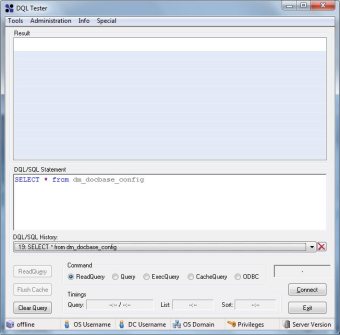
  • DQLTester: small, fast, samson-like utility. Even if it still uses dmcl, it’s probably the best portable tool to have in case of an emergency

dqltester.jpg

  • SquirrelSQL: Free/Open-Source database tool.
  • dmclC: This is a little program I made that works as an application launcher. It allows to quickly change your dmcl.ini to point to a different docbroker. Useful when working in several environments when (still) using old clients and you don’t want to be manually editing dmcl.ini every time you wnat to use a different environment.

dmclc.jpg

  • Cygwin: You are always going to miss linux commands (tail!) when using Windows.
  • dqMan: no comments needed, even if I’m not a huge fan

Feel free to add your favourite tools in the comments


EMC Elect 2015 – I got in!

This week EMC announced the 2015 EMC Elect program and I’ve been lucky enough to make it to the final step.

Even in the “small” Documentum, sorry, IIG, I mean ECD world, where we (mostly) know each other, it’s always nice to be publicly recognized. Taking into account the numbers involved (450 nominations, 200 finalists and 102 “winners”) it’s makes anyone feel thrilled and honored considering the “competition”

So thanks everyone in charge of the program (I guess Mark Browne and Sean Thulin are the main faces of the program) and everyone that had to judge the nominees (more info here: Journey to EMC Elect 2015 (with Bonus Number-Crunching) | GeekFluent)

I’m looking forward to seeing how the EMC Elect program evolves this year

347028-graphic-EMC Elect 2015-hires.jpg.jpeg

(Unofficial) D7.2 Developer Edition

This is a step-by-step guide to install D7.2 in a Linux environment with Oracle XE 10.2.0.3 (not supported by 7.2). You should be able to have everything running in 3-4 hours (I did it with 1.5GB ram, if you set it to 4gb it should really be way faster)

This time I didn’t take screenshots, however there’s only one new screen (lockbox configuration) in the installer so there’s no need for screenshots

Environment

Host:
Windows 7 x64 4GB RAM
VMWare Player 6.0.3

Guest:
CentOS 7 x64 40GB HD 1.5GB RAM (if your host has more than 4gb give it at least 4gb ram)
Oracle XE 11.0.2 (not officially supported) / InstantClient 11.0.3 (not officially supported)
Documentum 7.2
Tomcat 8.0.14
/mnt/hgfs/dctm72 as a shared folder with host machine

VM Creation

Mount the CentOS 7 DVD image, boot the machine and follow the steps. Not much to explain here. I used minimal package install to save resources, named the machine vm-dctm72, configure the network and set the root password

OS Configuration

  • Install required packages:

[root@vm-dctm72 ~]# yum install net-tools bash-completion
[root@vm-dctm72 ~]# yum group install “Development Tools”
[root@vm-dctm72 ~]# yum update
[root@vm-dctm72 ~]# yum install kernel-devel
[root@vm-dctm72 ~]# yum group install X\ Window\ System

  • If you need to install VMware tools, this is the moment:

[root@vm-dctm72 ~]# mkdir /mnt/cdrom
[root@vm-dctm72 ~]# mount /dev/cdrom /mnt/cdrom
[root@vm-dctm72 ~]# mkdir /tmp/vmtools
[root@vm-dctm72 ~]# cp /mnt/cdrom/VMwareTools-9.6.4-2441333.tar.gz /tmp/vmtools/
[root@vm-dctm72 ~]# cd /tmp/vmtools/
[root@vm-dctm72 vmtools]# tar -xvf VMwareTools-9.6.4-2441333.tar.gz
[root@vm-dctm72 vmtools]# cd vmware-tools-distrib/
[root@vm-dctm72 vmware-tools-distrib]# ./vmware-install.pl

  • Create dmadmin user:

[root@vm-dctm72 /]# useradd dmadmin
[root@vm-dctm72 /]# passwd dmadmin

Oracle XE setup

  • I copied every installer in $DOCUMENTUM/installers, so:

[dmadmin@vm-dctm72 opt]$ sudo mkdir documentum
[dmadmin@vm-dctm72 opt]$ sudo chown dmadmin.dmadmin documentum
[dmadmin@vm-dctm72 documentum]$ mkdir installers
[dmadmin@vm-dctm72 documentum]$ mkdir product
[dmadmin@vm-dctm72 documentum]$ mkdir product/7.2
[dmadmin@vm-dctm72 installers]$ cp /mnt/hgfs/dctm72/oracle-xe-11.2.0-1.0.x86_64.rpm/Disk1/oracle-xe-11.2.0-1.0.x86_64.rpm .

  • Install needed libraries, run installer, run configuration tool (remember to change the default 8080 port to something else to avoid conflicts with tomcat):

[dmadmin@vm-dctm72 installers]$ sudo yum install libaio bc
[dmadmin@vm-dctm72 installers]$ sudo rpm -ivh oracle-xe-11.2.0-1.0.x86_64.rpm
[dmadmin@vm-dctm72 installers]$ sudo /etc/init.d/oracle-xe configure

  • Launch sqlplus to enable remote access and remove the password expiration:

[dmadmin@vm-dctm72 installers]$ . /u01/app/oracle/product/11.2.0/xe/bin/oracle_env.sh

[dmadmin@vm-dctm72 installers]$ /u01/app/oracle/product/11.2.0/xe/bin/sqlplus system
EXEC DBMS_XDB.SETLISTENERLOCALACCESS(FALSE);
ALTER PROFILE DEFAULT LIMIT PASSWORD_LIFE_TIME UNLIMITED;
quit

Oracle client setup

  • Install required libraries:

[dmadmin@vm-dctm72 installers]$ sudo yum install libXp.x86_64
[dmadmin@vm-dctm72 installers]$ sudo yum install libXp.i686 libXi.i686 libXtst.i686 libXt.i686
[dmadmin@vm-dctm72 installers]$ sudo yum install glibc.i686 libgcc.i686 libstdc++.i686 libaio.i686

  • Configure 32bit libraries:

[dmadmin@vm-dctm72 installers]$ cd /u01/app/oracle/product/11.2.0/xe/
[dmadmin@vm-dctm72 xe]$ sudo mkdir lib32
[dmadmin@vm-dctm72 xe]$ sudo chown oracle.dba lib32
[dmadmin@vm-dctm72 xe]$ sudo cp /mnt/hgfs/dctm72/instantclient-basic-linux-11.2.0.3.0/instantclient_11_2/lib* lib32/
[dmadmin@vm-dctm72 xe]$ cd lib32
[dmadmin@vm-dctm72 lib32]$ sudo ln -s libclntsh.so.11.1 libclntsh.so
[dmadmin@vm-dctm72 lib32]$ sudo ln -s libocci.so.11.1 libocci.so
[dmadmin@vm-dctm72 lib32]$ sudo chown -h oracle.dba *
[dmadmin@vm-dctm72 lib32]$ sudo chown -h oracle.dba libclntsh.so
[dmadmin@vm-dctm72 lib32]$ sudo chown -h oracle.dba libocci.so

Content Server 7.2

Preinstall tasks

  • Configure environment variables:

[dmadmin@vm-dctm72 ~]$ vi .bash_profile

DOCUMENTUM=/opt/documentum
export DOCUMENTUM
DM_HOME=$DOCUMENTUM/product/7.2
export DM_HOME
ORACLE_HOME=/u01/app/oracle/product/11.2.0/xe
export ORACLE_HOME
ORACLE_SID=XE
export ORACLE_SID
NLS_LANG=’$ORACLE_HOME/bin/nls_lang.sh’ #be aware of the « special » quotes here
export NLS_LANG
PATH=$ORACLE_HOME/bin:$DM_HOME/bin:$PATH
export PATH
LC_ALL=C
export LC_ALL
LD_LIBRARY_PATH=$LD_LIBRARY_PATH:$ORACLE_HOME/lib32
export LD_LIBRARY_PATH

  • Reserve ports for the repository:

[dmadmin@vm-dctm72 ~]$ sudo vi /etc/services
# dctm services
dctm72 49001/tcp # 7.2 Repository native connection
dctm72_s 49002/tcp # 7.2 Repository secure connection

  • Copy installer, extract files, set permissions:

[dmadmin@vm-dctm72 installers]$ cp /mnt/hgfs/dctm72/Content_Server_7.2_linux64_oracle.tar .
[dmadmin@vm-dctm72 installers]$ tar -xvf Content_Server_7.2_linux64_oracle.tar
[dmadmin@vm-dctm72 installers]$ chmod 777 *
[dmadmin@vm-dctm72 installers]$ chmod +x serverSetup.bin

  • Set display to our client IP to allow the X system to work:

[dmadmin@vm-dctm72 installers]$ export DISPLAY=192.168.88.1:0.0

Content Server installation

  • Run the installer, next, next, … and in the last option choose not to configure the repository now

[dmadmin@vm-dctm72 installers]$ ./serverSetup.bin

We need to “workaround” some issues before configuring the repository:

  • Installer cannot find libsasl2.so.2… umm, ok… :

[dmadmin@vm-dctm72 installers]$ sudo ln /usr/lib64/libsasl2.so.3 /usr/lib64/libsasl2.so.2

  • The database version (11.0.2.3 is not supported, as the minimum required version is 11.0.2.4) so let’s cheat. Make a backup of dmdbtest, create a new dmdbtest file and simply write “exit 0”, save the file and go on:

[dmadmin@vm-dctm72 installers]$ mv ../product/7.2/bin/dmdbtest ../product/7.2/bin/dmdbtest.bak
[dmadmin@vm-dctm72 installers]$ vi ../product/7.2/bin/dmdbtest
exit 0
[dmadmin@vm-dctm72 installers]$ chmod 777 ../product/7.2/bin/dmdbtest

  • Now run the repository configuration, configure docbroker and then configure the repository:

[dmadmin@vm-dctm72 installers]$ cd ../product/7.2/install/
[dmadmin@vm-dctm72 install]$ ./dm_launch_server_config_program.sh

Tomcat 8

  • Copy the installer, unzip, move to destination folder, create a symlink for ease of access, change permissions:

[dmadmin@vm-dctm72 tmp]$ cp /mnt/hgfs/dctm72/apache-tomcat-8.0.14.tar.gz .
[dmadmin@vm-dctm72 tmp]$ tar xavf apache-tomcat-8.0.14.tar.gz
[dmadmin@vm-dctm72 tmp]$ sudo mv apache-tomcat-8.0.14 /opt
[dmadmin@vm-dctm72 tmp]$ sudo chown dmadmin.dmadmin -R /opt/apache-tomcat-8.0.14/
[dmadmin@vm-dctm72 tmp]$ sudo ln -s /opt/apache-tomcat-8.0.14/ /opt/tomcat8
[dmadmin@vm-dctm72 tmp]$ sudo chown -h dmadmin.dmadmin /opt/tomcat8

  • Configure the server:

[dmadmin@vm-dctm72 tmp]$ vi /opt/tomcat8/bin/catalina.sh
JAVA_HOME=/opt/documentum/java64/1.7.0_72/
JAVA_OPTS=”-server -Xms256m -Xmx512m -XX:MaxPermSize=256m -Ddfc.properties.file=/opt/documentum/config/dfc.properties”

  • Change firewall configuration:

[dmadmin@vm-dctm72 tmp]$ sudo firewall-cmd –zone=public –add-port=8080/tcp –permanent
[dmadmin@vm-dctm72 tmp]$ sudo firewall-cmd –reload

  • Start the server, test it is working, then stop it before deploying DA

[dmadmin@vm-dctm72 tmp]$ /opt/tomcat8/bin/startup.sh
[dmadmin@vm-dctm72 tmp]$ /opt/tomcat8/bin/shutdown.sh

DA 7.2

  • Copy da.war to webapps:

[dmadmin@vm-dctm72 tmp]$ cp /mnt/hgfs/dctm72/da.war /opt/tomcat8/webapps/

  • Let’s start the configuration with context.xml:

[dmadmin@vm-dctm72 tmp]$ cd /opt/tomcat8/conf/
[dmadmin@vm-dctm72 conf]$ vi context.xml

<Context useHttpOnly="false">
  • Now, catalina.properties:

[dmadmin@vm-dctm72 conf]$ vi catalina.properties
org.apache.jasper.compiler.Parser.STRICT_WHITESPACE=false
jnlp.com.rsa.cryptoj.fips140loader=true

  • web.xml:

[dmadmin@vm-dctm72 conf]$ vi web.xml

<init-param>
            <param-name>enablePooling</param-name>
            <param-value>false</param-value>
        </init-param>
  • server.xml:

[dmadmin@vm-dctm72 conf]$ vi server.xml

  <Connector port="8080" protocol="HTTP/1.1"                connectionTimeout="20000"                redirectPort="8443"                compression="on"                 compressionMinSize="2048"                 compressableMimeType="text/html,text/xml,application/xml,text/plain,text/css,text/                 javascript,text/json,application/x-javascript,application/                 javascript,application/json"                 useSendfile="false" />
  • We need to modify custom/app.xml to disable compression filter, so extract the file, modify, repack the war and delete the extracted file:

[dmadmin@vm-dctm72 conf]$ cd ..
[dmadmin@vm-dctm72 tomcat8]$ cd webapps/
[dmadmin@vm-dctm72 webapps]$ unzip da.war custom/app.xml
[dmadmin@vm-dctm72 webapps]$ vi custom/app.xml

 <compression_filter_enabled>false</compression_filter_enabled>
      </application>

[dmadmin@vm-dctm72 webapps]$ /opt/documentum/java64/1.7.0_72/bin/jar uf da.war custom/app.xml
[dmadmin@vm-dctm72 webapps]$ rm -fr custom

  • And now let’s see if it works:

[dmadmin@vm-dctm72 webapps]$ cd ../bin
[dmadmin@vm-dctm72 bin]$ ./startup.sh
Webtop Recycle Bin using Aspects

When you talk with a customer for the first time, there’s always the issue with deleting documents. Do we allow delete? If so, who can delete? and then, what happens if a document is deleted by accident?

1. Restore a previous backup: You’re limited to the last backup (DB+Filestore), so you’ll lost everything done from that moment on. Recovery of individual documents is painful.

PROS: Should be the “default” as every organization is supposed to have backups of their systems.

CONS: Incomplete recovery (only until the last backup was done)

2. Use some backup/recovery tool such as CYA SmartRecovery: I’ve used this on the past. I wouldn’t use it again unless the recovery of individual documents is an essential business requirement.

PROS: You can restore “easily” individual documents. In case of full disaster you can restore the last backup and then use SmartRecovery to restore the newer documents.

CONS: Initial backup can take forever depending on the size of the repository. You’ll duplicate the required space for backups/Filestore

3. Develop some kind of customization:

PROS: Avoid license/Filestore costs. Enjoy developing for a while

CONS: Mostly client dependant, something will probably break when migrating to a newer version

I’ve usually seen the 3rd option implemented by overriding the destroy/destroyAllVersions/doDestroy methods or the delete action in Webtop to do anything else (or doing nothing at all). D2 implements this functionality out-of-the-box, so I though Aspects where a nice tool to implement this in a WDK-client, so here’s a little step by step guide:

1. Define the aspect type and the aspect attributes: In this case I’ve use “trash_aspect” for the aspect name and defined an “path” attribute to store the source folder of the document.

2. Implement the aspect:

ITrashAspect.java:

package es.test.trashaspect;  
  
import com.documentum.fc.common.DfException;  
  
public interface ITrashAspect {  
    public String getTrashPathName() throws DfException;  
    public void setTrashPathName(String path) throws DfException;  
}  

TrashAspect.java:

package es.test.trashaspect;  
  
import com.documentum.fc.client.DfDocument;  
import com.documentum.fc.common.DfException;  
  
public class TrashAspect extends DfDocument implements ITrashAspect {  
  
    private static final String ASPECT_PATH_NAME = "trash_aspect.pathname";  
    
    public String getTrashPathName() throws DfException {  
        return this.getString(ASPECT_PATH_NAME);  
    }  
  
    public void setTrashPathName(String path) throws DfException {  
        this.setString(ASPECT_PATH_NAME path);        
    }    
}  

3. Package the classes into jar files, and create the jar definitions in Composer. Create the trash_aspect module and configure the aspect module to use the trash_aspect type.

4. Modify your custom base type TBO with:

    public boolean checkTrashAspect(){  
        boolean isTrash=false;  
        
        try {  
            IDfList aspectList = getAspects();  
            
            for (int i=0; i < aspectList.getCount() && !isTrash; i++) {  
                if (((String) aspectList.get(i)).equalsIgnoreCase("trash_aspect")) {  
                    isTrash=true;  
                }  
            }  
            
            if (!isTrash){  
                String folderPath="";  
                String folderIdPath="";  
                IDfId processingFolderId=getFolderId(0);  
                while (!folderIdPath.startsWith("/0c")){  
                    IDfFolder folder=(IDfFolder)getSession().getObject(processingFolderId);  
                    folderPath="/"+folder.getObjectName()+folderPath;  
                    processingFolderId=folder.getFolderId(0);  
                }  
                
                CallBackTrashAspect callback=new CallBackTrashAspect();  
                callback.setFolderPath(folderPath);  
                
                attachAspect("trash_aspect",callback);  
                
                unlink(folderPath);  
                link("/TRASH");  
                
                save();  
            }  
        } catch (DfException e) {  
            e.printStackTrace();  
        }  
        
        
        return isTrash;  
    }  
    @Override  
    public void destroy() throws DfException {  
        if (checkTrashAspect()){  
            super.destroy();  
        }  
    }  
    
    @Override  
    public void destroyAllVersions() throws DfException {  
        if (checkTrashAspect()){  
            super.destroyAllVersions();  
        }  
    }  
    
    @Override  
    protected void doDestroy(boolean arg0, Object[] arg1) throws DfException {  
        if (checkTrashAspect()){  
            super.doDestroy(arg0, arg1);  
        }  
    } 

CallBackTrashAspect.java:

    import com.documentum.fc.client.IDfPersistentObject;  
    import com.documentum.fc.client.aspect.IDfAttachAspectCallback;  
    import com.documentum.fc.common.DfException;  
      
    import es.test.trashaspect.ITrashAspect;  
      
    public class CallBackTrashAspect implements IDfAttachAspectCallback {  
      
        private String folderPath="";  
        
        public String getFolderPath() {  
            return folderPath;  
        }  
      
        public void setFolderPath(String folderPath) {  
            this.folderPath = folderPath;  
        }  
      
        public void doPostAttach(IDfPersistentObject currentObj) throws Exception {  
            ((ITrashAspect)currentObj).setTrashPathName(folderPath);  
            currentObj.save();  
        }  
    }  

5. The restore functionality, using a Webtop action:

    package es.test.trashaspect;  
      
    import java.util.Map;  
      
    import com.documentum.fc.client.IDfDocument;  
    import com.documentum.fc.client.aspect.IDfAspects;  
    import com.documentum.fc.common.DfException;  
    import com.documentum.fc.common.DfId;  
    import com.documentum.fc.common.IDfList;  
    import com.documentum.web.common.ArgumentList;  
    import com.documentum.web.formext.action.IActionExecution;  
    import com.documentum.web.formext.component.Component;  
    import com.documentum.web.formext.config.Context;  
    import com.documentum.web.formext.config.IConfigElement;  
      
    public class RestoreAction implements IActionExecution{  
      
        @Override  
        public boolean execute(String arg0, IConfigElement arg1, ArgumentList arg2, Context arg3, Component arg4, Map arg5) {        
            try {  
                IDfDocument restoreObj=(IDfDocument)arg4.getDfSession().getObject(new DfId(arg2.get("objectId")));  
                IDfList aspectList = ((IDfAspects) restoreObj).getAspects();  
                
                boolean isTrash=false;  
                
                for (int i=0; i < aspectList.getCount() && !isTrash; i++) {  
                    if (((String) aspectList.get(i)).equalsIgnoreCase("trash_aspect")) {  
                        isTrash=true;  
                    }  
                }  
                
                if (isTrash){  
                    String sourceFolder=((ITrashAspect)restoreObj).getTrashPathName();  
                    restoreObj.unlink("/TRASH");  
                    restoreObj.link(sourceFolder);  
                    
                    ((IDfAspects) restoreObj).detachAspect("trash_aspect", null);  
                    restoreObj.save();  
                }  
                
            } catch (DfException e) {  
                e.printStackTrace();  
            }  
            
            return false;  
        }  
      
        @Override  
        public String[] getRequiredParams() {  
            return null;  
        }  
    }