(Unofficial) D2 4.6 Developer Edition

I had time to install the latest D2, and as usual, it wasn’t just “next, next, next, finish” so I took the chance to do a quick post

Environment

Required software

  • emc-dfs-sdk-7.2.zip
  • D2_4.6.0_P03.zip

D2 Installation

Installation

  • Stop Tomcat, JMS, Content Server and docbroker
  • Create the following folder structure:
    • $DOCUMENTUM/d2
    • $DOCUMENTUM/d2/install
    • $DOCUMENTUM/d2/dfs72
    • $DOCUMENTUM/d2/dar
    • $DOCUMENTUM/d2/d2-api
    • $DOCUMENTUM/d2/lockbox
  • Copy to the $DOCUMENTUM/d2/dfs72 the contents of emc-dfs-sdk-7.2.zip
  • Modify sdk’s dfc.properties to use the existing content server dfc.properties file

[dmadmin@vm-dctm72 d2]$ vi dfs72/etc/dfc.properties
#include /opt/documentum/config/dfc.properties

  • Copy to $DOCUMENTUM/d2/install the contents of D2_4.6.0_P03.zip

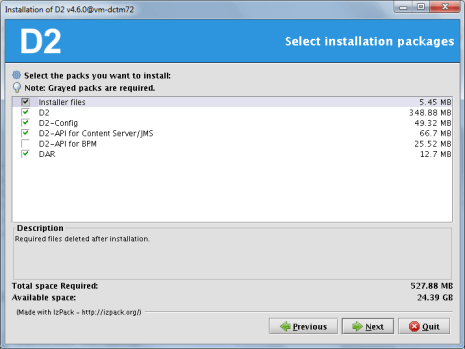
And let’s install D2:

[dmadmin@vm-dctm72 install]$ java -jar D2-Installer-4.6.0.jar

Next screens are just “next, next, next”. Despite what the screens says, the installer won’t configure Lockbox anyway, but it will install the required files.

Also, the installer will most likely fail when installing the DAR files, pointing to a non-existing log file. Just ignore it, as it looks like the installer is unable to install the dar files, so we’ll be manually installing those later.

PostInstall Configuration

  • Set environment variables:

D2=$DOCUMENTUM/d2
export D2
D2_API=$D2/d2-api
export D2_API
D2_LOCKBOX=$D2/lockbox
export D2_LOCKBOX
PATH=$HOME/.local/bin:$HOME/bin:$JAVA_HOME/bin:$ORACLE_HOME/bin:$DM_HOME/bin:$D2_LOCKBOX/linux_gcc64_ia64:$PATH
export PATH
CLASSPATH=$D2_API/C6-Common.jar:$D2_API/LB.jar:$D2_API/LBJNI.jar
export CLASSPATH
LD_LIBRARY_PATH=$ORACLE_HOME/lib32:$DM_HOME/bin/FIPS/:$JAVA_HOME/jre/lib/amd64/server:$DM_HOME/bin:$D2_LOCKBOX/linux_gcc34_x64
export LD_LIBRARY_PATH

  • Create lockbox file:

[dmadmin@vm-dctm72 d2]$ java com.emc.common.java.crypto.SetLockboxProperty $D2 D2Method.passphrase <your passphrase>

  • Copy D2.lockbox to the JMS:

[dmadmin@vm-dctm72 d2]$ cp D2.lockbox /opt/documentum/jboss7.1.1/server/DctmServer_MethodServer/deployments/ServerApps.ear/APP-INF/classes/

  • Create the following folder:

[dmadmin@vm-dctm72 d2]$ mkdir -p /opt/documentum/jboss7.1.1/modules/emc/d2/lockbox/main

  • Copy LB.jar and LBJNI.jar to that folder:

[dmadmin@vm-dctm72 d2]$ cp LB* /opt/documentum/jboss7.1.1/modules/emc/d2/lockbox/main/

  •  Create a module.xml file with the following content:

[dmadmin@vm-dctm72 d2]$ vi /opt/documentum/jboss7.1.1/modules/emc/d2/lockbox/main/module.xml
<module xmlns=”urn:jboss:module:1.1″ name=”emc.d2.lockbox”>
<resources>
<resource-root path=”LB.jar” />
<resource-root path=”LBJNI.jar” />
</resources>
</module>

  • Edit jboss-deployment-structure.xml and add the following section inside the deployments node:

[dmadmin@vm-dctm72 d2]$ vi /opt/documentum/jboss7.1.1//server/DctmServer_MethodServer/deployments/ServerApps.ear/META-INF/jboss-deployment-structure.xml
<dependencies>
<module name=”emc.d2.lockbox”/>
</dependencies>

  •  And the following to the exclusions section:

<module name=”org.slf4j” />
<module name=”org.slf4j.impl” />
<module name=”org.hibernate” />

  • Copy LB.jar and LBJNI.jar to tomcat’s lib folder:

[dmadmin@vm-dctm72 d2]$ cp LB* /opt/tomcat8/lib/

  •  Edit lockboxPath property from D2-Config/WEB-INF/classes/D2-Config.properties and D2/WEB-INF/classes/D2FS.properties to point to $D2 (use the actual path):

lockboxPath=/opt/documentum/d2

Dar Installation

  • Install the following DARs:

D2-DAR.dar

[dmadmin@vm-dctm72 dar]$ java -Ddar=$D2/dar/D2-DAR.dar -Dlogpath=$D2/dar/D2-DAR.log -Ddocbase=dctm72 -Duser=dmadmin -Ddomain= -Dpassword=dmadmin -cp $DM_HOME/install/composer/ComposerHeadless/startup.jar org.eclipse.core.launcher.Main -data $DM_HOME/install/composer/workspace -application org.eclipse.ant.core.antRunner -buildfile $DM_HOME/install/composer/deploy.xml

D2Widget-DAR.dar

[dmadmin@vm-dctm72 dar]$ java -Ddar=$D2/dar/D2Widget-DAR.dar -Dlogpath=$D2/dar/D2Widget-DAR.log -Ddocbase=dctm72 -Duser=dmadmin -Ddomain= -Dpassword=dmadmin -cp $DM_HOME/install/composer/ComposerHeadless/startup.jar org.eclipse.core.launcher.Main -data $DM_HOME/install/composer/workspace -application org.eclipse.ant.core.antRunner -buildfile $DM_HOME/install/composer/deploy.xml

Collaboration_Services.dar

[dmadmin@vm-dctm72 dar]$ java -Ddar=$D2/dar/Collaboration_Services.dar -Dlogpath=$D2/dar/Collaboration_Services.log -Ddocbase=dctm72 -Duser=dmadmin -Ddomain= -Dpassword=dmadmin -cp $DM_HOME/install/composer/ComposerHeadless/startup.jar org.eclipse.core.launcher.Main -data $DM_HOME/install/composer/workspace -application org.eclipse.ant.core.antRunner -buildfile $DM_HOME/install/composer/deploy.xml

  • Start docbroker, Content, JMS, Tomcat and (hopefully) everything should start fine (check JMS’ log as we’ve been messing with its configuration and anything out of place will cause it to fail)
MMTM 2016

Now that Momentum/EMC World is almost done, time for a quick recap. Announcements in the ECD’s keynote have covered Leap (Project Horizon), Documentum 7.3 and InfoArchive 4.0.

If you want to get detailed information on these, you can check the usual sources:

And don’t forget about the “Ask the expert” session about Leap

Thoughts after reading the news and watching the streamings and webcasts:

Good:

  • Leap looks nice. Integration with existing Documentum installations is good. Free for existing customers is the best way to push it (check the spark blog link for more info on licensing and TGS blog for initial prices)
  • Documentum for CentOs+PostgreSQL (finally!!!) and support for docker (cool!) to reduce TCO
  • Removal of UCF/Java from Webtop/D2 (THANK GOD) and support for Chrome/Edge (about time…)

Not so good:

  • Leap integration with DCTM is done through CMIS, but it seems like apps are not quite there yet. I suspect we won’t be able to use Leap against CS until 7.3 is released (or maybe later). I also don’t like CMIS too much, because even though is a standard, it’s missing a lot of specific features (for every vendor), so we’ll have too see how that works.
  • Docker is cool, but I still don’t have a clear picture of how it will work with Documentum. We’ll have to wait and see what EMC provides. Besides, if you want to reduce cost of upgrades, you should provide detailed information of what has changed (wdk classes, api reference, etc.) as most of the time that takes to perform an upgrade is lost in tracing changes in applications and why feature x stopped working (same with patch releases)
  • I still would love if EMC would remove once and for all dmbasic scripts from the installation process and methods, although that looks like a lost battle
  • No word about ECD’s future, it was something to expect but still disappointing

Bad:

  • DCTM 7.3 would be available first in EMC’s cloud environment to “debug” it with customers. I’m quite sure that knowing the history of bugs of Documentum (and the pace at what those are resolved) this will most likely backfire on them. If you want to deliver a solid-rock product, then what you should do is fixing reported bugs fast (instead of having to report same bug several times without luck or wasting time with support), not have (paying) customers beta-testing the product for months

My Documentum Wishlist for 2016

The top items in my list probably are:

  • What is going to happen with Dell/EMC/ECD?
  • Documentum postgresql production ready
  • Greater focus on dctm clients and browser support (In 2016 any product that just supports firefox and ie doesn’t look serious)
  • Improve Java/UCF support between java/browser versions (or even dropping it, considering only ie11 will support java by the end of the year)
  • Public (or easily available to partners/customers), clear roadmap (I’m still hearing EMC sales reps saying Webtop is dead… I think I’ve already lived this situation with WebPublisher…)

By the way, what’s going on with “project horizon”?, it could be great or it could be another centerstage, who knows… (not us, sadly)

ESAPI vs character codification

Webtop Patch notes state that problems with esapi have been fixed:

WEBTOP-32460
Opening a document with accent in name using http mode with Webtop 6.8 using IE11 results in a security exception and the contents of the file are not displayed.

Well, if you check HttpTransportManager.class you can check the “fix” by yourself:

Prepatch:

    try{
       contentDisposition.append(SECURITY.validator().getValidHeader("HttpTransportManager", makeSafeHeaderValue(strCleanFileName), "Header Manipulation"));
    }catch (UnsupportedEncodingException e){
        throw new WrapperRuntimeException(e);
    }

Patch “fix”:

    try{
         ClientInfo localClientInfo = ClientInfoService.getInfo();
         if ((localClientInfo.isPlatform(ClientInfo.WIN)) && (localClientInfo.isBrowser(ClientInfo.MSIE))) {
            contentDisposition.append(makeSafeHeaderValue(str));
          } else {
            contentDisposition.append(SECURITY.validator().getValidHeader("HttpTransportManager", makeSafeHeaderValue(str), "Header Manipulation"));
          }
    }catch (UnsupportedEncodingException localUnsupportedEncodingException){
          throw new WrapperRuntimeException(localUnsupportedEncodingException);
    }

This is obviously a lazy way to “fix” it, as the problem is in the ESAPI library and skipping the security check is not really a way to fix it.

There are basically 3 problems with the character enconding in wdk:

  1. The way WDK handles characters: This is a minor problem, as even if WDK does weird things such as converting back and forth the charecters, it “works”
  2. ESAPI is not character encoding aware, this makes useless adding your “special” characters to the ESAPI.properties validators, as this would be read incorrectly by ESAPI (more info here: Virtuallinks vs character encoding vs ESAPI)
  3. Inconsistencies when WDK calls ESAPI security validators as it sends the string to validate in different encodings (escaped/non-escaped, UTF-8 “native”, UTF-8 “converted”, etc.).

So, in order to fix this problems we need to fix the ESAPI library to be aware of the character encoding:

1. Get ESAPI 2.1.0 sources (Downloads – owasp-esapi-java – OWASP Enterprise Security API (Java Edition) – Google Project Hosting)

2. Add the following entries to webtop/WEB-INF/ESAPI.properties:

Validator.InputEncoding=UTF-8 //App server encoding
Validator.OutputEncoding=ISO-8859-1 //Locale encoding

3. Modify Validator.HTTPHeaderValue, Validator.FileName and Validator.DirectoryName with your special characters:

Validator.HTTPHeaderValue=^[a-zA-Z0-9<strong>áéíóúÁÉÍÓÚñÑ</strong>()\\-=\\*\\.\\?;,+\\/:&amp;_ ]*$
Validator.FileName=^[a-zA-Z0-9<strong>áéíóúÁÉÍÓÚñÑ</strong>!@#$%^&amp;{}\\[\\]()_+\\-=,.~'` ]{1,255}$
Validator.DirectoryName=^[a-zA-Z0-9<strong>áéíóúÁÉÍÓÚñÑ</strong>:/\\\\!@#$%^&amp;{}\\[\\]()_+\\-=,.~'` ]{1,255}$

4. Modify Validator.WDKHTTPURI adding a blank (because EMC assumes that nobody uses blanks when naming a folder):

Validator.WDKHTTPURI=^/([a-zA-Z0-9. \\-_]*/?)$

5. Add the following lines to org.owasp.esapi.reference.DefaultSecurityConfiguration

    private String inputEncoding = null;
    private String outputEncoding = null;  

    public String getInputEncoding() {
        return getESAPIProperty(INPUT_ENCODING, "UTF-8"); //UTF-8 is the default value returned if Validator.InputEncoding is not found
    }  

    public String getOutputEncoding() {
        return getESAPIProperty(OUTPUT_ENCODING, "ISO-8859-1"); //ISO-8859-1 is the default value returned if Validator.OutputEncoding is not found
    }  

    private String getEncodedESAPIProperty(String key){
        try {
            if (inputEncoding!=null && outputEncoding!=null){
                return new String(((String)properties.get(key)).getBytes(outputEncoding), inputEncoding);
            }else{
                return (String)properties.get(key);
            }
        } catch (UnsupportedEncodingException e) {
            e.printStackTrace();
        }
        return key;
    }

6. Modify DefaultSecurityConfiguration(), getESAPIProperty(String key, String def) and getESAPIProperty(String key, boolean def) methods:

    public DefaultSecurityConfiguration() {
        // load security configuration
        try {
            loadConfiguration();
            this.setCipherXProperties();  

            //deal with encoding
            inputEncoding=getInputEncoding();
            outputEncoding=getOutputEncoding();  

        } catch( IOException e ) {
          logSpecial("Failed to load security configuration", e );
          throw new ConfigurationException("Failed to load security configuration", e);
        }
    }  

    protected String getESAPIProperty( String key, String def ) {
        //String value = properties.getProperty(key);
        String value=getEncodedESAPIProperty(key);
        if ( value == null ) {
              logSpecial( "SecurityConfiguration for " + key + " not found in ESAPI.properties. Using default: " + def, null );
              return def;
        }
        return value;
    }  

    protected boolean getESAPIProperty( String key, boolean def ) {
        //String property = properties.getProperty(key);
        String property=getEncodedESAPIProperty(key);
        if ( property == null ) {
              logSpecial( "SecurityConfiguration for " + key + " not found in ESAPI.properties. Using default: " + def, null );
              return def;
        }
        if ( property.equalsIgnoreCase("true") || property.equalsIgnoreCase("yes" ) ) {
            return true;
        }
        if ( property.equalsIgnoreCase("false") || property.equalsIgnoreCase( "no" ) ) {
            return false;
        }
        logSpecial( "SecurityConfiguration for " + key + " not either \"true\" or \"false\" in ESAPI.properties. Using default: " + def, null );
        return def;
    }

7. Now that you are modifying this class, you can comment the logSpecial calls from loadPropertiesFromStream,loadConfiguration and getResourceFile and skip the messages thrown by ESAPI when loading the libraries (Best Practices – Review before releasing)

8. Modify org.owasp.esapi.reference.validation.StringValidationRule:

private String checkWhitelist(String context, String input, String orig) throws ValidationException{
  // check whitelist patterns
  //deal with encoding
  DefaultSecurityConfiguration sec=(DefaultSecurityConfiguration)DefaultSecurityConfiguration.getInstance();  

  Charset inputcharset = Charset.forName(sec.getInputEncoding());
  Charset outputcharset = Charset.forName(sec.getOutputEncoding());  

  ByteBuffer inputBuffer=null;
  try {
      inputBuffer = ByteBuffer.wrap(URLDecoder.decode(input,sec.getOutputEncoding()).getBytes());
  } catch (UnsupportedEncodingException e) {
      e.printStackTrace();
  }  

  CharBuffer data = inputcharset.decode(inputBuffer);  

  ByteBuffer outputBuffer = outputcharset.encode(data);
  byte[] outputData = outputBuffer.array();
  input=new String(outputData);  

    for (Pattern p : whitelistPatterns) {
        if ( !p.matcher(input).matches() ) {
            throw new ValidationException( context + ": Invalid input. Please conform to regex " + p.pattern() + ( maxLength == Integer.MAX_VALUE ? "" : " with a maximum length of " + maxLength ), "Invalid input: context=" + context + ", type(" + getTypeName() + ")=" + p.pattern() + ", input=" + input + (NullSafe.equals(orig,input) ? "" : ", orig=" + orig), context );
        }
    }  

    return input;
}

9. Generate jar file or replace the classes in the bundled esapi.jar.

This changes will work for virtual links and http transfer, however you may need to modify additional methods/validators depending on your customizations or case uses, but you get the idea.

This “patch” works with webtop 6.8 latest patch in every browser I’ve tested (ie, firefox, chrome, opera).

Virtuallinks vs character encoding vs ESAPI

One has to wonder what is EMC thinking when they take some decisions: In Webtop 6.8 EMC introduced a “new” library in order to improve protection against XSS vulnerabilities. They decided to use OWASP’s ESAPI library, a project that hasn’t been updated in over 2 years (check ESAPI/esapi-java-legacy · GitHub and ESAPI/esapi-java · GitHub) and doesn’t show any sign of being currently developed (quite the contrary: Off-the-Wall Security)

Anyway, with the introduction of this library they have broken the virtuallinks component, at least for everyone that uses non ASCII characters. To sum up what has been discussed in Webtop 6.8 Download Servlet Escaped Umlaut Problem:

In a “standard” environment:

  • Tomcat running with -Dfile.encoding=UTF-8
  • Default ESAPI.properties
  • Webtop version: 6.8 SP6

Any “weird” character (in spanish: áéíóúñ) will break the virtuallinks functionality in two cases:

1. The user is logged in webtop:
VirtualLink404Handler.getServletErrorRequestUri method has an url conversion

virtualLinkPath = URLDecoder.decode(virtualLinkPath, "UTF-8");

that has the following behaviour (in Chrome and Firefox, IE seems to work just fine):

BEFORE URLDecoder: /folder%20name/%C3%A1%C3%A9%C3%AD%C3%B3%C3%BA
AFTER URLDecoder: /folder name/áéíóú
BEFORE URLDecoder: /folder%20name/%C3%A1%C3%A9%C3%AD%C3%B3%C3%BA
AFTER URLDecoder: /folder name/áéíóú
BEFORE URLDecoder: /folder%20name/%E1%E9%ED%F3%FA
AFTER URLDecoder: /folder name/?????

that “????” string will return “?????” or a sequence of square icons or simply a blank depending of the character encoding. In order to fix it, you need to rewrite the class changing that method to something like:

    String vLink=URLDecoder.decode(virtualLinkPath, "UTF-8");
    if (vLink.indexOf("?")!=-1){//broken UTF-8 encoding
        virtualLinkPath = URLDecoder.decode(virtualLinkPath, "ISO-8859-1");
    }else{
        virtualLinkPath = URLDecoder.decode(virtualLinkPath, "UTF-8");
    }

This will make virtuallinks that have special characters to be correctly opened from any browser.

2. The user hasn’t logged in webtop:
Virtuallink component will redirect to the login component (check url-addressable-components & virtuallinkconnect first) and then you’ll get a popup saying

“There’s been an error. Contact with your administrator”

without any additional info or stacktrace in the logs.

What is happening is that ESAPI is forbidding the redirection to the login compoenent due to the presence of “unsafe” characters as you can see in a the following phantom exception:

HTTP header value: Header Manipulation: FormProcessor: Invalid input. Please conform to regex ^[a-zA-Z0-9()\-=\*\.\?;,+\/:&_ ]*$ with a maximum length of 1024

Obviously, your next step would be adding the special characters to the Validator.HTTPHeaderValue regular expression in ESAPI.properties:

Validator.HTTPHeaderValue=^[%a-zA-Z0-9áéíóúÁÉÍÓÚñÑ()\\-=\\*\\.\\?;,+\\/:&_ ]*$

Restart the server, retry the virtuallink url and:

HTTP header value: Header Manipulation: FormProcessor: Invalid input. Please conform to regex ^[%a-zA-Z0-9áéÃóúÁÉÍÓÚñÑ()\-=\*\.\?;,+\/:&_ ]*$ with a maximum length of 1024

WTF!!?? ESAPI reads the properties file as a stream and doesn’t care about the encoding

You can fix this by overwriting WDKESAPIValidator.getValidHeader (check Re: Webtop 6.8 Download Servlet Escaped Umlaut Problem) or you can do it in a nicer way (considering it is unlikely that the ESAPI jar will be ever updated):

1. Download ESAPI 2.1.0 source
2. Modify org\owasp\esapi\reference\DefaultSecurityConfiguration.java:

protected String getESAPIProperty( String key, String def ) {
  String value = properties.getProperty(key);

with

    String value=null;
    try {
      value = new String(((String)properties.get(key)).getBytes("ISO-8859-1"), "UTF-8");
    } catch (UnsupportedEncodingException e) {
      e.printStackTrace();
    }

And

protected boolean getESAPIProperty( String key, boolean def ) {
  String property = properties.getProperty(key);

with

    String property=null;
    try {
      property = new String(((String)properties.get(key)).getBytes("ISO-8859-1"), "UTF-8");
    } catch (UnsupportedEncodingException e) {
      e.printStackTrace();
    }

3. Replace the class in webtop/WEB-INF/lib/esapi-2.1.0.jar

And now your special characters in ESAPI.properties will be read correctly and you can use again the virtuallink component.

Video streaming from Webtop

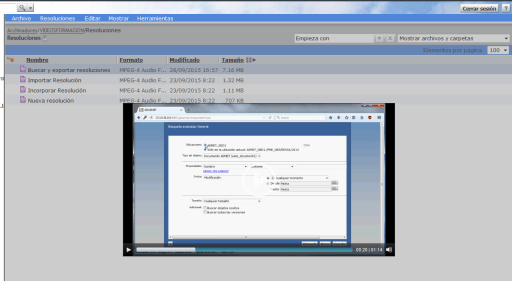
We have stored in our repository some video tutorials to help users. Usually they double click on them, the UCF applet/http download launches and they’ll open them with some video player than may or may not have the rigth codecs to play the video.

So in order to improve the “user experience” we decided to try using some HTML5 video player to play the content from the browser.

In this case we are using MediaElements.js (mediaelementjs.com), but any player will do.

1. Create a hidden cabinet with mp4/webm videos.
2. Add a menu action to load the hidden cabinet in an objectlist (I’m simulating a click on the browsertree):

      <actionmenuitem dynamic="generic" name="videohelp"  
           nlsid="MSG_VIDEOHELP" action="videohelp_action"  
           showifinvalid="false" showifdisabled="true" />  
        @Override  
        public boolean execute(String paramString, IConfigElement paramIConfigElement,  
              ArgumentList paramArgumentList, Context paramContext, Component paramComponent,  
              Map paramMap) {  
            String pathIds=FolderUtil.getFolderIdsFromPath("/VIDEOS");  
          
            ArgumentList args=new ArgumentList();  
            args.add("objectId",pathIds);  
          
            ClientSessionState.setAttribute("customlocation", "/VIDEOS");  
          
            return ActionService.execute("view", args, paramContext, paramComponent, this);  
        }  

NOTE: I’m using a custom scope that allows to scope by folder, that’s why I’m setting the customlocation attribute.

3. Create a new objectlist component which:

  • Overrides the default action when double clicking a document so it launches the video player instead of opening.
  • Generates a virtual link for the video content.
    private String getVideoUrl(IDfDocument video) throws DfException, IOException{  
            String url="";  
      
            IDfFolder fold=(IDfFolder)getDfSession().getObject(video.getFolderId(0));      
            url=url+getPageContext().getRequest().getServerName()+":"  
                   +getPageContext().getRequest().getServerPort()  
                   +getPageContext().getServletContext().getContextPath();  
            url=url+fold.getFolderPath(0)+"/"+video.getObjectName();  
          
            return url;  
    }  

objectlist_videos.jsp:

    //add javascript to show/hide player in a cool way.  
    //Add the parameter passed in the click event to the src attribute of the video tag.  
  
       <dmf:form>  
          <video width="640" height="360" src="" type="video/mp4"  
            id="player1" controls="controls" preload="none"></video>  
          
         <%@ include file='/custom/jsp/objectlist/doclist_body_videos.jsp' %>  
      </dmf:form> 

doclist_body_videos.jsp:

        //modify object id celltemplate:  
      
         <dmf:datagridRowEvent eventname="dblclick">  
             <dmf:link onclick='show' name='objectLink'  
                    runatclient='true' datafield='title'>  
                    <dmf:argument name='id' datafield='r_object_id' />  
                    <dmf:argument name='type' datafield='r_object_type' />  
                    <dmf:argument name='isFolder' datafield='isfolder' />  
                    <dmf:argument name="isVirtualDoc" datafield='r_is_virtual_doc' />  
                    <dmf:argument name='assembledFromId' datafield='r_assembled_from_id' />  
                    <dmf:argument name="linkCount" datafield='r_link_cnt' />  
                    <% String url=form.getVideoUrl(dataProvider.getDataField("r_object_id")); %>  
                    <dmf:argument name="url" value="<%=url %>" />  
             </dmf:link>  

This works, but is not really streaming, as it first downloads the video, and then plays it. But (I never though I would say this) ACS comes to rescue!

ACS links allow content streaming, so instead of getting the virtual url link to the video, we’ll get the ACS url:

    try{  
        IDfClientX clientx = new DfClientX();  
        IDfDocument video=(IDfDocument)getDfSession().getObject(new DfId(objectId));  
      
        IDfAcsTransferPreferences atp = clientx.getAcsTransferPreferences();  
        atp.preferAcsTransfer(true);  
      
        IDfExportOperation exportOp = clientx.getExportOperation();  
        exportOp.setAcsTransferPreferences(atp);  
        IDfExportNode exportNode = (IDfExportNode) exportOp.add(video);  
        boolean result = exportOp.execute();  
      
        if (result) {  
            IDfList nodes = exportOp.getNodes();  
            for (int i = 0, size = nodes.getCount(); i < size; i++) {  
                IDfExportNode node = (IDfExportNode) nodes.get(i);  
                IDfEnumeration acsRequests = node.getAcsRequests();  
                while (acsRequests.hasMoreElements()) {  
                    IDfAcsRequest acsRequest = (IDfAcsRequest) acsRequests.nextElement();  
                    String docURL = acsRequest.makeURL();  
                    return docURL;                    
                }  
            }  
        }    
    }catch(DfException e){  
        e.printStackTrace();  
    }  

And the result:

videoplayer.png

Note: Fullscreen is disabled due to frameset architechture that Webtop uses makes html5 full screen work like: Put browser in full screen mode, play video in full frame (instead of full screen).

url-addressable-components & virtuallinkconnect

In recent Webtop versions EMC introduced a new secutiry feature that forbid components to be invoked through an URL:

The following configuration has been added to enable or disable components that are invoked through a URL.

<url-addressable-components>

<enabled>false</enabled>

</url-addressable-components>

Set <enabled> to true to invoke all the components through the URL.

Specific components can also be configuredforURLaddressability. This can be done by adding the <url-addressable-enabled/> tag in the corresponding component configuration file.

For example, add the following configuration file, <Web-app-root>\wdk\config\errormessage_component.xml, where <url-addressable-enabled/> enables URL addressability.

Note: EMC recommends that administrators add <url-addressable-enabled/> in the specific URL addressable-component instead of choosing to set <enabled> to true.

So when I’m getting a “401: The URL is unauthorized in WDK” when trying to use a virtual link I check app.xml:

<url-addressable-components>
<enabled>false</enabled>
</url-addressable-components>

Ok, default configuration is set, so components without <url-addressable-enabled/> cannot be invoked through an URL. Let’s check virtuallinkconnect component default configuration:

<!–XSRF component whitelisting change–>
<url-addressable-enabled/>

Ok, so if the component is whitelisted by default, why it is being blocked? Well, what does any component do when you invoke it through an URL? Yes, it redirects to the login component, which ,of course, it’s not whitelisted by default.

So by adding <url-addressable-enabled/> to the login definition, the virtuallinkconnect component will work with the component blocking enabled.

What happens when you don’t configure OOTB Jobs (DCTM/xCP)

Environment: DCTM 7.2 + PE 2.2, 2 months running an empty test repository:

  • …/dba/logs/…/agentexec: +150k files
  • …/dba/logs/…/dmadmin: +150k files
  • /Temp/Jobs/…/: +60k objects in several folders (dm_document objects)
  • /System/Sysadmin/Reports/…: +60k versions of some objects (dm_document objects)
  • dm_audittrail: +1.5 million objects
  • Database File Size: ~ 5GB

Be specially careful with the methods that by default run every minute:

  • bpm_XCPAutoTaskMgmt
  • Iniatilizae_WQ

And those that run every hour:

  • QmPriorityAging
  • QmThresholdNotification
  • WfmsTimer
  • WFSuspendTimer

If you’re not using those features you should really disable them. Or run logpurge+audittrail+dmclean as often as possible.

End of Life Announcement for Documentum WebPublisher

From EMC newsletter:

Users of the Documentum WebPublisher product line are advised that End of Life has been initiated for this product.

EMC has partnered with Hippo to offer best of breed WCM that integrates and synchronizes content with Documentum. Hippo CMS, which is EMC Select Partner offering, offers modern, next-generation Web Experience Management capabilities.

Important dates related to the Documentum WebPublisher v 6.5 SP 6 and v 6.5 SP 7 are:

  • End of Primary Support is October 31, 2015
  • End of Extended Support / End of Service Life is April 30, 2018

Best Practices – Review before releasing

I’ve already said before (Certificate-based SSL Documentum 7.1 with xCP 2.1) that EMC (any company for this matter) should be more careful when releasing products with the comments left in files and/or the scripts done for Windows environments that doesn’t work on *nix even if they are supposed to. This doesn’t break anything, but it really does look bad. Well, here we go again:

If you’re using Webtop 6.8 (by the way, this is still not fixed: sortablelistbox bug) you’d probably noticed the ESAPI messages thrown in your application server log when webtop is deployed OOTB or following the deployment guide:

Attempting to load ESAPI.properties via file I/O.
Attempting to load ESAPI.properties as resource file via file I/O.
Not found in ‘org.owasp.esapi.resources’ directory or file not readable: C:\blablablablablablabla\Tomcat v7.0 Server at localhost-config\ESAPI.properties
Not found in SystemResource Directory/resourceDirectory: .esapi\ESAPI.properties
Not found in ‘user.home’ (C:\Users\blablablablablablabla) directory: C:\Users\blablablablablablabla\esapi\ESAPI.properties
Loading ESAPI.properties via file I/O failed. Exception was: java.io.FileNotFoundException
Attempting to load ESAPI.properties via the classpath.
SUCCESSFULLY LOADED ESAPI.properties via the CLASSPATH from ‘/ (root)’ using current thread context class loader!
Attempting to load validation.properties via file I/O.
Attempting to load validation.properties as resource file via file I/O.
Not found in ‘org.owasp.esapi.resources’ directory or file not readable: C:\blablablablablablabla\Tomcat v7.0 Server at localhost-config\validation.properties
Not found in SystemResource Directory/resourceDirectory: .esapi\validation.properties
Not found in ‘user.home’ (C:\Users\blablablablablablabla) directory: C:\Users\blablablablablablabla\esapi\validation.properties
Loading validation.properties via file I/O failed.
Attempting to load validation.properties via the classpath.
SUCCESSFULLY LOADED validation.properties via the CLASSPATH from ‘/ (root)’ using current thread context class loader!

So I decided to investigate this to see if it can be removed. Long story sort:

You can add “-Dorg.owasp.esapi.resources=”C:\blablabla\webtop\WEB-INF\classes” to the JVM parameters to reduce the messages thrown to:

Attempting to load ESAPI.properties via file I/O.
Attempting to load ESAPI.properties as resource file via file I/O.
Found in ‘org.owasp.esapi.resources’ directory: C:\blablabla\webtop\WEB-INF\classes\ESAPI.properties
Loaded ‘ESAPI.properties’ properties file
Attempting to load validation.properties via file I/O.
Attempting to load validation.properties as resource file via file I/O.
Found in ‘org.owasp.esapi.resources’ directory: C:\blablabla\webtop\WEB-INF\classes\validation.properties
Loaded ‘validation.properties’ properties file

but you can’t get rid of the messages as those are thrown with System.out.println (ouch)

However, this “investigation” led me to webtop/WEB-INF/classes/ESAPI.properties. This file is the ESAPI configuration file where we can find some funny/sad comments:

# Default file upload location (remember to escape backslashes with \\)
HttpUtilities.UploadDir=C:\\ESAPI\\testUpload
# let this default to java.io.tmpdir for testing
#HttpUtilities.UploadTempDir=C:\\temp

Yes, let’s default this to java.io.tmpdir… in next version maybe…

# ESAPI Executor
# CHECKME – Not sure what this is used for, but surely it should be made OS independent.
Executor.WorkingDirectory=C:\\Windows\\Temp
Executor.ApprovedExecutables=C:\\Windows\\System32\\cmd.exe,C:\\Windows\\System32\\runas.exe

Umm, not sure what it is used for? Let’s check the original bundled ESAPI.properties:

# ESAPI Executor
# CHECKME – This should be made OS independent. Don’t use unsafe defaults.
# # Examples only — do NOT blindly copy!
# For Windows:
# Executor.WorkingDirectory=C:\\Windows\\Temp
# Executor.ApprovedExecutables=C:\\Windows\\System32\\cmd.exe,C:\\Windows\\System32\\runas.exe
# For *nux, MacOS:
# Executor.WorkingDirectory=/tmp
# Executor.ApprovedExecutables=/bin/bash
Executor.WorkingDirectory=
Executor.ApprovedExecutables=

Well, we still don’t know what this is used for but remember, do NOT blindly copy!