Messing around with type hierarchy/definition

Warning: if you really need/want to do this, do it at your own risk, as this guide comes with no support (and be sure to have a backup just in case)

Use case:

You want to modify type hierarchy (ie: type A -> subtype B -> subtype C to type A -> subtype C) or want to change attribute name/type while keeping metadata AND there is a limited number of affected objects (I don’t think you want to try this with millions of objects)

  1. Create a new project in Composer
  2. Import every affected object as sysobject
  3. Delete unwanted type (subtype b) from type artifacts
  4. Modify subtype C supertype to type A
  5. Add necessary attributes to your subtype (those required that were inherited from subtype B) or modify the name/type of whatever attribute you want to modify
  6. Open sysobject artifacts with text editor, modify <typeExtension> node with the required <attributes> elements (remove unused, add new ones, edit modified definitions). You probably want to develop some program that automatically does everything for you. JDK has anything you need without additional libraries.
  7. Delete every object instance of types b and c from repository.
  8. Drop types b and c
  9. Install DAR.

DFS 7.2 (7.x?) vs JBoss 7.1.1 (plus some other tips)

I’m currently involved in a 6.6 -> 7.2 migration, consider the following tips if you are in a similar situation:

  • JBoss 7.1.1 won’t work with JRE/JDK8, stick to 1.7. It seems it doesn’t work with a 64bit JVM either.
  • DFS 7.2 won’t work out of the box in JBoss (not sure about other app servers): You’ll get a crypto error no matter what. Check SR #000185942 for a similar error with xCP 2.1 and apply the same fix (or do what I did: use the JARs from DA 7.2). Be sure to actually test the services with soapui/xmlspy/custom test class because even though wsdl are accesible the services won’t work.

For your custom DFS services:

  • Stick with JRE6/7 as JRE8 won’t work with the build files provided by the SDK.
  • If you have slightly complex services, they won’t compile due to bugs in the bundled JAXB jar version. Download JAXB version 2.2.6 (at least), remove the META-INF/maven folder from the jars and replace the jaxb jars included in the SDK.
  • I had to use additional libraries not included with the DFS SDK to generate the custom service ear: jaxp-api.jar, jaxp-ri.jar, jax-qname.jar and relaxngDatatype.jar.

After this changes, now I can run the OOTB DFS and the custom services, so now I just have to test everything (still) works…


Must-have tools for Documentum

After reading Scott Roth‘s blogpost about managing DCMT urls (https://msroth.wordpress.com/2015/03/16/managing-all-those-environment-urls/) I decided to share my must-have tools when developing:

  • SecureCRT/mRemote/mRemoteNG/RoyalTS: For the last couple of years I’ve been using a custom fork from mRemoteNG with some added functionality. Currently I’m testing RoyalTS with the free 1-year EMC Elect license. Any of these is a must-have when working with remote servers and you should take your time to configure the commands to launch ftp/sftp/ssh commands from the connection list.
  • Excel/CSV/sticky Notes/Browser bookmarks: To list every URL you have access to. Usually browser bookmarks/sticky notes work for me.
  • Launchy/executor: Applications launchers. You can set them up to index browser bookmarks and quickly access DA/Webtop/whatever. The same goes for remote sessions.
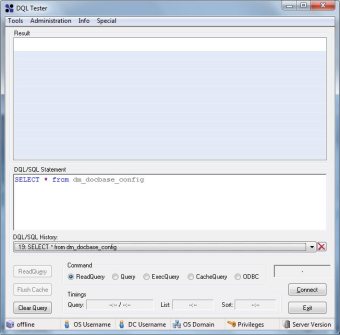
  • DQLTester: small, fast, samson-like utility. Even if it still uses dmcl, it’s probably the best portable tool to have in case of an emergency

dqltester.jpg

  • SquirrelSQL: Free/Open-Source database tool.
  • dmclC: This is a little program I made that works as an application launcher. It allows to quickly change your dmcl.ini to point to a different docbroker. Useful when working in several environments when (still) using old clients and you don’t want to be manually editing dmcl.ini every time you wnat to use a different environment.

dmclc.jpg

  • Cygwin: You are always going to miss linux commands (tail!) when using Windows.
  • dqMan: no comments needed, even if I’m not a huge fan

Feel free to add your favourite tools in the comments


EMC Elect 2015 – I got in!

This week EMC announced the 2015 EMC Elect program and I’ve been lucky enough to make it to the final step.

Even in the “small” Documentum, sorry, IIG, I mean ECD world, where we (mostly) know each other, it’s always nice to be publicly recognized. Taking into account the numbers involved (450 nominations, 200 finalists and 102 “winners”) it’s makes anyone feel thrilled and honored considering the “competition”

So thanks everyone in charge of the program (I guess Mark Browne and Sean Thulin are the main faces of the program) and everyone that had to judge the nominees (more info here: Journey to EMC Elect 2015 (with Bonus Number-Crunching) | GeekFluent)

I’m looking forward to seeing how the EMC Elect program evolves this year

347028-graphic-EMC Elect 2015-hires.jpg.jpeg

(Unofficial) D7.2 Developer Edition

This is a step-by-step guide to install D7.2 in a Linux environment with Oracle XE 10.2.0.3 (not supported by 7.2). You should be able to have everything running in 3-4 hours (I did it with 1.5GB ram, if you set it to 4gb it should really be way faster)

This time I didn’t take screenshots, however there’s only one new screen (lockbox configuration) in the installer so there’s no need for screenshots

Environment

Host:
Windows 7 x64 4GB RAM
VMWare Player 6.0.3

Guest:
CentOS 7 x64 40GB HD 1.5GB RAM (if your host has more than 4gb give it at least 4gb ram)
Oracle XE 11.0.2 (not officially supported) / InstantClient 11.0.3 (not officially supported)
Documentum 7.2
Tomcat 8.0.14
/mnt/hgfs/dctm72 as a shared folder with host machine

VM Creation

Mount the CentOS 7 DVD image, boot the machine and follow the steps. Not much to explain here. I used minimal package install to save resources, named the machine vm-dctm72, configure the network and set the root password

OS Configuration

  • Install required packages:

[root@vm-dctm72 ~]# yum install net-tools bash-completion
[root@vm-dctm72 ~]# yum group install “Development Tools”
[root@vm-dctm72 ~]# yum update
[root@vm-dctm72 ~]# yum install kernel-devel
[root@vm-dctm72 ~]# yum group install X\ Window\ System

  • If you need to install VMware tools, this is the moment:

[root@vm-dctm72 ~]# mkdir /mnt/cdrom
[root@vm-dctm72 ~]# mount /dev/cdrom /mnt/cdrom
[root@vm-dctm72 ~]# mkdir /tmp/vmtools
[root@vm-dctm72 ~]# cp /mnt/cdrom/VMwareTools-9.6.4-2441333.tar.gz /tmp/vmtools/
[root@vm-dctm72 ~]# cd /tmp/vmtools/
[root@vm-dctm72 vmtools]# tar -xvf VMwareTools-9.6.4-2441333.tar.gz
[root@vm-dctm72 vmtools]# cd vmware-tools-distrib/
[root@vm-dctm72 vmware-tools-distrib]# ./vmware-install.pl

  • Create dmadmin user:

[root@vm-dctm72 /]# useradd dmadmin
[root@vm-dctm72 /]# passwd dmadmin

Oracle XE setup

  • I copied every installer in $DOCUMENTUM/installers, so:

[dmadmin@vm-dctm72 opt]$ sudo mkdir documentum
[dmadmin@vm-dctm72 opt]$ sudo chown dmadmin.dmadmin documentum
[dmadmin@vm-dctm72 documentum]$ mkdir installers
[dmadmin@vm-dctm72 documentum]$ mkdir product
[dmadmin@vm-dctm72 documentum]$ mkdir product/7.2
[dmadmin@vm-dctm72 installers]$ cp /mnt/hgfs/dctm72/oracle-xe-11.2.0-1.0.x86_64.rpm/Disk1/oracle-xe-11.2.0-1.0.x86_64.rpm .

  • Install needed libraries, run installer, run configuration tool (remember to change the default 8080 port to something else to avoid conflicts with tomcat):

[dmadmin@vm-dctm72 installers]$ sudo yum install libaio bc
[dmadmin@vm-dctm72 installers]$ sudo rpm -ivh oracle-xe-11.2.0-1.0.x86_64.rpm
[dmadmin@vm-dctm72 installers]$ sudo /etc/init.d/oracle-xe configure

  • Launch sqlplus to enable remote access and remove the password expiration:

[dmadmin@vm-dctm72 installers]$ . /u01/app/oracle/product/11.2.0/xe/bin/oracle_env.sh

[dmadmin@vm-dctm72 installers]$ /u01/app/oracle/product/11.2.0/xe/bin/sqlplus system
EXEC DBMS_XDB.SETLISTENERLOCALACCESS(FALSE);
ALTER PROFILE DEFAULT LIMIT PASSWORD_LIFE_TIME UNLIMITED;
quit

Oracle client setup

  • Install required libraries:

[dmadmin@vm-dctm72 installers]$ sudo yum install libXp.x86_64
[dmadmin@vm-dctm72 installers]$ sudo yum install libXp.i686 libXi.i686 libXtst.i686 libXt.i686
[dmadmin@vm-dctm72 installers]$ sudo yum install glibc.i686 libgcc.i686 libstdc++.i686 libaio.i686

  • Configure 32bit libraries:

[dmadmin@vm-dctm72 installers]$ cd /u01/app/oracle/product/11.2.0/xe/
[dmadmin@vm-dctm72 xe]$ sudo mkdir lib32
[dmadmin@vm-dctm72 xe]$ sudo chown oracle.dba lib32
[dmadmin@vm-dctm72 xe]$ sudo cp /mnt/hgfs/dctm72/instantclient-basic-linux-11.2.0.3.0/instantclient_11_2/lib* lib32/
[dmadmin@vm-dctm72 xe]$ cd lib32
[dmadmin@vm-dctm72 lib32]$ sudo ln -s libclntsh.so.11.1 libclntsh.so
[dmadmin@vm-dctm72 lib32]$ sudo ln -s libocci.so.11.1 libocci.so
[dmadmin@vm-dctm72 lib32]$ sudo chown -h oracle.dba *
[dmadmin@vm-dctm72 lib32]$ sudo chown -h oracle.dba libclntsh.so
[dmadmin@vm-dctm72 lib32]$ sudo chown -h oracle.dba libocci.so

Content Server 7.2

Preinstall tasks

  • Configure environment variables:

[dmadmin@vm-dctm72 ~]$ vi .bash_profile

DOCUMENTUM=/opt/documentum
export DOCUMENTUM
DM_HOME=$DOCUMENTUM/product/7.2
export DM_HOME
ORACLE_HOME=/u01/app/oracle/product/11.2.0/xe
export ORACLE_HOME
ORACLE_SID=XE
export ORACLE_SID
NLS_LANG=’$ORACLE_HOME/bin/nls_lang.sh’ #be aware of the « special » quotes here
export NLS_LANG
PATH=$ORACLE_HOME/bin:$DM_HOME/bin:$PATH
export PATH
LC_ALL=C
export LC_ALL
LD_LIBRARY_PATH=$LD_LIBRARY_PATH:$ORACLE_HOME/lib32
export LD_LIBRARY_PATH

  • Reserve ports for the repository:

[dmadmin@vm-dctm72 ~]$ sudo vi /etc/services
# dctm services
dctm72 49001/tcp # 7.2 Repository native connection
dctm72_s 49002/tcp # 7.2 Repository secure connection

  • Copy installer, extract files, set permissions:

[dmadmin@vm-dctm72 installers]$ cp /mnt/hgfs/dctm72/Content_Server_7.2_linux64_oracle.tar .
[dmadmin@vm-dctm72 installers]$ tar -xvf Content_Server_7.2_linux64_oracle.tar
[dmadmin@vm-dctm72 installers]$ chmod 777 *
[dmadmin@vm-dctm72 installers]$ chmod +x serverSetup.bin

  • Set display to our client IP to allow the X system to work:

[dmadmin@vm-dctm72 installers]$ export DISPLAY=192.168.88.1:0.0

Content Server installation

  • Run the installer, next, next, … and in the last option choose not to configure the repository now

[dmadmin@vm-dctm72 installers]$ ./serverSetup.bin

We need to “workaround” some issues before configuring the repository:

  • Installer cannot find libsasl2.so.2… umm, ok… :

[dmadmin@vm-dctm72 installers]$ sudo ln /usr/lib64/libsasl2.so.3 /usr/lib64/libsasl2.so.2

  • The database version (11.0.2.3 is not supported, as the minimum required version is 11.0.2.4) so let’s cheat. Make a backup of dmdbtest, create a new dmdbtest file and simply write “exit 0”, save the file and go on:

[dmadmin@vm-dctm72 installers]$ mv ../product/7.2/bin/dmdbtest ../product/7.2/bin/dmdbtest.bak
[dmadmin@vm-dctm72 installers]$ vi ../product/7.2/bin/dmdbtest
exit 0
[dmadmin@vm-dctm72 installers]$ chmod 777 ../product/7.2/bin/dmdbtest

  • Now run the repository configuration, configure docbroker and then configure the repository:

[dmadmin@vm-dctm72 installers]$ cd ../product/7.2/install/
[dmadmin@vm-dctm72 install]$ ./dm_launch_server_config_program.sh

Tomcat 8

  • Copy the installer, unzip, move to destination folder, create a symlink for ease of access, change permissions:

[dmadmin@vm-dctm72 tmp]$ cp /mnt/hgfs/dctm72/apache-tomcat-8.0.14.tar.gz .
[dmadmin@vm-dctm72 tmp]$ tar xavf apache-tomcat-8.0.14.tar.gz
[dmadmin@vm-dctm72 tmp]$ sudo mv apache-tomcat-8.0.14 /opt
[dmadmin@vm-dctm72 tmp]$ sudo chown dmadmin.dmadmin -R /opt/apache-tomcat-8.0.14/
[dmadmin@vm-dctm72 tmp]$ sudo ln -s /opt/apache-tomcat-8.0.14/ /opt/tomcat8
[dmadmin@vm-dctm72 tmp]$ sudo chown -h dmadmin.dmadmin /opt/tomcat8

  • Configure the server:

[dmadmin@vm-dctm72 tmp]$ vi /opt/tomcat8/bin/catalina.sh
JAVA_HOME=/opt/documentum/java64/1.7.0_72/
JAVA_OPTS=”-server -Xms256m -Xmx512m -XX:MaxPermSize=256m -Ddfc.properties.file=/opt/documentum/config/dfc.properties”

  • Change firewall configuration:

[dmadmin@vm-dctm72 tmp]$ sudo firewall-cmd –zone=public –add-port=8080/tcp –permanent
[dmadmin@vm-dctm72 tmp]$ sudo firewall-cmd –reload

  • Start the server, test it is working, then stop it before deploying DA

[dmadmin@vm-dctm72 tmp]$ /opt/tomcat8/bin/startup.sh
[dmadmin@vm-dctm72 tmp]$ /opt/tomcat8/bin/shutdown.sh

DA 7.2

  • Copy da.war to webapps:

[dmadmin@vm-dctm72 tmp]$ cp /mnt/hgfs/dctm72/da.war /opt/tomcat8/webapps/

  • Let’s start the configuration with context.xml:

[dmadmin@vm-dctm72 tmp]$ cd /opt/tomcat8/conf/
[dmadmin@vm-dctm72 conf]$ vi context.xml

<Context useHttpOnly="false">
  • Now, catalina.properties:

[dmadmin@vm-dctm72 conf]$ vi catalina.properties
org.apache.jasper.compiler.Parser.STRICT_WHITESPACE=false
jnlp.com.rsa.cryptoj.fips140loader=true

  • web.xml:

[dmadmin@vm-dctm72 conf]$ vi web.xml

<init-param>
            <param-name>enablePooling</param-name>
            <param-value>false</param-value>
        </init-param>
  • server.xml:

[dmadmin@vm-dctm72 conf]$ vi server.xml

  <Connector port="8080" protocol="HTTP/1.1"                connectionTimeout="20000"                redirectPort="8443"                compression="on"                 compressionMinSize="2048"                 compressableMimeType="text/html,text/xml,application/xml,text/plain,text/css,text/                 javascript,text/json,application/x-javascript,application/                 javascript,application/json"                 useSendfile="false" />
  • We need to modify custom/app.xml to disable compression filter, so extract the file, modify, repack the war and delete the extracted file:

[dmadmin@vm-dctm72 conf]$ cd ..
[dmadmin@vm-dctm72 tomcat8]$ cd webapps/
[dmadmin@vm-dctm72 webapps]$ unzip da.war custom/app.xml
[dmadmin@vm-dctm72 webapps]$ vi custom/app.xml

 <compression_filter_enabled>false</compression_filter_enabled>
      </application>

[dmadmin@vm-dctm72 webapps]$ /opt/documentum/java64/1.7.0_72/bin/jar uf da.war custom/app.xml
[dmadmin@vm-dctm72 webapps]$ rm -fr custom

  • And now let’s see if it works:

[dmadmin@vm-dctm72 webapps]$ cd ../bin
[dmadmin@vm-dctm72 bin]$ ./startup.sh

Webtop Recycle Bin using Aspects

When you talk with a customer for the first time, there’s always the issue with deleting documents. Do we allow delete? If so, who can delete? and then, what happens if a document is deleted by accident?

1. Restore a previous backup: You’re limited to the last backup (DB+Filestore), so you’ll lost everything done from that moment on. Recovery of individual documents is painful.

PROS: Should be the “default” as every organization is supposed to have backups of their systems.

CONS: Incomplete recovery (only until the last backup was done)

2. Use some backup/recovery tool such as CYA SmartRecovery: I’ve used this on the past. I wouldn’t use it again unless the recovery of individual documents is an essential business requirement.

PROS: You can restore “easily” individual documents. In case of full disaster you can restore the last backup and then use SmartRecovery to restore the newer documents.

CONS: Initial backup can take forever depending on the size of the repository. You’ll duplicate the required space for backups/Filestore

3. Develop some kind of customization:

PROS: Avoid license/Filestore costs. Enjoy developing for a while

CONS: Mostly client dependant, something will probably break when migrating to a newer version

I’ve usually seen the 3rd option implemented by overriding the destroy/destroyAllVersions/doDestroy methods or the delete action in Webtop to do anything else (or doing nothing at all). D2 implements this functionality out-of-the-box, so I though Aspects where a nice tool to implement this in a WDK-client, so here’s a little step by step guide:

1. Define the aspect type and the aspect attributes: In this case I’ve use “trash_aspect” for the aspect name and defined an “path” attribute to store the source folder of the document.

2. Implement the aspect:

ITrashAspect.java:

package es.test.trashaspect;  
  
import com.documentum.fc.common.DfException;  
  
public interface ITrashAspect {  
    public String getTrashPathName() throws DfException;  
    public void setTrashPathName(String path) throws DfException;  
}  

TrashAspect.java:

package es.test.trashaspect;  
  
import com.documentum.fc.client.DfDocument;  
import com.documentum.fc.common.DfException;  
  
public class TrashAspect extends DfDocument implements ITrashAspect {  
  
    private static final String ASPECT_PATH_NAME = "trash_aspect.pathname";  
    
    public String getTrashPathName() throws DfException {  
        return this.getString(ASPECT_PATH_NAME);  
    }  
  
    public void setTrashPathName(String path) throws DfException {  
        this.setString(ASPECT_PATH_NAME path);        
    }    
}  

3. Package the classes into jar files, and create the jar definitions in Composer. Create the trash_aspect module and configure the aspect module to use the trash_aspect type.

4. Modify your custom base type TBO with:

    public boolean checkTrashAspect(){  
        boolean isTrash=false;  
        
        try {  
            IDfList aspectList = getAspects();  
            
            for (int i=0; i < aspectList.getCount() && !isTrash; i++) {  
                if (((String) aspectList.get(i)).equalsIgnoreCase("trash_aspect")) {  
                    isTrash=true;  
                }  
            }  
            
            if (!isTrash){  
                String folderPath="";  
                String folderIdPath="";  
                IDfId processingFolderId=getFolderId(0);  
                while (!folderIdPath.startsWith("/0c")){  
                    IDfFolder folder=(IDfFolder)getSession().getObject(processingFolderId);  
                    folderPath="/"+folder.getObjectName()+folderPath;  
                    processingFolderId=folder.getFolderId(0);  
                }  
                
                CallBackTrashAspect callback=new CallBackTrashAspect();  
                callback.setFolderPath(folderPath);  
                
                attachAspect("trash_aspect",callback);  
                
                unlink(folderPath);  
                link("/TRASH");  
                
                save();  
            }  
        } catch (DfException e) {  
            e.printStackTrace();  
        }  
        
        
        return isTrash;  
    }  
    @Override  
    public void destroy() throws DfException {  
        if (checkTrashAspect()){  
            super.destroy();  
        }  
    }  
    
    @Override  
    public void destroyAllVersions() throws DfException {  
        if (checkTrashAspect()){  
            super.destroyAllVersions();  
        }  
    }  
    
    @Override  
    protected void doDestroy(boolean arg0, Object[] arg1) throws DfException {  
        if (checkTrashAspect()){  
            super.doDestroy(arg0, arg1);  
        }  
    } 

CallBackTrashAspect.java:

    import com.documentum.fc.client.IDfPersistentObject;  
    import com.documentum.fc.client.aspect.IDfAttachAspectCallback;  
    import com.documentum.fc.common.DfException;  
      
    import es.test.trashaspect.ITrashAspect;  
      
    public class CallBackTrashAspect implements IDfAttachAspectCallback {  
      
        private String folderPath="";  
        
        public String getFolderPath() {  
            return folderPath;  
        }  
      
        public void setFolderPath(String folderPath) {  
            this.folderPath = folderPath;  
        }  
      
        public void doPostAttach(IDfPersistentObject currentObj) throws Exception {  
            ((ITrashAspect)currentObj).setTrashPathName(folderPath);  
            currentObj.save();  
        }  
    }  

5. The restore functionality, using a Webtop action:

    package es.test.trashaspect;  
      
    import java.util.Map;  
      
    import com.documentum.fc.client.IDfDocument;  
    import com.documentum.fc.client.aspect.IDfAspects;  
    import com.documentum.fc.common.DfException;  
    import com.documentum.fc.common.DfId;  
    import com.documentum.fc.common.IDfList;  
    import com.documentum.web.common.ArgumentList;  
    import com.documentum.web.formext.action.IActionExecution;  
    import com.documentum.web.formext.component.Component;  
    import com.documentum.web.formext.config.Context;  
    import com.documentum.web.formext.config.IConfigElement;  
      
    public class RestoreAction implements IActionExecution{  
      
        @Override  
        public boolean execute(String arg0, IConfigElement arg1, ArgumentList arg2, Context arg3, Component arg4, Map arg5) {        
            try {  
                IDfDocument restoreObj=(IDfDocument)arg4.getDfSession().getObject(new DfId(arg2.get("objectId")));  
                IDfList aspectList = ((IDfAspects) restoreObj).getAspects();  
                
                boolean isTrash=false;  
                
                for (int i=0; i < aspectList.getCount() && !isTrash; i++) {  
                    if (((String) aspectList.get(i)).equalsIgnoreCase("trash_aspect")) {  
                        isTrash=true;  
                    }  
                }  
                
                if (isTrash){  
                    String sourceFolder=((ITrashAspect)restoreObj).getTrashPathName();  
                    restoreObj.unlink("/TRASH");  
                    restoreObj.link(sourceFolder);  
                    
                    ((IDfAspects) restoreObj).detachAspect("trash_aspect", null);  
                    restoreObj.save();  
                }  
                
            } catch (DfException e) {  
                e.printStackTrace();  
            }  
            
            return false;  
        }  
      
        @Override  
        public String[] getRequiredParams() {  
            return null;  
        }  
    }  

Review of my 2014 predictions

Let’s see:

  • 2014 will be the year of Big Data and the Cloud. By the end of 2014 everyone will be sure that 2015 will be the year of Big Data and the Cloud.

I consider this a yes

  • At least one big cloud provider will make the news for some epic fail (interruption of service, data loss, data theft or something similar…) that will seriously hit the credibility of cloud providers (for at least a week )

I’ll take the “celebgate” as a cloud provider issue

  • PanfilovAB will found more vulnerabilites in Documentum (if EMC releases a major version of the Documentum family, the number of bugs found increased, as he will check if the old bugs he discovered are still present… and of course those will be there ).

This was an easy one

  • 2014 will be the year of D2 and xCP 2.x. By the end of 2014 most people will be thinking that D2 is going to be as successful as CenterStage and that xCP2 is as bad as xCP1 but “nicer”

Next year will be the year of D2 (if they match the funcionality provided by 3.1) and xCP 2.2

  • EMC will release a mobile app for the community. Only for iOS. Android version “coming soon”.

Still waiting

  • Java will lose market share to .NET/Silverlight/Adobe Flash. Oracle will release either Java 7u680 or Java 25 before the end of the year, breaking every single applet/program made with earlier versions in the way. Hopefully Oracle will also bury Oracle UCM deep in the ground.

Sadly no

  • Apple will release iOS 8, forcing every app to be iOS 8 compliant. They’ll release the iPhone 5 in colors you don’t even know existed.

I’d never expected Apple to release a “bendable” phone, that’s for sure

  • Microsoft will release another SP for windows 8 that will bring back the menu bar/start menu. Windows 9 will be announced with a return to windows 3.1 window’s style as main feature.

Close enough with the return of the start menu, and windows 9 10…

  • Real Madrid will won the champions league
  • and Spain will lose the world basketball championship against the USA (damn frenchies!!! we didn’t even get to hte finals )


CMIS vs REST comparison with code examples (Custom WebDAV server for Documentum)

Although My Documentum for Desktop is a nice product when you want a deeper integration with Windows, if you only need WebDAV access for browsing and creating documents it can be too much for the users. So I decided to develop a custom WebDAV server using a 1.x version of milton.io’s WebDAV library (newer 2.x free version doesn’t seem to work well with Office documents).

This library provides a WebDAV Servlet that you can customize for providing your own objects as WebDAV elements. I used CMIS (with Apache Chemistry) to query the repository and provide a WebDAV access to a Documentum repository. I wasn’t happy with the performance so I tried with the REST API as well.

The following is a comparison of features and code between those two implementations:

  CMIS REST
Compatibility Multiple CMS Documentum only
Memory footprint * Big Small
Ease of implementation ** Very easy Easy
Speed/Performance Fast Slightly faster (noticeable difference)

* Memory footprint: Although I’m still not sure of the source of the problem, CMIS consumes every Documentum session specified in dfc.properties. So if you have 100 max concurrent sessions, it’s going to use every single one. This is less noticeable when using a WebDAV client (session usage is between 7-20 sessions) but when using Windows integrated WebDAV client it goes crazy after 2nd level of folders. Not sure if it is due to windows querying every single object displayed or something related to CMIS specification or the implementation in emc-cmis.war

** Ease of implementation: When using CMIS with Apache Chemistry, you can code every single operation with a couple of lines of code.

Using the REST API will require a little bit more coding (I used org.json library to parse the responses):

Create document

  • CMIS:
Folder tempFolder=(Folder)session.getObjectByPath(path);
Map&lt;String, Object&gt; properties = new HashMap&lt;String, Object&gt;();
properties.put(PropertyIds.OBJECT_TYPE_ID, "dm_document");
properties.put(PropertyIds.NAME, newName);  

ContentStream contentStream = new ContentStreamImpl(newName,
          BigInteger.valueOf(length), contentType, in);
Document newDoc = tempFolder.createDocument(properties, contentStream, VersioningState.MAJOR);  

return newDoc.getId();
  • REST:
HttpPost httpPost=new HttpPost(pathId.replace("/objects/","/folders/")
          .replace(".json","/objects.json"));
httpPost.addHeader("Authorization",authorizationString);  

HttpClient client = new DefaultHttpClient();  

String json = "{\"properties\" : {\"object_name\" : \"" + newName +
          "\", \"r_object_type\" :\"dm_document\"}}";  

File temp = File.createTempFile(newName,".tmp");
byte[] data = IOUtils.toByteArray(in);
FileUtils.writeByteArrayToFile(temp, data);  

MultipartEntity reqEntity = new MultipartEntity();
reqEntity.addPart("data", new StringBody (json,
          "application/vnd.emc.documentum",Charset.forName("UTF-8")));
reqEntity.addPart("content", new FileBody(temp, newName, contentType, null));  

httpPost.setEntity(reqEntity);
HttpResponse response = client.execute(httpPost);
temp.delete();  

String result=getResponseAsString(response.getEntity().getContent());
JSONObject obj= new JSONObject(result);
JSONArray jsonArray = (JSONArray) obj.getJSONArray("links");  

return (String)jsonArray.getJSONObject(0).get("href");
Create Folder:

  • CMIS:
    Folder tempFolder=(Folder)session.getObjectByPath(path);
    Map&lt;String, Object&gt; properties = new HashMap&lt;String, Object&gt;();
    properties.put(PropertyIds.OBJECT_TYPE_ID, "cmis:folder");
    properties.put(PropertyIds.NAME, newName);  

    Folder newFolder=tempFolder.createFolder(properties);  

    return newFolder.getId();
  • REST:
    HttpPost httpPost=new HttpPost(pathId.replace("/objects/","/folders/")
                   .replace(".json","/objects.json"));
    httpPost.addHeader("Authorization",authorizationString);  

    HttpClient client = new DefaultHttpClient();  

    String json = "{\"properties\" : {\"object_name\" : \"" + newName +
              "\", \"r_object_type\" :\"dm_folder\"}}";  

    MultipartEntity reqEntity = new MultipartEntity();
    reqEntity.addPart("data", new StringBody (json,
              "application/vnd.emc.documentum",Charset.forName("UTF-8")));  

    httpPost.setEntity(reqEntity);
    HttpResponse response = client.execute(httpPost);  

    String result=getResponseAsString(response.getEntity().getContent());
    JSONObject obj= new JSONObject(result);
    JSONArray jsonArray = (JSONArray) obj.getJSONArray("links");  

    return (String)jsonArray.getJSONObject(0).get("href");
Version object:

  • CMIS:
Document newDoc = (Document) session.getObject(session.createObjectId(objectId));  

ObjectId newVersionId = newDoc.checkOut();
Document newVersion=(Document)session.getObject(newVersionId);
ContentStream cstream = new ContentStreamImpl(newDoc.getContentStream().getFileName(),
               BigInteger.valueOf(length), newDoc.getContentStream().getMimeType(), in);
newVersionId=newVersion.checkIn(true, null, cstream, null);  

return newVersionId.getId();

REST:

HttpGet httpGet=new HttpGet(pathId);
httpGet.addHeader("Authorization",authorizationString);  

HttpClient client = new DefaultHttpClient();  

//get lock-checkout url
HttpResponse response = client.execute(httpGet);  

String result=getResponseAsString(response.getEntity().getContent());
JSONObject obj=new JSONObject(result);
JSONArray jsonArray = (JSONArray) obj.getJSONArray("links");  

String lockUrl=null;
for (int i=0; i&lt;jsonArray.length(); i++){
     if (jsonArray.getJSONObject(i).get("rel").toString().endsWith("checkout")){
         lockUrl=jsonArray.getJSONObject(i).get("href").toString();
     }
}  

//lock-checkout object
HttpPut httpPut=new HttpPut(lockUrl);
httpPut.addHeader("Authorization",authorizationString);  

response = client.execute(httpPut);
result=getResponseAsString(response.getEntity().getContent());
obj=new JSONObject(result);
jsonArray = (JSONArray) obj.getJSONArray("links");  

String objName=obj.getJSONObject("properties").get("object_name").toString();
String checkinUrl=null;  

//get checkin url
for (int i=0; i&lt;jsonArray.length(); i++){
     if (jsonArray.getJSONObject(i).get("rel").toString().endsWith("checkin-next-major")){
         checkinUrl=jsonArray.getJSONObject(i).get("href").toString();
     }
}  

String json = "{\"properties\" : {}}";  

File temp = File.createTempFile(objName,".tmp");
byte[] data = IOUtils.toByteArray(in);
FileUtils.writeByteArrayToFile(temp, data);  

//cheking new version
HttpPost httpPost=new HttpPost(checkinUrl);
httpPost.addHeader("Authorization",authorizationString);  

MultipartEntity reqEntity = new MultipartEntity();
reqEntity.addPart("data", new StringBody (json,
             "application/vnd.emc.documentum",Charset.forName("UTF-8")));
reqEntity.addPart("content", new FileBody( temp , objName, contentType, null));  

httpPost.setEntity(reqEntity);  

response = client.execute(httpPost);
result=getResponseAsString(response.getEntity().getContent());
obj=new JSONObject(result);
jsonArray = (JSONArray) obj.getJSONArray("links");  

return (String)jsonArray.getJSONObject(0).get("href");

Documentum Email Notification improvements

Following PanfilovAB‘s post regarding Documentum email notification system and his customization (read it here: blog.documentum.pro/2014/08/04/e-mail-notifications) I decided to improve my own mail customization by adding the Groovy library in order to get advantage of the customization possibilities.

So, what does Documentum provide by default? Let’s see: Depending on the value stored in the mail_method attribute found in dm_server_config, CS will use:

  • dm_event_sender: Notifications will use dm_event_sender method. This method uses dmbasic to run $DM_HOME/bin/dm_event_sender.ebs. This EBS defines a plain-text email template for each of the possible events generated by the CS and sends the email by running the binary mail.exe bundled with the CS.
  • dm_html_event_sender: Same behaviour than dm_event_sender, but the email templates are HTML templates. In order to use it, dm_event_sender must be modified to use the $DM_HOME/bin/dm_html_event_sender.ebs script.
  • [BPM] dm_template_event_sender: When BPM is intalled in the CS, a new servlet (DO_METHOD) is deployed in JMS. mail_method attribute is updated with this placeholder to use the servlet instead of running a method. When an event generates a notification, a POST is send to the do_method servlet and the notification is processed. If the event is a workflow event, the servlet will process it applying (if has been previously defined) a JSP template and sending the email with Java Mail. Otherwise it will forward the notificacion to the dm_event_sender method.
  • mail method: There’s also a method that allows a “direct call” to mail.exe, as long as you provide the necessary parameters.

So, what main problems/limitations do we have?

  • If you have BPM installed, you have 3 different entry points to a new mail:
    • event_sender
    • html_event_sender
    • JSP templates

So if you update one template, you have to update every file to keep consistency

  • When migrating CS, you have to be careful not to overwrite/remove your customized EBS. And if “something” has changed you’ll have to recheck your existing templates. Meaning you’ll have to enjoy the “power” of dmbasic and its great debugging capabilities (yes, that means writing to an output file)

So, when I read Andrey’s solution using Groovy I realized that if you have to modify your email templates “often”, that’s the way to go. So, what do we need?:

Documentum container with two components and a custom method:

  • List templates
  • Edit template
  • Custom mail method

List template will be a listbox showing the documents returned by a query that fetches our custom templates located in a special folder:

Untitled.png

For ease of use, the name of the document indicates the event that uses the template and, if applicable, the r_object_id of the activity that uses the template, allowing further customization.

Edit template will be a component that loads the content of the selected template into an editor (codemirror, check Andrey’s updated post to see a “nice” implementation as WDK control), a sortablelistbox that will allow the user to put temporal values to be replaced in the template for preview, and the preview button that will generate the final email applying the submitted values to the template. This component has a <inputvars> element in its definition that defines default values to be already filled (docbase_name, user_description, server_url, etc).

Untitled2.png

Now, I only need to improve my mail designing skills

Finally, a custom Java method that will replace dm_template_event_sender and that will run a java class that generates the email body and sends the email.

What do we get with this customization?

  1. Get rid of dmbasic email notificacions
  2. Unify email notifications (it will only use the defined templates)
  3. Simplify email management (my “default” template now has 200 lines, while my “default” dm_event_sender has 1400)
  4. Easier upgrade process


sortablelistbox bug

I think this is not a very used control, otherwise I guess someone would’ve realized by now that if you do something like:

<dmf:sortablelistbox name="parametersList" id="parametersList" width="400" size="10" multiselect="false"/>

which, according to the WDK guide is correct:

 width (Optional) Width of this control

and then load the page:

org.apache.jasper.JasperException: /custom/jsp/editor/editor.jsp(46,5) No se puede encontrar el método de escritura para el atributo: width

which in english means: Cannot find write method for the attribute width

So, what’s going on? First, we check the control definition in the TLD:

           <attribute>  
             <name>width</name>  
             <required>false</required>  
             <rtexprvalue>true</rtexprvalue>  
             <description>  
                TBD.  
             </description>  
          </attribute>  

Ok, so if the attribute is defined, why doesn’t work?

    com.documentum.web.form.control.sortablelistbox.SortableListBox  
      
      public void setListBoxWidth(String strWidth)  
      {  
        this.m_strWidth = strWidth;  
        getItemsListBoxControl().setWidth(strWidth);  
      }  
      
      public String getListBoxWidth()  
      {  
        return this.m_strWidth;  
      }  

really?

So, you know, either add “listboxwidth” as an attribute in the TLD or recompile the SortableListBox class adding getWidth/setWidth methods.

I’ve checked this happens (at least) on webtop 6.6, 6.7SP2 and 6.7SP2 patch 17.