Video streaming from Webtop

We have stored in our repository some video tutorials to help users. Usually they double click on them, the UCF applet/http download launches and they’ll open them with some video player than may or may not have the rigth codecs to play the video.

So in order to improve the “user experience” we decided to try using some HTML5 video player to play the content from the browser.

In this case we are using MediaElements.js (mediaelementjs.com), but any player will do.

1. Create a hidden cabinet with mp4/webm videos.
2. Add a menu action to load the hidden cabinet in an objectlist (I’m simulating a click on the browsertree):

      <actionmenuitem dynamic="generic" name="videohelp"  
           nlsid="MSG_VIDEOHELP" action="videohelp_action"  
           showifinvalid="false" showifdisabled="true" />  
        @Override  
        public boolean execute(String paramString, IConfigElement paramIConfigElement,  
              ArgumentList paramArgumentList, Context paramContext, Component paramComponent,  
              Map paramMap) {  
            String pathIds=FolderUtil.getFolderIdsFromPath("/VIDEOS");  
          
            ArgumentList args=new ArgumentList();  
            args.add("objectId",pathIds);  
          
            ClientSessionState.setAttribute("customlocation", "/VIDEOS");  
          
            return ActionService.execute("view", args, paramContext, paramComponent, this);  
        }  

NOTE: I’m using a custom scope that allows to scope by folder, that’s why I’m setting the customlocation attribute.

3. Create a new objectlist component which:

  • Overrides the default action when double clicking a document so it launches the video player instead of opening.
  • Generates a virtual link for the video content.
    private String getVideoUrl(IDfDocument video) throws DfException, IOException{  
            String url="";  
      
            IDfFolder fold=(IDfFolder)getDfSession().getObject(video.getFolderId(0));      
            url=url+getPageContext().getRequest().getServerName()+":"  
                   +getPageContext().getRequest().getServerPort()  
                   +getPageContext().getServletContext().getContextPath();  
            url=url+fold.getFolderPath(0)+"/"+video.getObjectName();  
          
            return url;  
    }  

objectlist_videos.jsp:

    //add javascript to show/hide player in a cool way.  
    //Add the parameter passed in the click event to the src attribute of the video tag.  
  
       <dmf:form>  
          <video width="640" height="360" src="" type="video/mp4"  
            id="player1" controls="controls" preload="none"></video>  
          
         <%@ include file='/custom/jsp/objectlist/doclist_body_videos.jsp' %>  
      </dmf:form> 

doclist_body_videos.jsp:

        //modify object id celltemplate:  
      
         <dmf:datagridRowEvent eventname="dblclick">  
             <dmf:link onclick='show' name='objectLink'  
                    runatclient='true' datafield='title'>  
                    <dmf:argument name='id' datafield='r_object_id' />  
                    <dmf:argument name='type' datafield='r_object_type' />  
                    <dmf:argument name='isFolder' datafield='isfolder' />  
                    <dmf:argument name="isVirtualDoc" datafield='r_is_virtual_doc' />  
                    <dmf:argument name='assembledFromId' datafield='r_assembled_from_id' />  
                    <dmf:argument name="linkCount" datafield='r_link_cnt' />  
                    <% String url=form.getVideoUrl(dataProvider.getDataField("r_object_id")); %>  
                    <dmf:argument name="url" value="<%=url %>" />  
             </dmf:link>  

This works, but is not really streaming, as it first downloads the video, and then plays it. But (I never though I would say this) ACS comes to rescue!

ACS links allow content streaming, so instead of getting the virtual url link to the video, we’ll get the ACS url:

    try{  
        IDfClientX clientx = new DfClientX();  
        IDfDocument video=(IDfDocument)getDfSession().getObject(new DfId(objectId));  
      
        IDfAcsTransferPreferences atp = clientx.getAcsTransferPreferences();  
        atp.preferAcsTransfer(true);  
      
        IDfExportOperation exportOp = clientx.getExportOperation();  
        exportOp.setAcsTransferPreferences(atp);  
        IDfExportNode exportNode = (IDfExportNode) exportOp.add(video);  
        boolean result = exportOp.execute();  
      
        if (result) {  
            IDfList nodes = exportOp.getNodes();  
            for (int i = 0, size = nodes.getCount(); i < size; i++) {  
                IDfExportNode node = (IDfExportNode) nodes.get(i);  
                IDfEnumeration acsRequests = node.getAcsRequests();  
                while (acsRequests.hasMoreElements()) {  
                    IDfAcsRequest acsRequest = (IDfAcsRequest) acsRequests.nextElement();  
                    String docURL = acsRequest.makeURL();  
                    return docURL;                    
                }  
            }  
        }    
    }catch(DfException e){  
        e.printStackTrace();  
    }  

And the result:
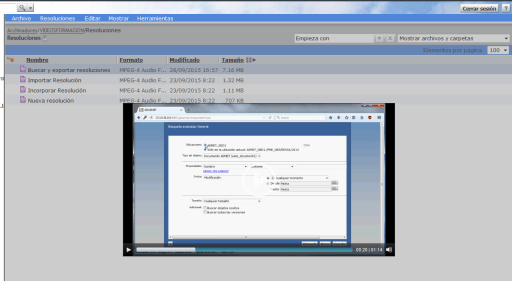
videoplayer.png

Note: Fullscreen is disabled due to frameset architechture that Webtop uses makes html5 full screen work like: Put browser in full screen mode, play video in full frame (instead of full screen).

url-addressable-components & virtuallinkconnect

In recent Webtop versions EMC introduced a new secutiry feature that forbid components to be invoked through an URL:

The following configuration has been added to enable or disable components that are invoked through a URL.

<url-addressable-components>

<enabled>false</enabled>

</url-addressable-components>

Set <enabled> to true to invoke all the components through the URL.

Specific components can also be configuredforURLaddressability. This can be done by adding the <url-addressable-enabled/> tag in the corresponding component configuration file.

For example, add the following configuration file, <Web-app-root>\wdk\config\errormessage_component.xml, where <url-addressable-enabled/> enables URL addressability.

Note: EMC recommends that administrators add <url-addressable-enabled/> in the specific URL addressable-component instead of choosing to set <enabled> to true.

So when I’m getting a “401: The URL is unauthorized in WDK” when trying to use a virtual link I check app.xml:

<url-addressable-components>
<enabled>false</enabled>
</url-addressable-components>

Ok, default configuration is set, so components without <url-addressable-enabled/> cannot be invoked through an URL. Let’s check virtuallinkconnect component default configuration:

<!–XSRF component whitelisting change–>
<url-addressable-enabled/>

Ok, so if the component is whitelisted by default, why it is being blocked? Well, what does any component do when you invoke it through an URL? Yes, it redirects to the login component, which ,of course, it’s not whitelisted by default.

So by adding <url-addressable-enabled/> to the login definition, the virtuallinkconnect component will work with the component blocking enabled.

What happens when you don’t configure OOTB Jobs (DCTM/xCP)

Environment: DCTM 7.2 + PE 2.2, 2 months running an empty test repository:

  • …/dba/logs/…/agentexec: +150k files
  • …/dba/logs/…/dmadmin: +150k files
  • /Temp/Jobs/…/: +60k objects in several folders (dm_document objects)
  • /System/Sysadmin/Reports/…: +60k versions of some objects (dm_document objects)
  • dm_audittrail: +1.5 million objects
  • Database File Size: ~ 5GB

Be specially careful with the methods that by default run every minute:

  • bpm_XCPAutoTaskMgmt
  • Iniatilizae_WQ

And those that run every hour:

  • QmPriorityAging
  • QmThresholdNotification
  • WfmsTimer
  • WFSuspendTimer

If you’re not using those features you should really disable them. Or run logpurge+audittrail+dmclean as often as possible.

End of Life Announcement for Documentum WebPublisher

From EMC newsletter:

Users of the Documentum WebPublisher product line are advised that End of Life has been initiated for this product.

EMC has partnered with Hippo to offer best of breed WCM that integrates and synchronizes content with Documentum. Hippo CMS, which is EMC Select Partner offering, offers modern, next-generation Web Experience Management capabilities.

Important dates related to the Documentum WebPublisher v 6.5 SP 6 and v 6.5 SP 7 are:

  • End of Primary Support is October 31, 2015
  • End of Extended Support / End of Service Life is April 30, 2018

Chrome dropping NPAPI (Java) support and UCF

Since Chrome 42 was released, NPAPI plugins are disabled by default and the support for these plugins will be completely removed in Chrome 45 (expected to be released in September). This means no more UCF in Chrome. So, what will EMC do?

Considering that in the latest Webtop release (6.8) only 3 browsers are supported (IE 10/11, Firefox 24.6 and Safari 6.1.4/7.0.4) most likely nothing. Besides, this move from Google can “help” EMC to keep pushing D2/xCP to customers and reinforce the “Webtop won’t be developed anymore” message. But, what does this move means for current users?

I think sooner or later Java will be removed from every browser. Spartan/Edge won’t even support Microsoft’s own ActiveX, and considering I don’t see Oracle developing a new plugin based on PPAPI (which by the way is not a standard protocol and it’s only supported by Chrome and Opera), so it wouldn’t surprise me to see Mozilla announcing they’re dropping support for NPAPI in future releases.

This means that by the end of this year, there will be most likely 6 browsers (Chrome, IE, Spartan/Edge, Firefox, Opera, Safari) and EMC will provide support only for 3 of them (2 being “obsolete”, IE and Firefox 24.x). And even though we know that (until now) even without being officialy supported webtop (mostly) works with any browser, this won’t be the case much longer (as long as you need to transfer content).

In the end, we’ll have to deal with angry users that like Chrome because it’s cool and because they don’t want to use the corporative IE6/7/8 (not supported also) or the company-branded browser they’ve come to hate through the years.

Until know, my “usual” hack for matching IE/Firefox performance with Chrome’s was mainly disabling the ucfinvoker in the main component and any plugin not used in app.xml. This makes webtop to load the ucf libraries only when needed instead of doing it every time the user login so it seems that the main component loads faster (yes, I’m cheating :D). And I’m also considering disabling UCF transfer for view action and leaving UCF enabled only for edition, so read-only users won’t be disturbed with error messages/warnings when using Webtop.

However, there’s still the problem of dealing with the users that cannot use their preferred browser to do their job and convincing them that is not Documentum’s fault…

Edit: Even better solution (removing UCF in chrome)

Extend the evaluator class defined in the action (LaunchViewEvaluator, LaunchEditEvaluator, ContentTransferLaunchComponentEvaluator, etc.) with:

    public class ContentTransferLaunchComponentEvaluator extends com.documentum.web.contentxfer.ContentTransferLaunchComponentEvaluator {
        public String evaluate(String strName, String strAction, IConfigElement config, ArgumentList arg, Context context, Component component){
            HttpServletRequest request = (HttpServletRequest)component.getPageContext().getRequest();
            String userAgent = request.getHeader("User-Agent");  

            if (userAgent!=null && userAgent.length()>0 && userAgent.indexOf("Chrome")>=0) {
                    return "http";
            }
            return super.evaluate(strName, strAction, config, arg, context, component);
        }
    }

Edit v2: The best solution:

1. Check PanfilovAB post about Component Qualifiers and check the request listener class: Component qualifier

2. Create the following class:

    public class CustomContentTransferConfig extends com.documentum.web.contentxfer.ContentTransferConfig {
        @Override
        public String getContentTransferMechanism(){
            String userAgent=ComponentRequestListener.getBrowserUserAgent();  

            if (userAgent!=null && userAgent.length()>0 && userAgent.indexOf("Chrome")>=0) {
                return "http";
            }
            return super.getContentTransferMechanism();
        }
    }

3. Modify webtop\WEB-INF\classes\com\documentum\web\contentxfer\ContentTransferConfig.properties with:

configReaderClass=CustomContentTransferConfig

Done!

Customizing/Extending REST services (II)

This is an improved version of the “hack” posted in the previous post (Customizing/Extending REST services)

  • Decompile com.emc.documentum.rest.controller.QueryController
  • Look for method executeQuery and modify the following line as you wish:

Preconditions.checkArgument(DQLChecker.isSafeQuery(dql), MessageBundle.INSTANCE.get(“E_UNSAFE_QUERY_DQL”, new Object[] { dql }));

You can use something like:

Preconditions.checkArgument(true, MessageBundle.INSTANCE.get(“E_UNSAFE_QUERY_DQL”, new Object[] { dql }));

if you want everyone to be able to run write queries or you can allow these queries to be executed only by some user(s) with something like:

if (RepositoryContextHolder.getLoginName().equalsIgnoreCase(“dmadmin”)){
//skip DQLChecker check for select statements
}

  • Finally place the new class in dctm-rest/WEB-INF/classes/com/emc/documentum/rest/controller.

Migrating from Documentum 6.6 to 7.2

I’m currently finishing a migration from documentum 6.6 to 7.2, Webtop 6.8 and xCP 1.6 (mixed mode installation as ECD calls it), these are some of my thoughts/tips/warnings on the migration process

  • There’s this legend about my ability to come across bugs in every product/project I’m involved. I’m glad to say that this migration hasn’t been an exception, thanks JBOSS.
  • I wonder if EMC will ever sort the downloads/subscribenet out. They keep trying to hide the new stuff but (luckily) we keep find it. With every Documentum release we get a new way to sort the stack. I think it’s currently easier to find non supported versions (cs 5.3) than some products from recent versions…
  • I hate w2k8 action centre and I always forget to edit files with a program ran as administrator, so I’m always getting the “the file cannot be saved” message. Running some preoducts without administrator privileges shows some funny error messages, such as Process Builder 6.7 SP2 failing because “Process Builder 6.6 can’t work with versions newer than 6.5”
  • I hate w2k8 and ipv6. The ACS log will go crazy complaining about ipv6 related errors unless you completely disable ipv6 in windows registry.
  • Do we really need a JBOSS in order to run ServerApps and acs? If we’ve already ditched DFS from the JMS (see my previous post about DFS 7.2) and considering that besides those who are in a distributed environment, everyone I know first thing they do right after finishing the installation is to disable the acs/bocs stuff to avoid content transfer problems, why can’t we go back to Tomcat? Soon JMS will have higher requierments than CS
  • I hate having to “patch” dmldap.jar with every new version or patch. Please EMC add more LDAP support (ie: openLDAP) OOTB (I’m sure most of the community can provide you the code :D)
  • Presets still don’t work if you name them with blanks (ie: “preset one”) with no warning/error whatsoever. My bad for not remembering how long it took us to realise this the first time we used them.
  • Why doesn’t EMC attach a list of modified WDK components (options added to configuration files, modified jsps) since the last release to the release notes? Instead we have to check component by component what/if something has changed
  • Webtop 6.8 feels slower to me. Not measured (yet), just have the feeling that I spend more time watching a white browser tab while something loads. It could be due to the new development environment not having enough resources to run smoothly though. We’ll see what happens when we move to the production servers.
  • Most stuff from the 7.2 stack works just fine with Java 8, except (that I now of) JMS (not big problem as it uses internal jre7) and Rest Services (There’s some problem with a spring library not working at all with Java 8)
  • Everytime I use a dump, I forgot something that it gets moved to the new Repo when it shouldn’t. I have to check more carefully the dump conditions
  • Installing Documentum 7.2 with xCP 1.x mixed mode is an adventure due to the lack of information (What you can find in 7.2 release notes/requirements/supported versions is about 7.1/xCP2.1). I’ve just installed PE from xCP 2.2 and pb/fb from 6.7SP2 and it seems to be working. For now.

DCTM 7.2/CTS 7.2 Unhandled DM_INFINITE_LOOP_EXCEPTION

Q/A with boss:

Q: I need to know if customer X can install CTS 7.2 with their purchased licenses or if I should install CTS 6.7SP2

A: I’ll ask EMC sales rep.

(Later) They told me you should open a SR as CTS has changed in 7.2 and they’re not sure

Q: Opening a SR for this? Ok…

Q/A with EMC Support:

Q: I need to know if customer X, that has purchased the following licenses can install CTS 7.2 or should stick to 6.7SP2

A: CTS doesn’t use Adlib anymore, if that is the licenses you’re referring to. For more info you can contact EMC licensing.


Q/A with EMC licensing:

Q: I need to know if customer X, that has purchased the following licenses can install CTS 7.2 or should stick to 6.7SP2

A: You should contact your sales rep about this matter

I’m going to save these emails for the next support survey…

Messing around with type hierarchy/definition

Warning: if you really need/want to do this, do it at your own risk, as this guide comes with no support (and be sure to have a backup just in case)

Use case:

You want to modify type hierarchy (ie: type A -> subtype B -> subtype C to type A -> subtype C) or want to change attribute name/type while keeping metadata AND there is a limited number of affected objects (I don’t think you want to try this with millions of objects)

  1. Create a new project in Composer
  2. Import every affected object as sysobject
  3. Delete unwanted type (subtype b) from type artifacts
  4. Modify subtype C supertype to type A
  5. Add necessary attributes to your subtype (those required that were inherited from subtype B) or modify the name/type of whatever attribute you want to modify
  6. Open sysobject artifacts with text editor, modify <typeExtension> node with the required <attributes> elements (remove unused, add new ones, edit modified definitions). You probably want to develop some program that automatically does everything for you. JDK has anything you need without additional libraries.
  7. Delete every object instance of types b and c from repository.
  8. Drop types b and c
  9. Install DAR.

DFS 7.2 (7.x?) vs JBoss 7.1.1 (plus some other tips)

I’m currently involved in a 6.6 -> 7.2 migration, consider the following tips if you are in a similar situation:

  • JBoss 7.1.1 won’t work with JRE/JDK8, stick to 1.7. It seems it doesn’t work with a 64bit JVM either.
  • DFS 7.2 won’t work out of the box in JBoss (not sure about other app servers): You’ll get a crypto error no matter what. Check SR #000185942 for a similar error with xCP 2.1 and apply the same fix (or do what I did: use the JARs from DA 7.2). Be sure to actually test the services with soapui/xmlspy/custom test class because even though wsdl are accesible the services won’t work.

For your custom DFS services:

  • Stick with JRE6/7 as JRE8 won’t work with the build files provided by the SDK.
  • If you have slightly complex services, they won’t compile due to bugs in the bundled JAXB jar version. Download JAXB version 2.2.6 (at least), remove the META-INF/maven folder from the jars and replace the jaxb jars included in the SDK.
  • I had to use additional libraries not included with the DFS SDK to generate the custom service ear: jaxp-api.jar, jaxp-ri.jar, jax-qname.jar and relaxngDatatype.jar.

After this changes, now I can run the OOTB DFS and the custom services, so now I just have to test everything (still) works…