Webtop Recycle Bin using Aspects

When you talk with a customer for the first time, there’s always the issue with deleting documents. Do we allow delete? If so, who can delete? and then, what happens if a document is deleted by accident?

1. Restore a previous backup: You’re limited to the last backup (DB+Filestore), so you’ll lost everything done from that moment on. Recovery of individual documents is painful.

PROS: Should be the “default” as every organization is supposed to have backups of their systems.

CONS: Incomplete recovery (only until the last backup was done)

2. Use some backup/recovery tool such as CYA SmartRecovery: I’ve used this on the past. I wouldn’t use it again unless the recovery of individual documents is an essential business requirement.

PROS: You can restore “easily” individual documents. In case of full disaster you can restore the last backup and then use SmartRecovery to restore the newer documents.

CONS: Initial backup can take forever depending on the size of the repository. You’ll duplicate the required space for backups/Filestore

3. Develop some kind of customization:

PROS: Avoid license/Filestore costs. Enjoy developing for a while

CONS: Mostly client dependant, something will probably break when migrating to a newer version

I’ve usually seen the 3rd option implemented by overriding the destroy/destroyAllVersions/doDestroy methods or the delete action in Webtop to do anything else (or doing nothing at all). D2 implements this functionality out-of-the-box, so I though Aspects where a nice tool to implement this in a WDK-client, so here’s a little step by step guide:

1. Define the aspect type and the aspect attributes: In this case I’ve use “trash_aspect” for the aspect name and defined an “path” attribute to store the source folder of the document.

2. Implement the aspect:

ITrashAspect.java:

package es.test.trashaspect;  
  
import com.documentum.fc.common.DfException;  
  
public interface ITrashAspect {  
    public String getTrashPathName() throws DfException;  
    public void setTrashPathName(String path) throws DfException;  
}  

TrashAspect.java:

package es.test.trashaspect;  
  
import com.documentum.fc.client.DfDocument;  
import com.documentum.fc.common.DfException;  
  
public class TrashAspect extends DfDocument implements ITrashAspect {  
  
    private static final String ASPECT_PATH_NAME = "trash_aspect.pathname";  
    
    public String getTrashPathName() throws DfException {  
        return this.getString(ASPECT_PATH_NAME);  
    }  
  
    public void setTrashPathName(String path) throws DfException {  
        this.setString(ASPECT_PATH_NAME path);        
    }    
}  

3. Package the classes into jar files, and create the jar definitions in Composer. Create the trash_aspect module and configure the aspect module to use the trash_aspect type.

4. Modify your custom base type TBO with:

    public boolean checkTrashAspect(){  
        boolean isTrash=false;  
        
        try {  
            IDfList aspectList = getAspects();  
            
            for (int i=0; i < aspectList.getCount() && !isTrash; i++) {  
                if (((String) aspectList.get(i)).equalsIgnoreCase("trash_aspect")) {  
                    isTrash=true;  
                }  
            }  
            
            if (!isTrash){  
                String folderPath="";  
                String folderIdPath="";  
                IDfId processingFolderId=getFolderId(0);  
                while (!folderIdPath.startsWith("/0c")){  
                    IDfFolder folder=(IDfFolder)getSession().getObject(processingFolderId);  
                    folderPath="/"+folder.getObjectName()+folderPath;  
                    processingFolderId=folder.getFolderId(0);  
                }  
                
                CallBackTrashAspect callback=new CallBackTrashAspect();  
                callback.setFolderPath(folderPath);  
                
                attachAspect("trash_aspect",callback);  
                
                unlink(folderPath);  
                link("/TRASH");  
                
                save();  
            }  
        } catch (DfException e) {  
            e.printStackTrace();  
        }  
        
        
        return isTrash;  
    }  
    @Override  
    public void destroy() throws DfException {  
        if (checkTrashAspect()){  
            super.destroy();  
        }  
    }  
    
    @Override  
    public void destroyAllVersions() throws DfException {  
        if (checkTrashAspect()){  
            super.destroyAllVersions();  
        }  
    }  
    
    @Override  
    protected void doDestroy(boolean arg0, Object[] arg1) throws DfException {  
        if (checkTrashAspect()){  
            super.doDestroy(arg0, arg1);  
        }  
    } 

CallBackTrashAspect.java:

    import com.documentum.fc.client.IDfPersistentObject;  
    import com.documentum.fc.client.aspect.IDfAttachAspectCallback;  
    import com.documentum.fc.common.DfException;  
      
    import es.test.trashaspect.ITrashAspect;  
      
    public class CallBackTrashAspect implements IDfAttachAspectCallback {  
      
        private String folderPath="";  
        
        public String getFolderPath() {  
            return folderPath;  
        }  
      
        public void setFolderPath(String folderPath) {  
            this.folderPath = folderPath;  
        }  
      
        public void doPostAttach(IDfPersistentObject currentObj) throws Exception {  
            ((ITrashAspect)currentObj).setTrashPathName(folderPath);  
            currentObj.save();  
        }  
    }  

5. The restore functionality, using a Webtop action:

    package es.test.trashaspect;  
      
    import java.util.Map;  
      
    import com.documentum.fc.client.IDfDocument;  
    import com.documentum.fc.client.aspect.IDfAspects;  
    import com.documentum.fc.common.DfException;  
    import com.documentum.fc.common.DfId;  
    import com.documentum.fc.common.IDfList;  
    import com.documentum.web.common.ArgumentList;  
    import com.documentum.web.formext.action.IActionExecution;  
    import com.documentum.web.formext.component.Component;  
    import com.documentum.web.formext.config.Context;  
    import com.documentum.web.formext.config.IConfigElement;  
      
    public class RestoreAction implements IActionExecution{  
      
        @Override  
        public boolean execute(String arg0, IConfigElement arg1, ArgumentList arg2, Context arg3, Component arg4, Map arg5) {        
            try {  
                IDfDocument restoreObj=(IDfDocument)arg4.getDfSession().getObject(new DfId(arg2.get("objectId")));  
                IDfList aspectList = ((IDfAspects) restoreObj).getAspects();  
                
                boolean isTrash=false;  
                
                for (int i=0; i < aspectList.getCount() && !isTrash; i++) {  
                    if (((String) aspectList.get(i)).equalsIgnoreCase("trash_aspect")) {  
                        isTrash=true;  
                    }  
                }  
                
                if (isTrash){  
                    String sourceFolder=((ITrashAspect)restoreObj).getTrashPathName();  
                    restoreObj.unlink("/TRASH");  
                    restoreObj.link(sourceFolder);  
                    
                    ((IDfAspects) restoreObj).detachAspect("trash_aspect", null);  
                    restoreObj.save();  
                }  
                
            } catch (DfException e) {  
                e.printStackTrace();  
            }  
            
            return false;  
        }  
      
        @Override  
        public String[] getRequiredParams() {  
            return null;  
        }  
    }  
Documentum Email Notification improvements

Following PanfilovAB‘s post regarding Documentum email notification system and his customization (read it here: blog.documentum.pro/2014/08/04/e-mail-notifications) I decided to improve my own mail customization by adding the Groovy library in order to get advantage of the customization possibilities.

So, what does Documentum provide by default? Let’s see: Depending on the value stored in the mail_method attribute found in dm_server_config, CS will use:

  • dm_event_sender: Notifications will use dm_event_sender method. This method uses dmbasic to run $DM_HOME/bin/dm_event_sender.ebs. This EBS defines a plain-text email template for each of the possible events generated by the CS and sends the email by running the binary mail.exe bundled with the CS.
  • dm_html_event_sender: Same behaviour than dm_event_sender, but the email templates are HTML templates. In order to use it, dm_event_sender must be modified to use the $DM_HOME/bin/dm_html_event_sender.ebs script.
  • [BPM] dm_template_event_sender: When BPM is intalled in the CS, a new servlet (DO_METHOD) is deployed in JMS. mail_method attribute is updated with this placeholder to use the servlet instead of running a method. When an event generates a notification, a POST is send to the do_method servlet and the notification is processed. If the event is a workflow event, the servlet will process it applying (if has been previously defined) a JSP template and sending the email with Java Mail. Otherwise it will forward the notificacion to the dm_event_sender method.
  • mail method: There’s also a method that allows a “direct call” to mail.exe, as long as you provide the necessary parameters.

So, what main problems/limitations do we have?

  • If you have BPM installed, you have 3 different entry points to a new mail:
    • event_sender
    • html_event_sender
    • JSP templates

So if you update one template, you have to update every file to keep consistency

  • When migrating CS, you have to be careful not to overwrite/remove your customized EBS. And if “something” has changed you’ll have to recheck your existing templates. Meaning you’ll have to enjoy the “power” of dmbasic and its great debugging capabilities (yes, that means writing to an output file)

So, when I read Andrey’s solution using Groovy I realized that if you have to modify your email templates “often”, that’s the way to go. So, what do we need?:

Documentum container with two components and a custom method:

  • List templates
  • Edit template
  • Custom mail method

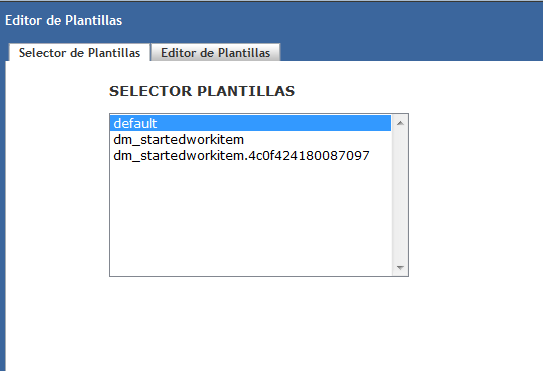
List template will be a listbox showing the documents returned by a query that fetches our custom templates located in a special folder:

Untitled.png

For ease of use, the name of the document indicates the event that uses the template and, if applicable, the r_object_id of the activity that uses the template, allowing further customization.

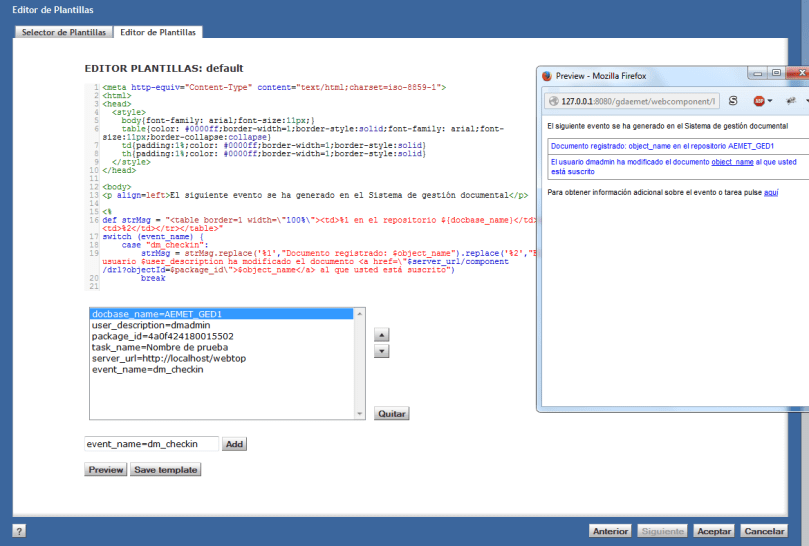
Edit template will be a component that loads the content of the selected template into an editor (codemirror, check Andrey’s updated post to see a “nice” implementation as WDK control), a sortablelistbox that will allow the user to put temporal values to be replaced in the template for preview, and the preview button that will generate the final email applying the submitted values to the template. This component has a <inputvars> element in its definition that defines default values to be already filled (docbase_name, user_description, server_url, etc).

Untitled2.png

Now, I only need to improve my mail designing skills

Finally, a custom Java method that will replace dm_template_event_sender and that will run a java class that generates the email body and sends the email.

What do we get with this customization?

  1. Get rid of dmbasic email notificacions
  2. Unify email notifications (it will only use the defined templates)
  3. Simplify email management (my “default” template now has 200 lines, while my “default” dm_event_sender has 1400)
  4. Easier upgrade process


sortablelistbox bug

I think this is not a very used control, otherwise I guess someone would’ve realized by now that if you do something like:

<dmf:sortablelistbox name="parametersList" id="parametersList" width="400" size="10" multiselect="false"/>

which, according to the WDK guide is correct:

 width (Optional) Width of this control

and then load the page:

org.apache.jasper.JasperException: /custom/jsp/editor/editor.jsp(46,5) No se puede encontrar el método de escritura para el atributo: width

which in english means: Cannot find write method for the attribute width

So, what’s going on? First, we check the control definition in the TLD:

           <attribute>  
             <name>width</name>  
             <required>false</required>  
             <rtexprvalue>true</rtexprvalue>  
             <description>  
                TBD.  
             </description>  
          </attribute>  

Ok, so if the attribute is defined, why doesn’t work?

    com.documentum.web.form.control.sortablelistbox.SortableListBox  
      
      public void setListBoxWidth(String strWidth)  
      {  
        this.m_strWidth = strWidth;  
        getItemsListBoxControl().setWidth(strWidth);  
      }  
      
      public String getListBoxWidth()  
      {  
        return this.m_strWidth;  
      }  

really?

So, you know, either add “listboxwidth” as an attribute in the TLD or recompile the SortableListBox class adding getWidth/setWidth methods.

I’ve checked this happens (at least) on webtop 6.6, 6.7SP2 and 6.7SP2 patch 17.

UCF troubleshooting v2

Here is an updated version from previous post (UCF troubleshooting) with some more/new tips:

UCF installation paths:

  • Windows XP: C:\Document and Settings\[user]\Documentum
  • Windows Vista/7/8: C:\Users\[user]\Documentum
  • Linux: ${home}/Documentum

Timeout/browser/jre problems:

  • Check the supported environment tables in webtop/da release notes. Most JRE versions will work even when aren’t supported, but you’d better check if the supported version works.
  • If not needed, disable ACS and BOCS.
  • If using a proxy, add host’s IP and hostname to the proxy exceptions
  • Add Webtop url to the browser’s pop-up blocker exceptions.
  • In case the UCF aplet cannot be installed, try disabling DEP protection
  • Delete the local UCF installation and try a clean installation
  • [Firefox] Check Java plugin is enabled. Mozilla automatically disables outdated JRE plugins.
  • [IE] Check Sun/Oracle JRE is the default JRE, disable ActiveX filtering, and check Java plugins are enabled in the Manage Addons window.
  • [IE/Firefox] If you are working with a 64 bit SO, check you’re using a 32bit browser with 32bit JRE. 64 bit browser/JRE with UCF is probably a bad idea.
  • [IE] Check Java integration with browsers is enabled.
  • [Java control panel] Delete JRE cache
  • [Java control panel] Disable the next generation Java plug-in.
  • [Java control panel] Disable verification of mixed code security.
  • [Java control panel] Check “Direct Connection” is selected in Network Settings (vishnu.music)
  • [UCF configuration] If UCF keeps throwing a timeout, disable the IPv6 compatibility by changing the following line in ucf.installs.config.xml (located in ${Documentum_UCF}/ucf/config)

<option value=”-Djava.net.preferIPv6Addresses=true“/> to <option value=”-Djava.net.preferIPv6Addresses=false“/>

JRE 7u51+ workaround:

In Java control panel check that:

  • Security is set to medium
  • Your application server url is listed under the exception site list

You should also check the thread The specified discussion was not found. by PanfilovAB if you’re having issues with multiple Java versions

Manual installation:

  • You can install the UCF applet in the client computer manually, just run the folowing bat script:
set DIRNAME=%~dp0%lib\
set URLDIR=%DIRNAME:\=/%
java -cp %DIRNAME%ucfinit.jar com.documentum.ucf.client.install.TestInstall "file:///%URLDIR%" "ucf.installer.config.xml"

This is the structure/files you need for this script to work (you can find these files in /wdk/contentXfer/):

UCFTestInstall.bat
\lib
\lib\ExJNIAPI.dll
\lib\ExJNIAPIGateway.jar
\lib\jacob.dll
\lib\jacob.jar
\lib\ucf-ca-office-auto.jar
\lib\ucf-client-installer.zip
\lib\ucf.installer.config.xml
\lib\ucfinit.jar
\lib\UCFWin32JNI.dl

And don’t forget to check UCF logs if you’re still having problems

Adding non-supported LDAP to DA

When you have to connect Documentum with a non-supported LDAP, you usually forget about the configuration UI provided by DA as you have to do most of the work by IAPI/DQL.

However, if you want to add your LDAP to the list of supported servers, you can do so quite easily:

1. Create the necessary DirectoryType class with your custom ldap type (openldap in this case):

public enum DirectoryType{
  OPENLDAP("openldap"), SUN_ONE("netscape"), ACTIVE_DIRECTORY("microsoft"),
  ORACLE_INTERNET_DIRECTORY("oracle"), IBM_TIVOLI("ibm"), NOVELL("novell"),
  MICROSOFT_ADAM("microsoftadam");
//some other stuff you can check in com.documentum.ldap.DirectoryType from the dfLdapConfig.jar
}

2. ldapList component:

ldaplist_component.xml:

<pages>  
     <start>/custom/jsp/customldap/ldaplist.jsp</start>  
</pages>  
<nlsbundle>somepackage.LdapListNlsProp</nlsbundle>  

ldaplist.jsp:

<%@ taglib uri="/WEB-INF/tlds/customldap.tld" prefix="customldap" %>"  
...  
<customldap:customldapdirtypevalueformatter>  
<dmf:label datafield='<%=LdapList.DIR_TYPE_ATTR%>'/>  
</customldap:customldapdirtypevalueformatter>

customldap.tld:

<taglib>  
     <tlibversion>1.0</tlibversion>  
     <jspversion>1.1</jspversion>  
     <shortname>customldap</shortname>  
     <tag>  
          <name>customldapdirtypevalueformatter</name>  
          <tagclass>somepackage.CustomLdapDirTypeValueFormatterTag</tagclass>  
          <bodycontent>jsp</bodycontent>  
          <attribute>  
               <name>name</name>  
               <required>false</required>  
          </attribute>  
     </tag>  
</taglib>

Formatter:

public String format(String strValue){  
     String strDirType = getForm().getString("MSG_UNKNOWN_DIR_TYPE");  
     if ((strValue != null) && (strValue.length() != 0)) {  
          if (strValue.equals("netscape")) {strDirType = getForm().getString("MSG_NETSCAPE");  
          } else if (strValue.equals("microsoft")) {strDirType = getForm().getString("MSG_MICROSOFT");  
          } else if (strValue.equals("oracle")) {strDirType = getForm().getString("MSG_ORACLE");  
          } else if (strValue.equals("microsoftadam")) {strDirType = getForm().getString("MSG_MICROSOFT_ADAM");  
          } else if (strValue.equals("ibm")) {strDirType = getForm().getString("MSG_IBM");  
          } else if (strValue.equals("novell")) {strDirType = getForm().getString("MSG_NOVELL");  
          } else if (strValue.equals("openldap")){strDirType = getForm().getString("MSG_OPENLDAP");  
        }  
     }  
return strDirType;  
}  

3. ldapInfo component

ldapInfo_component.xml:

    <pages>  
         <start>/custom/jsp/customldap/ldapinfo.jsp</start>  
    </pages>      
    <nlsbundle>somepackage.LdapInfoNlsProp</nlsbundle>  

LdapInfo.class:

    public class LdapInfo extends com.documentum.webcomponent.admin.ldap.LdapInfo {  
        public static final String LDAP_DIR_VALUE_OPENLDAP = "openldap";  
    }  

ldapinfo.jsp:

<%@ page import="somepackage.LdapInfo" %>  
    ...  
<dmf:option value='<%=LdapInfo.LDAP_DIR_VALUE_OPENLDAP%>' nlsid='MSG_OPENLDAP'/>  

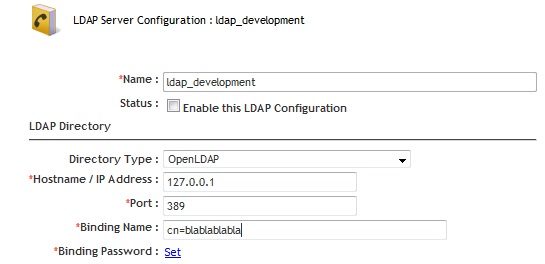
4. Final result:

ldap1

ldap2

Firefox 24 and future versions will block every Java object by default

As stated here: 914690 – In Firefox 24 and following, mark all versions of Java as unsafe every java version is going to be marked as unsafe by default, meaning you’ll have to manually enable/allow every time you use any java object (If you’re on Firefox beta channel you should realized by now that something was “wrong” when using webtop/ucf transfer with the latest versions: You have to manually allow actions like selecting a file to check-in or every UCF operation)

You probably know by now what this means to Webtop… oh God, when I though I couldn’t hate more UCF, now this… Am I the only one that *loves* having to deal with end-users/customers that take for granted that this Java-Browser compatibilities are a “Documentum problem”…

PS: go HTTP transfer mode!


UCF troubleshooting

Check the updated version of this post here: UCF troubleshooting v2

Don’t we all love troubleshooting UCF problems? Here’s a quick list of common solutions to usual problems:

UCF installation paths:

  • Windows XP: C:\Document and Settings\[user]\Documentum
  • Windows Vista/7/8: C:\Users\[user]\Documentum
  • Linux: ${home}/Documentum

Timeout/browser/jre problems:

  • Check the supported environment tables in webtop/da release notes. Most JRE versions will work even when aren’t supported, but you’d better check if the supported version works.
  • If not needed, disable ACS and BOCS.
  • If using a proxy, add host’s IP and hostname to the proxy exceptions
  • In case the UCF aplet cannot be installed, try disabling DEP protection
  • Delete the local UCF installation and try a clean installation
  • [Firefox] Check Java plugin is enabled. Mozilla automatically disables outdated JRE plugins.
  • [IE] Check Sun/Oracle JRE is the default JRE, disable ActiveX filtering, and check Java plugins are enabled in the Manage Addons window.
  • [IE/Firefox] If you are working with a 64 bit Operating System, check if you’re using a 32bit browser with 32bit JRE. 64 bit browser/JRE with UCF is probably a bad idea.
  • [IE] Check Java integration with browsers is enabled.
  • [Java control panel] Delete JRE caché
  • [Java control panel] Disable the next generation Java plug-in.
  • [Java control panel] Disable verification of mixed code security.
  • [UCF configuration] If UCF keeps throwing a timeout, disable the IPv6 compatibility by changing the following line in ucf.installs.config.xml (located in ${Documentum_UCF}/ucf/config)

true”/> tofalse”/>

Manual installation:

  • You can install the UCF applet in the client computer manually, just run the folowing bat script:
set DIRNAME=%~dp0%lib\
set URLDIR=%DIRNAME:\=/%
java -cp %DIRNAME%ucfinit.jar com.documentum.ucf.client.install.TestInstall "file:///%URLDIR%" "ucf.installer.config.xml"

This is the structure/files you need for this script to work (you can find these files in /wdk/contentXfer/):

UCFTestInstall.bat
\lib
\lib\ExJNIAPI.dll
\lib\ExJNIAPIGateway.jar
\lib\jacob.dll
\lib\jacob.jar
\lib\ucf-ca-office-auto.jar
\lib\ucf-client-installer.zip
\lib\ucf.installer.config.xml
\lib\ucfinit.jar
\lib\UCFWin32JNI.dl