What does this mean to Documentum? Well, if your Webtop/D2 is using applets (UCF), starting March, you’ll only be able to use it with IE11 and older versions, as no other major browser (actually, Firefox is the only “major” browser that still allows NPAPI plugins, but this is due to their slow pace of development) will allow NPAPI plugins (Java).
Category: Webtop
D2 (and Webtop and xCP) CTF
CTF (Content Transfer Framework) is how EMC Dell calls their “new UCF”. It works as a browser extension, and is the same extension you’ve used for the latest version of Webtop (new functionality getting first to Webtop? LOL). And this mode is not the default (why?) so you’ll need to change it in the settings.properties file of D2.
Also, this extension will generate some “index” files on the folder where you download files:
- .checkout.xml
- .d2_edit_storage.json
- .d2_view_storage.json
- .view.xml
That contain object names, ids, operation performed, and folder paths of the files transferred.
Tested on latest Firefox Nightly x64 and Chrome.
FYI, I’m pasting the “wonderful” ASCII compatibility matrix provided by Dell in the configuration file:
# +——————-+——+——+——+——+
# | Browser:OS \ Mode | Thin | Java | ctf | Note |
# +——————-+——+——+——+——+
# | IE 11 | yes | yes | yes | |
# +——————-+——+——+——+——+
# | Edge | yes | NO | NO | (1) |
# +——————-+——+——+——+——+
# | Firefox | yes | yes | yes | |
# +——————-+——+——+——+——+
# | Chrome | yes | NO | yes | (1) |
# +——————-+——+——+——+——+
# | Safari:Mac_OSX | yes | yes | yes | |
# +——————-+——+——+——+——+
# | Safari:Mac_IOS | yes | NO | NO | (2) |
# +——————-+——+——+——+——+
# Notes:
#
# (1) Chrome and Edge do not support java applets, and Edge does not support the CTF plugin.
# D2 will fallback to thin client mode appropriately when java or ctf has been
# specified in the value of the browser.plugin.mode setting as described above.
#
# (2) If browser.plugin.mode contains java or ctf, then D2 will silently continue to run in
# thin client mode. Safari running on Mac_IOS does not support the java or ctf plugin.
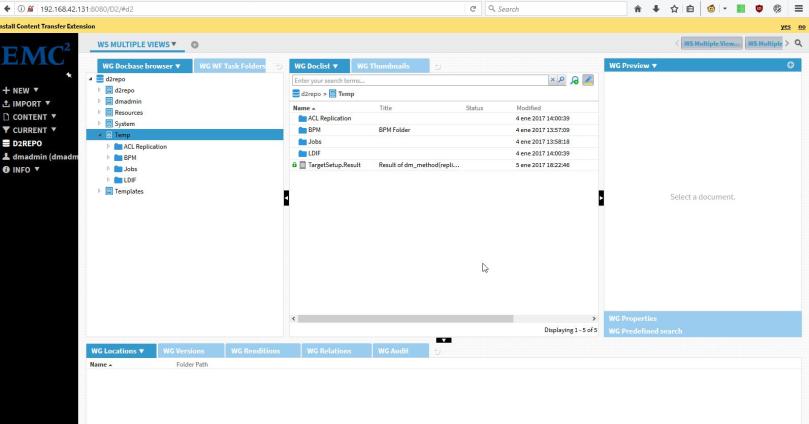
- Prompt for installing the extension:
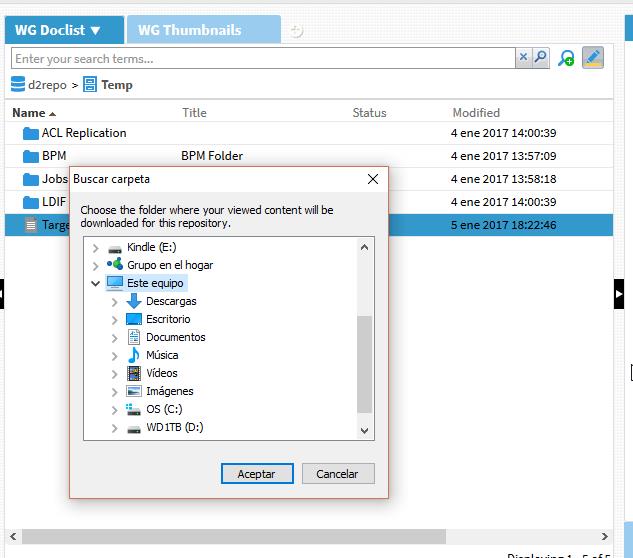
- View content prompt:
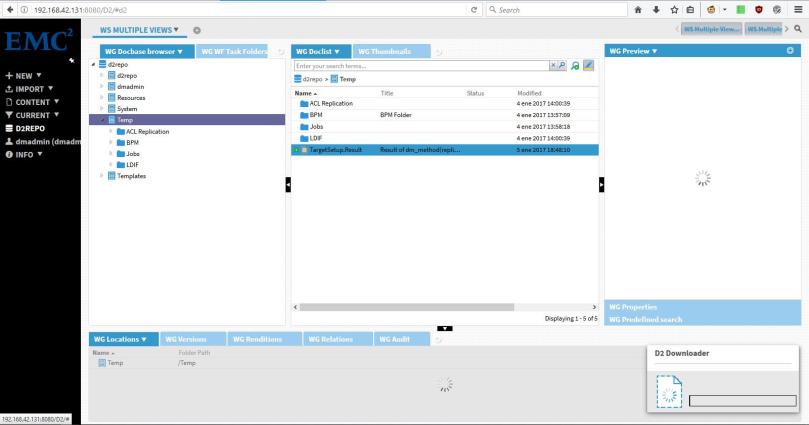
- Edit:
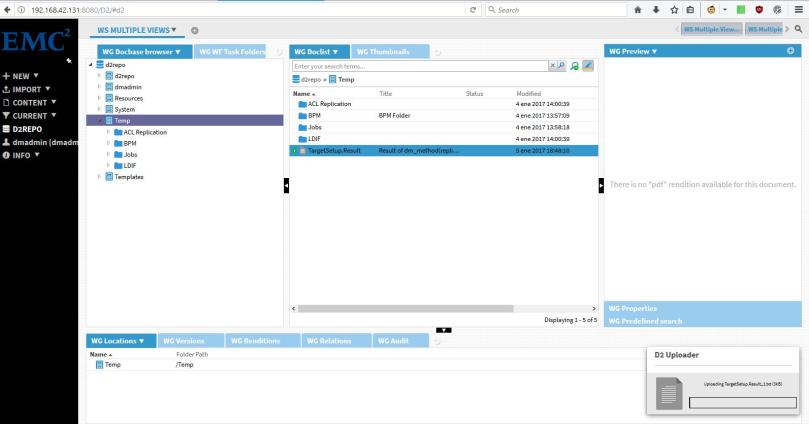
- Check in:
What I expect for Documentum from ECD/OpenText
What I think OpenText should keep:
- Support Community
- ContentHub
- EMC Support (at least the search engine with the knowledge base)
- Download Center (After so many changes, I really don’t want to change again :P)
- EMC GitHub
- Webtop (It’s the only client that works OOTB)
What I think OpenText should change:
- Sales policy (Stop pushing products that customers don’t need, and yes, that means D2 and xCP for customers that simply want a “library”)
- Sort libraries/dependencies in the Documentum stack (if 7.x is released, make it that every product has the same version of every library). Rebrand products accordingly (yeah, Webtop 7.x if it is using DFC 7.x)
- Detailed changelog of the products (don’t force us to go through every single customization to check if some component we’re extending has changed and broke the customizations)
- Kill lockbox with fire (or at least, make it optional for both CS and D2). Nobody understands it, nobody knows how to set it up, so it is more a pain in the ass than a security feature
- Oh, and remove D2 dependency on JMS
I’ve lost any hope to see dmbasic gone for good, or JBOSS replaced with something “lighter”, that’s why those didn’t make it into the list (as probably many others, that I don’t remember now)
(And yes, I’m not a huge fan of D2 :P)
WebTop’s new content transfer mechanism
Yesterday I saw Webtop 6.8.2 was released, and as this was great news because this version was supposed to remove Java applets once and for all. While most of us though that removing applets would imply moving to HTML5, EMC has decided to implement an intermediate solution 😦
Webtop 6.8.2 will prompt users to install a browser extension first time you log in:

In Firefox the extension will be installed, and in Chrome user will be redirected to the Chrome Web Store:
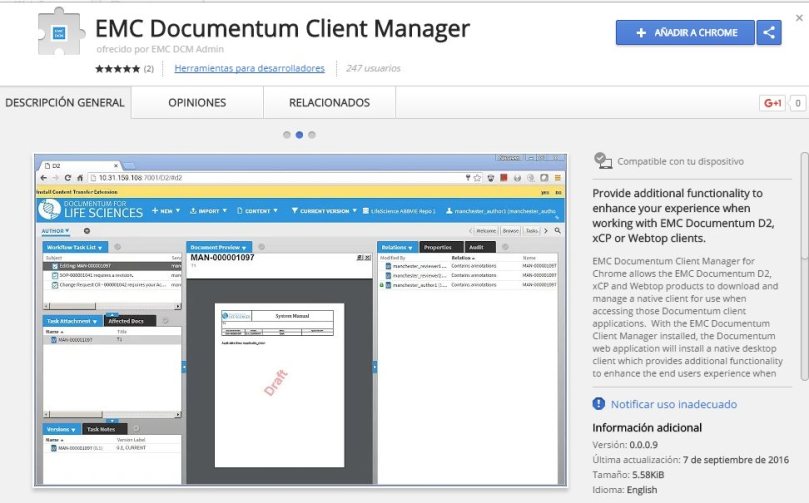
After installing the extension, the first time users try to download something they’ll be prompted to install a local application that will handle the transfers (WebSockets I presume).
Good news: Now you don’t need to fight with Java/browser combination
Bad news: Users have to perform operations. Not the cleanest solution (IMHO).
Bonus: Now importing files is really not-user friendly:
- File -> import
- Ugly Java window will pop-up over the import container asking for files to import
- Select files/folders, press ok and… nothing happens. You are kept in a blank container window with “Next” and “Finish” buttons and no indication whatsoever if the files are been/have been uploaded or what is going on.
Webtop 6.8.2 released
With the announcements of the Dell-EMC merge and OpenText buying Documentum, it looks like this slipped through. EMC/DellEMC ECD/OpenText released the WebTop with the new content transfer mechanism.
Release notes: https://support.emc.com/docu78653_Documentum-Webtop-6.8.2-Release-Notes.pdf
ESAPI vs character codification
Webtop Patch notes state that problems with esapi have been fixed:
WEBTOP-32460
Opening a document with accent in name using http mode with Webtop 6.8 using IE11 results in a security exception and the contents of the file are not displayed.
Well, if you check HttpTransportManager.class you can check the “fix” by yourself:
Prepatch:
    try{
       contentDisposition.append(SECURITY.validator().getValidHeader("HttpTransportManager", makeSafeHeaderValue(strCleanFileName), "Header Manipulation"));
    }catch (UnsupportedEncodingException e){
        throw new WrapperRuntimeException(e);
    }
Patch “fix”:
    try{
         ClientInfo localClientInfo = ClientInfoService.getInfo();
         if ((localClientInfo.isPlatform(ClientInfo.WIN)) && (localClientInfo.isBrowser(ClientInfo.MSIE))) {
            contentDisposition.append(makeSafeHeaderValue(str));
          } else {
            contentDisposition.append(SECURITY.validator().getValidHeader("HttpTransportManager", makeSafeHeaderValue(str), "Header Manipulation"));
          }
    }catch (UnsupportedEncodingException localUnsupportedEncodingException){
          throw new WrapperRuntimeException(localUnsupportedEncodingException);
    }
This is obviously a lazy way to “fix” it, as the problem is in the ESAPI library and skipping the security check is not really a way to fix it.
There are basically 3 problems with the character enconding in wdk:
- The way WDK handles characters: This is a minor problem, as even if WDK does weird things such as converting back and forth the charecters, it “works”
- ESAPI is not character encoding aware, this makes useless adding your “special” characters to the ESAPI.properties validators, as this would be read incorrectly by ESAPI (more info here: Virtuallinks vs character encoding vs ESAPI)
- Inconsistencies when WDK calls ESAPI security validators as it sends the string to validate in different encodings (escaped/non-escaped, UTF-8 “native”, UTF-8 “converted”, etc.).
So, in order to fix this problems we need to fix the ESAPI library to be aware of the character encoding:
1. Get ESAPI 2.1.0 sources (Downloads – owasp-esapi-java – OWASP Enterprise Security API (Java Edition) – Google Project Hosting)
2. Add the following entries to webtop/WEB-INF/ESAPI.properties:
Validator.InputEncoding=UTF-8 //App server encoding
Validator.OutputEncoding=ISO-8859-1 //Locale encoding
3. Modify Validator.HTTPHeaderValue, Validator.FileName and Validator.DirectoryName with your special characters:
Validator.HTTPHeaderValue=^[a-zA-Z0-9<strong>áéíóúÁÉÍÓÚñÑ</strong>()\\-=\\*\\.\\?;,+\\/:&_ ]*$
Validator.FileName=^[a-zA-Z0-9<strong>áéíóúÁÉÍÓÚñÑ</strong>!@#$%^&{}\\[\\]()_+\\-=,.~'` ]{1,255}$
Validator.DirectoryName=^[a-zA-Z0-9<strong>áéíóúÁÉÍÓÚñÑ</strong>:/\\\\!@#$%^&{}\\[\\]()_+\\-=,.~'` ]{1,255}$
4. Modify Validator.WDKHTTPURI adding a blank (because EMC assumes that nobody uses blanks when naming a folder):
Validator.WDKHTTPURI=^/([a-zA-Z0-9. \\-_]*/?)$
5. Add the following lines to org.owasp.esapi.reference.DefaultSecurityConfiguration
    private String inputEncoding = null;
    private String outputEncoding = null;

    public String getInputEncoding() {
        return getESAPIProperty(INPUT_ENCODING, "UTF-8"); //UTF-8 is the default value returned if Validator.InputEncoding is not found
    }

    public String getOutputEncoding() {
        return getESAPIProperty(OUTPUT_ENCODING, "ISO-8859-1"); //ISO-8859-1 is the default value returned if Validator.OutputEncoding is not found
    }

    private String getEncodedESAPIProperty(String key){
        try {
            if (inputEncoding!=null && outputEncoding!=null){
                return new String(((String)properties.get(key)).getBytes(outputEncoding), inputEncoding);
            }else{
                return (String)properties.get(key);
            }
        } catch (UnsupportedEncodingException e) {
            e.printStackTrace();
        }
        return key;
    }
6. Modify DefaultSecurityConfiguration(), getESAPIProperty(String key, String def) and getESAPIProperty(String key, boolean def) methods:
    public DefaultSecurityConfiguration() {
        // load security configuration
        try {
            loadConfiguration();
            this.setCipherXProperties();

            //deal with encoding
            inputEncoding=getInputEncoding();
            outputEncoding=getOutputEncoding();

        } catch( IOException e ) {
          logSpecial("Failed to load security configuration", e );
          throw new ConfigurationException("Failed to load security configuration", e);
        }
    }

    protected String getESAPIProperty( String key, String def ) {
        //String value = properties.getProperty(key);
        String value=getEncodedESAPIProperty(key);
        if ( value == null ) {
              logSpecial( "SecurityConfiguration for " + key + " not found in ESAPI.properties. Using default: " + def, null );
              return def;
        }
        return value;
    }

    protected boolean getESAPIProperty( String key, boolean def ) {
        //String property = properties.getProperty(key);
        String property=getEncodedESAPIProperty(key);
        if ( property == null ) {
              logSpecial( "SecurityConfiguration for " + key + " not found in ESAPI.properties. Using default: " + def, null );
              return def;
        }
        if ( property.equalsIgnoreCase("true") || property.equalsIgnoreCase("yes" ) ) {
            return true;
        }
        if ( property.equalsIgnoreCase("false") || property.equalsIgnoreCase( "no" ) ) {
            return false;
        }
        logSpecial( "SecurityConfiguration for " + key + " not either \"true\" or \"false\" in ESAPI.properties. Using default: " + def, null );
        return def;
    }
7. Now that you are modifying this class, you can comment the logSpecial calls from loadPropertiesFromStream,loadConfiguration and getResourceFile and skip the messages thrown by ESAPI when loading the libraries (Best Practices – Review before releasing)
8. Modify org.owasp.esapi.reference.validation.StringValidationRule:
private String checkWhitelist(String context, String input, String orig) throws ValidationException{
  // check whitelist patterns
  //deal with encoding
  DefaultSecurityConfiguration sec=(DefaultSecurityConfiguration)DefaultSecurityConfiguration.getInstance();

  Charset inputcharset = Charset.forName(sec.getInputEncoding());
  Charset outputcharset = Charset.forName(sec.getOutputEncoding());

  ByteBuffer inputBuffer=null;
  try {
      inputBuffer = ByteBuffer.wrap(URLDecoder.decode(input,sec.getOutputEncoding()).getBytes());
  } catch (UnsupportedEncodingException e) {
      e.printStackTrace();
  }

  CharBuffer data = inputcharset.decode(inputBuffer);

  ByteBuffer outputBuffer = outputcharset.encode(data);
  byte[] outputData = outputBuffer.array();
  input=new String(outputData);

    for (Pattern p : whitelistPatterns) {
        if ( !p.matcher(input).matches() ) {
            throw new ValidationException( context + ": Invalid input. Please conform to regex " + p.pattern() + ( maxLength == Integer.MAX_VALUE ? "" : " with a maximum length of " + maxLength ), "Invalid input: context=" + context + ", type(" + getTypeName() + ")=" + p.pattern() + ", input=" + input + (NullSafe.equals(orig,input) ? "" : ", orig=" + orig), context );
        }
    }

    return input;
}
9. Generate jar file or replace the classes in the bundled esapi.jar.
This changes will work for virtual links and http transfer, however you may need to modify additional methods/validators depending on your customizations or case uses, but you get the idea.
This “patch” works with webtop 6.8 latest patch in every browser I’ve tested (ie, firefox, chrome, opera).
Virtuallinks vs character encoding vs ESAPI
One has to wonder what is EMC thinking when they take some decisions: In Webtop 6.8 EMC introduced a “new” library in order to improve protection against XSS vulnerabilities. They decided to use OWASP’s ESAPI library, a project that hasn’t been updated in over 2 years (check ESAPI/esapi-java-legacy · GitHub and ESAPI/esapi-java · GitHub) and doesn’t show any sign of being currently developed (quite the contrary: Off-the-Wall Security)
Anyway, with the introduction of this library they have broken the virtuallinks component, at least for everyone that uses non ASCII characters. To sum up what has been discussed in Webtop 6.8 Download Servlet Escaped Umlaut Problem:
In a “standard” environment:
- Tomcat running with -Dfile.encoding=UTF-8
- Default ESAPI.properties
- Webtop version: 6.8 SP6
Any “weird” character (in spanish: áéíóúñ) will break the virtuallinks functionality in two cases:
1. The user is logged in webtop:
VirtualLink404Handler.getServletErrorRequestUri method has an url conversion
virtualLinkPath = URLDecoder.decode(virtualLinkPath, "UTF-8");
that has the following behaviour (in Chrome and Firefox, IE seems to work just fine):
BEFORE URLDecoder: /folder%20name/%C3%A1%C3%A9%C3%AD%C3%B3%C3%BA
AFTER URLDecoder: /folder name/áéíóú
BEFORE URLDecoder: /folder%20name/%C3%A1%C3%A9%C3%AD%C3%B3%C3%BA
AFTER URLDecoder: /folder name/áéíóú
BEFORE URLDecoder: /folder%20name/%E1%E9%ED%F3%FA
AFTER URLDecoder: /folder name/?????
that “????” string will return “?????” or a sequence of square icons or simply a blank depending of the character encoding. In order to fix it, you need to rewrite the class changing that method to something like:
    String vLink=URLDecoder.decode(virtualLinkPath, "UTF-8");
    if (vLink.indexOf("?")!=-1){//broken UTF-8 encoding
        virtualLinkPath = URLDecoder.decode(virtualLinkPath, "ISO-8859-1");
    }else{
        virtualLinkPath = URLDecoder.decode(virtualLinkPath, "UTF-8");
    }
This will make virtuallinks that have special characters to be correctly opened from any browser.
2. The user hasn’t logged in webtop:
Virtuallink component will redirect to the login component (check url-addressable-components & virtuallinkconnect first) and then you’ll get a popup saying
“There’s been an error. Contact with your administrator”
without any additional info or stacktrace in the logs.
What is happening is that ESAPI is forbidding the redirection to the login compoenent due to the presence of “unsafe” characters as you can see in a the following phantom exception:
HTTP header value: Header Manipulation: FormProcessor: Invalid input. Please conform to regex ^[a-zA-Z0-9()\-=\*\.\?;,+\/:&_ ]*$ with a maximum length of 1024
Obviously, your next step would be adding the special characters to the Validator.HTTPHeaderValue regular expression in ESAPI.properties:
Validator.HTTPHeaderValue=^[%a-zA-Z0-9áéíóúÁÉÍÓÚñÑ()\\-=\\*\\.\\?;,+\\/:&_ ]*$
Restart the server, retry the virtuallink url and:
HTTP header value: Header Manipulation: FormProcessor: Invalid input. Please conform to regex ^[%a-zA-Z0-9áéÃóúÃÉÃÓÚñÑ()\-=\*\.\?;,+\/:&_ ]*$ with a maximum length of 1024
WTF!!?? ESAPI reads the properties file as a stream and doesn’t care about the encoding
You can fix this by overwriting WDKESAPIValidator.getValidHeader (check ) or you can do it in a nicer way (considering it is unlikely that the ESAPI jar will be ever updated):
1. Download ESAPI 2.1.0 source
2. Modify org\owasp\esapi\reference\DefaultSecurityConfiguration.java:
protected String getESAPIProperty( String key, String def ) {
  String value = properties.getProperty(key);
with
    String value=null;
    try {
      value = new String(((String)properties.get(key)).getBytes("ISO-8859-1"), "UTF-8");
    } catch (UnsupportedEncodingException e) {
      e.printStackTrace();
    }
And
protected boolean getESAPIProperty( String key, boolean def ) {
  String property = properties.getProperty(key);
with
    String property=null;
    try {
      property = new String(((String)properties.get(key)).getBytes("ISO-8859-1"), "UTF-8");
    } catch (UnsupportedEncodingException e) {
      e.printStackTrace();
    }
3. Replace the class in webtop/WEB-INF/lib/esapi-2.1.0.jar
And now your special characters in ESAPI.properties will be read correctly and you can use again the virtuallink component.
Video streaming from Webtop
We have stored in our repository some video tutorials to help users. Usually they double click on them, the UCF applet/http download launches and they’ll open them with some video player than may or may not have the rigth codecs to play the video.
So in order to improve the “user experience” we decided to try using some HTML5 video player to play the content from the browser.
In this case we are using MediaElements.js (mediaelementjs.com), but any player will do.
1. Create a hidden cabinet with mp4/webm videos.
2. Add a menu action to load the hidden cabinet in an objectlist (I’m simulating a click on the browsertree):
      <actionmenuitem dynamic="generic" name="videohelp"
           nlsid="MSG_VIDEOHELP" action="videohelp_action"
           showifinvalid="false" showifdisabled="true" />
        @Override
        public boolean execute(String paramString, IConfigElement paramIConfigElement,
              ArgumentList paramArgumentList, Context paramContext, Component paramComponent,
              Map paramMap) {
            String pathIds=FolderUtil.getFolderIdsFromPath("/VIDEOS");

            ArgumentList args=new ArgumentList();
            args.add("objectId",pathIds);

            ClientSessionState.setAttribute("customlocation", "/VIDEOS");

            return ActionService.execute("view", args, paramContext, paramComponent, this);
        }
NOTE: I’m using a custom scope that allows to scope by folder, that’s why I’m setting the customlocation attribute.
3. Create a new objectlist component which:
- Overrides the default action when double clicking a document so it launches the video player instead of opening.
- Generates a virtual link for the video content.
    private String getVideoUrl(IDfDocument video) throws DfException, IOException{
            String url="";

            IDfFolder fold=(IDfFolder)getDfSession().getObject(video.getFolderId(0));
            url=url+getPageContext().getRequest().getServerName()+":"
                   +getPageContext().getRequest().getServerPort()
                   +getPageContext().getServletContext().getContextPath();
            url=url+fold.getFolderPath(0)+"/"+video.getObjectName();

            return url;
    }
objectlist_videos.jsp:
    //add javascript to show/hide player in a cool way.
    //Add the parameter passed in the click event to the src attribute of the video tag.

       <dmf:form>
          <video width="640" height="360" src="" type="video/mp4"
            id="player1" controls="controls" preload="none"></video>

         <%@ include file='/custom/jsp/objectlist/doclist_body_videos.jsp' %>
      </dmf:form>
doclist_body_videos.jsp:
        //modify object id celltemplate:

         <dmf:datagridRowEvent eventname="dblclick">
             <dmf:link onclick='show' name='objectLink'
                    runatclient='true' datafield='title'>
                    <dmf:argument name='id' datafield='r_object_id' />
                    <dmf:argument name='type' datafield='r_object_type' />
                    <dmf:argument name='isFolder' datafield='isfolder' />
                    <dmf:argument name="isVirtualDoc" datafield='r_is_virtual_doc' />
                    <dmf:argument name='assembledFromId' datafield='r_assembled_from_id' />
                    <dmf:argument name="linkCount" datafield='r_link_cnt' />
                    <% String url=form.getVideoUrl(dataProvider.getDataField("r_object_id")); %>
                    <dmf:argument name="url" value="<%=url %>" />
             </dmf:link>
This works, but is not really streaming, as it first downloads the video, and then plays it. But (I never though I would say this) ACS comes to rescue!
ACS links allow content streaming, so instead of getting the virtual url link to the video, we’ll get the ACS url:
    try{
        IDfClientX clientx = new DfClientX();
        IDfDocument video=(IDfDocument)getDfSession().getObject(new DfId(objectId));

        IDfAcsTransferPreferences atp = clientx.getAcsTransferPreferences();
        atp.preferAcsTransfer(true);

        IDfExportOperation exportOp = clientx.getExportOperation();
        exportOp.setAcsTransferPreferences(atp);
        IDfExportNode exportNode = (IDfExportNode) exportOp.add(video);
        boolean result = exportOp.execute();

        if (result) {
            IDfList nodes = exportOp.getNodes();
            for (int i = 0, size = nodes.getCount(); i < size; i++) {
                IDfExportNode node = (IDfExportNode) nodes.get(i);
                IDfEnumeration acsRequests = node.getAcsRequests();
                while (acsRequests.hasMoreElements()) {
                    IDfAcsRequest acsRequest = (IDfAcsRequest) acsRequests.nextElement();
                    String docURL = acsRequest.makeURL();
                    return docURL;
                }
            }
        }
    }catch(DfException e){
        e.printStackTrace();
    }
And the result:
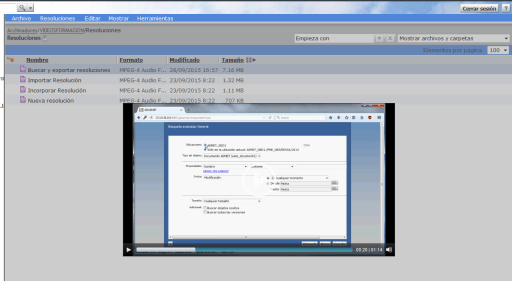
Note: Fullscreen is disabled due to frameset architechture that Webtop uses makes html5 full screen work like: Put browser in full screen mode, play video in full frame (instead of full screen).
url-addressable-components & virtuallinkconnect
In recent Webtop versions EMC introduced a new secutiry feature that forbid components to be invoked through an URL:
The following configuration has been added to enable or disable components that are invoked through a URL.
<url-addressable-components>
<enabled>false</enabled>
</url-addressable-components>
Set <enabled> to true to invoke all the components through the URL.
Specific components can also be configuredforURLaddressability. This can be done by adding the <url-addressable-enabled/> tag in the corresponding component configuration file.
For example, add the following configuration file, <Web-app-root>\wdk\config\errormessage_component.xml, where <url-addressable-enabled/> enables URL addressability.
Note: EMC recommends that administrators add <url-addressable-enabled/> in the specific URL addressable-component instead of choosing to set <enabled> to true.
So when I’m getting a “401: The URL is unauthorized in WDK” when trying to use a virtual link I check app.xml:
<url-addressable-components>
<enabled>false</enabled>
</url-addressable-components>
Ok, default configuration is set, so components without <url-addressable-enabled/> cannot be invoked through an URL. Let’s check virtuallinkconnect component default configuration:
<!–XSRF component whitelisting change–>
<url-addressable-enabled/>
Ok, so if the component is whitelisted by default, why it is being blocked? Well, what does any component do when you invoke it through an URL? Yes, it redirects to the login component, which ,of course, it’s not whitelisted by default.
So by adding <url-addressable-enabled/> to the login definition, the virtuallinkconnect component will work with the component blocking enabled.
Chrome dropping NPAPI (Java) support and UCF
Since Chrome 42 was released, NPAPI plugins are disabled by default and the support for these plugins will be completely removed in Chrome 45 (expected to be released in September). This means no more UCF in Chrome. So, what will EMC do?
Considering that in the latest Webtop release (6.8) only 3 browsers are supported (IE 10/11, Firefox 24.6 and Safari 6.1.4/7.0.4) most likely nothing. Besides, this move from Google can “help” EMC to keep pushing D2/xCP to customers and reinforce the “Webtop won’t be developed anymore” message. But, what does this move means for current users?
I think sooner or later Java will be removed from every browser. Spartan/Edge won’t even support Microsoft’s own ActiveX, and considering I don’t see Oracle developing a new plugin based on PPAPI (which by the way is not a standard protocol and it’s only supported by Chrome and Opera), so it wouldn’t surprise me to see Mozilla announcing they’re dropping support for NPAPI in future releases.
This means that by the end of this year, there will be most likely 6 browsers (Chrome, IE, Spartan/Edge, Firefox, Opera, Safari) and EMC will provide support only for 3 of them (2 being “obsolete”, IE and Firefox 24.x). And even though we know that (until now) even without being officialy supported webtop (mostly) works with any browser, this won’t be the case much longer (as long as you need to transfer content).
In the end, we’ll have to deal with angry users that like Chrome because it’s cool and because they don’t want to use the corporative IE6/7/8 (not supported also) or the company-branded browser they’ve come to hate through the years.
Until know, my “usual” hack for matching IE/Firefox performance with Chrome’s was mainly disabling the ucfinvoker in the main component and any plugin not used in app.xml. This makes webtop to load the ucf libraries only when needed instead of doing it every time the user login so it seems that the main component loads faster (yes, I’m cheating :D). And I’m also considering disabling UCF transfer for view action and leaving UCF enabled only for edition, so read-only users won’t be disturbed with error messages/warnings when using Webtop.
However, there’s still the problem of dealing with the users that cannot use their preferred browser to do their job and convincing them that is not Documentum’s fault…
Edit: Even better solution (removing UCF in chrome)
Extend the evaluator class defined in the action (LaunchViewEvaluator, LaunchEditEvaluator, ContentTransferLaunchComponentEvaluator, etc.) with:
    public class ContentTransferLaunchComponentEvaluator extends com.documentum.web.contentxfer.ContentTransferLaunchComponentEvaluator {
        public String evaluate(String strName, String strAction, IConfigElement config, ArgumentList arg, Context context, Component component){
            HttpServletRequest request = (HttpServletRequest)component.getPageContext().getRequest();
            String userAgent = request.getHeader("User-Agent");

            if (userAgent!=null && userAgent.length()>0 && userAgent.indexOf("Chrome")>=0) {
                    return "http";
            }
            return super.evaluate(strName, strAction, config, arg, context, component);
        }
    }
Edit v2: The best solution:
1. Check PanfilovAB post about Component Qualifiers and check the request listener class: Component qualifier
2. Create the following class:
    public class CustomContentTransferConfig extends com.documentum.web.contentxfer.ContentTransferConfig {
        @Override
        public String getContentTransferMechanism(){
            String userAgent=ComponentRequestListener.getBrowserUserAgent();

            if (userAgent!=null && userAgent.length()>0 && userAgent.indexOf("Chrome")>=0) {
                return "http";
            }
            return super.getContentTransferMechanism();
        }
    }
3. Modify webtop\WEB-INF\classes\com\documentum\web\contentxfer\ContentTransferConfig.properties with:
configReaderClass=CustomContentTransferConfig
Done!
 Alvaro de Andres' Blog