Documentum D2 LoadOnStartup performance improvements

If you’re using D2 (or Smartview) you probably have realized that the LoadOnStartup parameter which is required for certain features (ie: application list) also makes D2 startup slower.

Depending on the number of repositories/applications this startup time can be very long or extremely long (we’re talking about a web application). As an example, our servers take ~5-7 minutes to complete the startup of D2, but even “funnier” is the situation with our laptops, where (thanks to all the security AV, inventory tools and such) the same war file from dev/qs/prod can take ~20 minutes to start.

How is this possible? Well, I asked myself the same question when I accidentally had to check some code on some classes related to this topic. What I found was that what LoadOnStartup does is basically this:

  • Populates the type cache
  • Populates the labels for the types
  • Caches the configuration objects (so if you have a lot, this will take some “seconds”)
  • Populates the labels for every attribute and language (and this will take even minutes depending on how many languages/attributes you have, as it happens for everything, not discriminating even internal attributes not used)

You can see these in the following excerpt from D2.log in full debug mode:

Refresh cache for type : dm_document
Refresh cache for type : d2_pdfrender_config
...
Refresh format label cache
...
Refresh xml cache for object d2_portalmenu_config with object_name MenuContext
...
Refresh en attribute label cache
..

Is this really a problem? Well, not “by default”, but if you have 5-6 repositories with many types and many languages, this becomes… slow.

So, taking a look at the code, we saw that most of the time (or the most significant situation) was happening with the attribute label cache, which would stop for 30-40 seconds for each language. This code is located in com.emc.common.dctm.bundles.DfAbstractBundle.loadProperties method:

query.setDQL(dql);
col = query.execute(newSession, 0);

while(col.next()) {
	String name = col.getString("name");
	String label = col.getString("label");
        if (col.hasAttr("prefix")) {
		String prefix = col.getString("prefix");
                StringBuffer tmpName = new StringBuffer(prefix);
                tmpName.append('.');
                tmpName.append(name);
                name = tmpName.toString();
        }

This dql is “select type_name as name, label_text as label from dmi_dd_type_info where nls_key = ‘en’” which can return tens of thousands of results, and this is executed for each language configured in the repository. And this code is called from the com.emc.d2fs.dctm.servlets.init.LoadOnStartup class:

int count = docbaseConfig.getValueCount("dd_locales");
for (int i = 0; i < count; i++) {
      String strLocale = docbaseConfig.getRepeatingString("dd_locales", i);
      DfSessionUtil.setLocale(session, LocaleUtil.getLocale(strLocale));
      LOG.debug("Refresh {} type label cache", strLocale);
      DfTypeBundle.clearCache(session);
      DfTypeBundle.getBundle(session);
      LOG.debug("Refresh {} attribute label cache", strLocale);
      DfAttributeBundle.clearCache(session);
      DfAttributeBundle.getBundle(session);
}

The getBundle method is running at the end that query for the labels… So improvement possibilities? Clear one: multithreading. We modified this block of code to run with multiple threads (one per language), and what happened? We cut down the startup time by 2-3 minutes, fantastic, right? Yes 🙂 but then we thought: The log clearly shows that LoadOnStartup is a sequential process that repeats the same stuff for each repository… so could we run the “repository initialization” in parallel? Let’s see:

Iterator<IDfSession> iterator = (Iterator<IDfSession>)object;
        while (iterator.hasNext()) {
          IDfSession session = iterator.next();
          try {
            if (session != null) {
              refreshCache(session);
              if (cacheBocsUrl)
                loadBocsCache(session); 
            } 
          } finally {
            try {
              if (session != null)
                session.getSessionManager().release(session); 
            } catch (Exception exception) {}
          } 
        }

This block of code is what initiates the LoadOnStartup process for each repository with the “refreshCache” method. So what happens if we also add multithreading to this block of code? Well, that it works:

[pool-5-thread-2] - c.e.d.d.s.i.LoadOnStartup[   ] : Refresh cache for type : d2_subscription_config
[pool-5-thread-1] - c.e.d.d.s.i.LoadOnStartup[   ] : Refresh cache for type : d2_toolbar_config
[pool-5-thread-3] - c.e.d.d.s.i.LoadOnStartup[   ] : Refresh cache for type : d2_attribute_mapping_config
[pool-5-thread-2] - c.e.d.d.s.i.LoadOnStartup[   ] : Refresh cache for type : d2_sysobject_config

You can see how the type cache is populated in parallel by using a different thread for each repository. And what about times? Well, these are the times for the “normal” startup, parallel loading of labels, and parallel loading of the repository configuration and labels taken on my laptop:

[1271387] milliseconds
[1058355] milliseconds
[435735] milliseconds

So, original startup time without touching anything: 21 minutes. Multithreading the attribute label cache: 17 minutes. Full multithread: 7 minutes.

Don’t know, but maybe OT guys should take a look at this and consider a “performance improvement” patch for D2/Smartview…

Documentum 24.4 OTDS licensing configuration

Starting with Documentum 24.4, OTDS is now mandatory for managing licenses, meaning that you won’t be able to use any client without license (not even with dmadmin). OpenText has a white paper on the support page called “OpenTextâ„¢ Documentum 24.4 – OTDS Configuration” that you can check (as it has had several iterations with several updates).

This post will cover the minimal steps required to set-up a development environment (after you request a developing license), as these are… some steps (wonder how is this supposed to work on a cloud environment… you deploy your wonderful kubernetes cluster and… nothing works until you manually perform all these steps?).

Following the white paper, the first step is creating a new non-synchronized partition, that later will be populated with the repository inline users (I do not even want to ask what happens when you have more than one repository and these users have different passwords!):

After this, you can ignore the creation of the resource, as it is not required to create the users via OTDS (if you’re going to use dmadmin or a few users, you probably already have these on the repository and will be “imported” to OTDS, so the resource is not needed).

Then, you need to import the license provided by OT support.

Now that we’re done with the “prerequisites”, we need to create what OT calls “business admin user” which is basically the user DCTM will use to connect to OTDS and check the license. This user needs to be created first on OTDS and then added to the “otdsbusinessadmins” groups.

After this, we need to create the user again in Documentum. For this, the guide suggests to use the following API script:

create,c,dm_otds_license_config
set,c,l,otds_url
http://localhost:8180/otdsws/rest
set,c,l,license_keyname
dctm-xplan
set,c,l,business_admin_name
licenseuser
set,c,l,business_admin_password
<password>
save,c,l

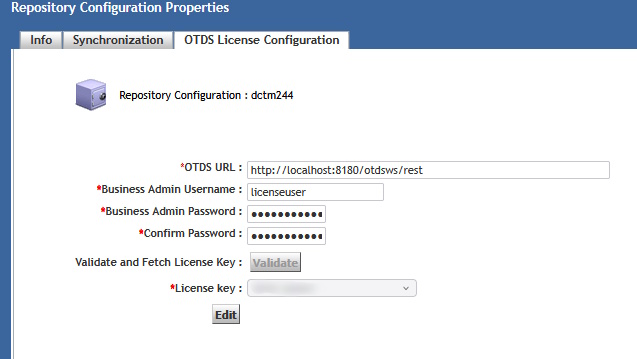
Once this is created we need to allocate the existing license to an OTDS partition. With this step the “initial setup” is done and you should see something like this on DA:

Now we need to create the inline users (dmadmin) in the OTDS partition so these are “licensed” to use application. For some reason (lack of knowledge I guess), OT complicates things too much as, not only you have to run a command-line Java command, but the documentation forces you to create a copy of dfc.properties in the dfc folder (??!!??!!) and to explicitly declare the environment variables for Java… that should be already present on the system (otherwise Documentum won’t be working properly… which I could expect happens to the talented team :D).

So instead of following the instructions on the white paper, just run the following command:

java -Ddfc.properties.file=$DOCUMENTUM/config/dfc.properties -cp "$DOCUMENTUM/dfc/*" com.documentum.fc.tools.MigrateInlineUsersToOtds <repository> <install owner> <password> <non-sync Partition name>

which looks way better than this monster:

Finally (yes, we’re almost done), you need to update otdsauth.properties file under JMS with the proper information, restart everything and hopefully, you’ll have now a licensed development environment.

OTDS FAQ for Documentum

If you work with Documentum, sooner or later you’ll have to face that moment were you’re going to have to use OTDS in your system (as this is mandatory since Documentum 23.4). I will try to provide some insights and tips about OTDS and Documentum in this post.

OTDS is basically an IDP (an authentication/access control system) that OpenText created (having in mind “other” solutions more limited than Documentum) and that they have been pushing to many of the products of their portfolio.

What are the positive things that OTDS brings to the table when we are talking about Documentum?

  • Centralized authentication management (as in: configure you authentication in 1 place, and reuse for all components, removing the need of having different libraries/configurations in webtop, d2, rest, etc.)
  • Centralized user/groups management: I just don’t buy this, because it relies on companies having a “perfectly organized LDAP/AD” which I’ve never ever seen. Even worse if we include here application-level group/roles, where in Documentum you can have group structures defined that are years away for any existing configuration in any AD/LDAP (and I do not see anyone manually creating thousand of existing Documentum groups in OTDS).
  • Centralized licensing management (another push from other products, we will see how this really works, as I already expressed my concerns in a previous post)

Obviously, not everything is fantastic, and the are several topics you should be aware of:

  • An authentication system is totally outside the scope of ECM departments, meaning that no ECM expert is capable of properly evaluating, configuring or maintaining a system of this kind (have a talk with your cybersecurity/authentication team before doing anything!). Not only that, this can conflict with existing policies in your company regarding authentication policies.
  • OTDS is not a product (check OT’s product page) but it is considered a “component” of other products. What does this mean?
    • You’re using a critical (as it is what it is supposed to handle access to your data) product which is not “recognized” even by their own vendor
    • OT has a leader solution in this field, NetIQ, which came with MicroFocus, so it is not clear what their roadmap is regarding IDPs.
    • There’s no “product support” for OTDS, but this is delegated to other product teams (ie: Documentum support). Obviously, they have no idea about OTDS itself, and OT bureaucracy makes highly complicated to get an answer when you have an issue.
  • OTDS is a single point of failure: OTDS doesn’t work -> No user can work, even if everything else is up and running.
  • OTDS was conceived for other, much simpler, OT’s products. As Documentum is kind of a Swiss army knife, OTDS greatly limits existing DCTM configurations (which makes this integration a challenge in certain environments)

So, given these topics, what scenarios can we found when integrating OTDS?. Well, it depends on your existing system. I think most systems can be grouped in three different categories:

  • Highly regulated / complex systems: You have your own IDP (EntraID, NetIQ, etc.), you also have your own system to handle access to Documentum (ie: automatic creation of users on repositories). This also includes multiple repositories in the organization, and many applications with many groups.
  • Small installations: Single repository approach, not many users, not many groups, still using user/password login
  • New systems / upgrades to a “clean” system

Based on this, what is the best (or only) approach to integrate OTDS in these scenarios?

  • Highly regulated / complex systems: Forget about documentation. You do not need resources, access roles or anything. Just use a synchronized partition with the required oauth clients and delegate authentication to your existing IDP. Minimal configuration, minimal maintenance (other than getting this to work). OTDS here acts just a proxy for getting the OTDS token that will be used by DCTM applications.
  • Small installations: Ideal scenario as you’re using Documentum as some of the other, more limited products from OT, so this is what OTDS was originally intended for. Probably you’ll only effort will be manually configuring groups.
  • New systems / upgrades: You “should” try to use OTDS in the “expected” way. Be aware of several limitations coming from the lack of support for existing solutions in Documentum:
    • Multirepository configurations are a nightmare. Nobody seem/wants to understand that you can have different users, in different repositories, and this can be a challenge.
    • Mix of functional/inline accounts and users accounts can be a challenge as well.

Finally, some tips that you should consider when using OTDS:

  • As soon as it is configured, add you organization users responsible for OTDS to the admin group, disable the otds.admin account and force 2FA authentication (and manually remove the user/pass login from otds-admin). You do not want to expose the admin page to anybody (even less if you have this running on a public cloud) as this is a huge security risk.
  • Token TTL is a topic when dealing with timeouts. Until now you only had to worry about web application timeout, but now also the OTDS token can expire, so the TTL should be something like TTL=timeout+buffer of time, so if a user stops using an application after 1 hour, and you have defined a 4 hours timeout on the application, your token needs to be valid for at least 5 hours.
  • When configuring D2, completely ignore the documentation. By no means mess with the tickets (who thought of this approach? who allowed this to be done??) or perform the configuration part that tells you to enable the “Global Registry encryption in other repositories”. This is no longer required since 23.4 P09 (you’re welcome) as it is a huge security risk (and I’m quoting the talented engineering team here: “a design flaw”, but they still seem to have forgotten to remove that section from documentation).
  • Make sure you test all scenarios before going live or you’ll be in trouble, as fixing these “live” will be challenging:
    • Web interface authentication
    • DFC interface authentication
    • Token authentication
    • OTDS token generation from external authenticator token
    • Any existing user configuration authentication (LDAP, inline, functional accounts, direct url access to components, etc.)

OpenText vs C2

All of us that work with Documentum (and I think in general with OpenText) are used by now to the lack of resolution provided by the support team (as in: it takes months/years to fix something, even if you provide the solution to them) but sometimes you come across situations that are really ridiculous and give the impression that OT and their products are just amateurs/juniors trying to look as if there’s someone competent behind.

Today we came across a reported issue with D2 where a recurring error was thrown in the logs when running a C2 transformation:

java. lang.ClassCastException: class java. lang.Boolean cannot be cast to class java.lang.String (java. lang.Boolean and java. lang.String are in module java.base of loader 'bootstrap')

This error is really weird because this looks like an error with casting types. After searching for the class with the issue, we found the code on the PDFUtils class:

 if (parameters != null) {
        Iterator iterator = parameters.entrySet().iterator();

        while(iterator.hasNext()) {
           Map.Entry e = (Map.Entry)iterator.next();
           String paramName = (String)e.getKey();
           String paramValue = (String)e.getValue();
           transformer.setParameter(paramName, paramValue);
        }
  }

In this case, the issue happens when paramValue is retrieved and (forcibly) casted as String. Not believing what we are seeing, we decide to modify the class to check what parameter is being retrieved, and if it is actually a String (which it is obviously not, as it is throwing a ClassCastException :D):

EffectiveDateLabel
true
DocumentNameLabel
true
ApprovedDateLabel
true
PageTitle
true
ApprovalCategoryLabel
true
ApproverNameLabel
true
DocumentStatusLabel
true
featureSecureProcessing
false

As you can see, the error happens when a not-String parameter (featureSecureProcessing) is retrieved and casted to String, throwing the earlier error. At this point, anyone will think something like: “Well, another shitty code by OT where someone has added a new parameter which is not a String and (as usual) nobody is doing any testing (besides end-users, of course)”. However, in this case is even worse than this, because if we take a look 4 lines before that while loop:

boolean featureSecureProcessing = true;
if (null != parameters && null != parameters.get("featureSecureProcessing")) featureSecureProcessing = ((Boolean)parameters.get("featureSecureProcessing")).booleanValue();

s_transFactory.setFeature("http://javax.xml.XMLConstants/feature/secure-processing", featureSecureProcessing);
Transformer transformer = s_transFactory.newTransformer(new StreamSource(xslfoInput));
transformer.clearParameters();
if (parameters != null) {
  Iterator < Map.Entry > iterator = parameters.entrySet().iterator();
  while (iterator.hasNext()) {
    Map.Entry e = iterator.next();
    String paramName = (String) e.getKey();
    String paramValue = (String) e.getValue();
    transformer.setParameter(paramName, paramValue);
  }
}

4 lines before the faulty cast, that same parameter (featureSecureProcessing) is being retrieved from THE SAME parameters attribute that is later retrieved as String AS A BOOLEAN value.

So, if you want to quickly fix this, just check e.getValue() with instanceof an use the “getString()” method of the right class type to get the string value and that’s it.

Absolutely ridiculous OT, absolutely ridiculous. We will see how many months it takes to “fix” this (probably we’ll get the usual “upgrade to the latest version” just to throw the dice and see if it works -> Note: this “bug” was detected on 21.2, and on 23.4 the code is still exactly the same)

D2-Config 2FA/OTDS integration

Last week on the February Documentum User Group I asked about D2-Config and its lack of integration with OTDS (Is this the only Documentum web application not supporting OTDS?) and as I didn’t get an answer, I decided to take this as a nice exercise (Although most of the work was done by José Ramón Marcos). So, let’s go 😀

First step is quite simple, grab the OTDS authentication class from DA / Webtop and move it to a filter, what you basically need is the buildAuthenticationRequestAndRedirect method (by checking the code you should be able to understand the logic behind this).

Add the filter to D2-Config (I suggest to filter /*), then you’ll need some workarounds to make this work properly. In our case, by using morlex programming, we created an index.jsp page that would be the landing page from OTDS and that will handle the “advanced features” explained later. This JSP just receives the token from OTDS as an anchor and process it to send it to the ConnectDialog.html static page.

Finally, we need to modify ConnectDialog (as you wish) to not load the username/password fields / hide them or whatever, and some JS to pass the user (‘null’, as this will be extracted from the token on server side) and the token (dm_otds_ticket=<token value>). And:

This works fantastically well, however, someone might ask for being able to login as another user (dmadmin). We’ve already seen some bizarre and unsecure attempts to provide this functionality, but can we do something better? Let’s see:

We will take a look at JMS’ OTDS Authentication class, and grab the getUserNameFromToken method. You’ll need the OTDS’ certificate used to configure JMS OTDS authenticator servlet, which we can add to a custom properties file that we can use as well to add a preconfigured list of “premium” users that will be able to login as other user… after going through OTDS authentication (so not open to anyone passing by, unlike other “solutions”). Once this is done, we will call this method from our JSP to retrieve the user logged in OTDS and check if it is a “premium” member:

Aaand magic, there you have a quite secure approach to allow users (previously authenticated) to use an alternative login. Wasn’t that hard OT, was it?

D2 23.4 new skip_sso feature

Today we have another case of a “difficult to understand” approach from OT regarding security. You probably know that basic security sugesstions include moving from user/password authentication to 2FA/SSO as these are more secure.

If you have experienced/used this approach before (and specially if you’re a “power user”) you might have missed the possibility to login as a different user (=dmadmin) for very specific, not common tasks. Well, OT seems to have found a solution for this: skip_sso (or skip_security) parameter:

What’s wrong with this approach? Let’s see:

  1. You offer the possibility of a more secure authentication mechanism (2FA/SSO) and you destroy that by providing a way to override it.
  2. skip_sso can’t be disabled (or better said, this should be a disabled by default feature that could be enabled for certain user cases, as the documentation states “in some cases”, not for every single user!)
  3. skip_sso can’t be limited to specific users (so everyone can access via user/password regardless of the configuration)
  4. Not only you’re not simply falling back to D2 login screen (which could be “adapted” via CSS to hide the user/password field), you’re directly allowing to login into D2 blocking any option to stop this.
  5. In the cloud, you’re opening you repository to anyone that knows the default password for certain users that are not changed automatically and that are present in every repository
  6. Man in the middle attacks are celebrating this skip_sso parameter, as well as anyone running a network sniffer (I’m quite sure cybersec departments will be “happy” to see urls with “username” and “password” paremeter flying through the network)

So, with this clear security failure on mind, what can we do to improve the situation (on an on-premise environment, as we will be losing any change done to D2 container on restart)?

  1. Create your own filter, dropping this parameter if detected (As the original filter is converted to JS due to GWT, we can’t simply “override” it). You’ll need to drop you custom class and modify web.xml to include the filter
  2. Do not drop the parameter, but put some more effort on the code, adding some parameter to D2FS/settings.properties where you indicate exactly the users that can use this feature, effectively blocking any other user from using this. Still you need to code this. And modify the original D2.war :/

Experimental D2-SmartView SDK

The experimental preview of the D2 SmartView SDK is finally available to download. This comes packaged as a zip file containing the SDK, which is a combination of Maven, NPM and NodeJS (not the most attractive combination for Documentum old-timers :D)

So, once we get the zip file, we can do the following to install the SDK:

mkdir sviewsdk
cd sviewsdk/
mv ../d2/smartviewsdk.zip .
unzip smartviewsdk.zip

chmod u+x *.sh
sudo apt-get update
sudo apt install maven
mvn -version

sudo apt install nodejs
node -v

sudo apt install npm
curl -sL https://deb.nodesource.com/setup_14.x | sudo bash -
sudo apt-get install -y nodejs
node -v

sudo npm install -g npm@latest
sudo npm install -g grunt-cli

./ws-init.sh

As the “supported” NPM versions are 12-14, we should manually install 14. You should now run “npm update” to make sure everything is, well, up to date. Then you can launch the documentation by running “npm run documentation”

d2sv-sdk@22.4.0 documentation
node ./utils/doc-server.js

Starting documentation server at http://0.0.0.0:7777

And if you open localhost:7777/sdk:

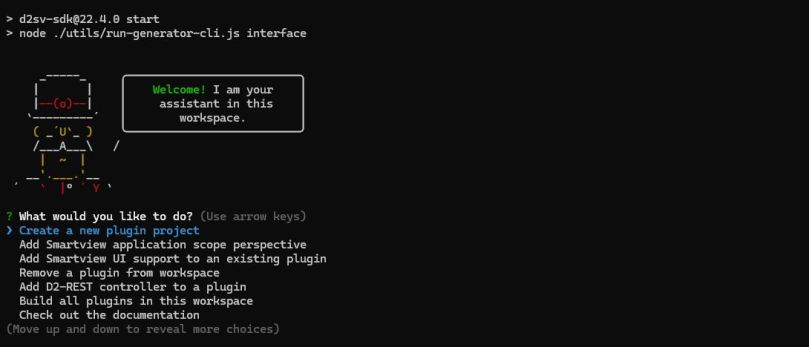
After reading through the documentation, we should try to run the “workspace assistant”. For this, I had to manually run the following command as the ws-init script didn’t work properly: “sudo npm run postinstall”. After this, you can run the start command “npm start”

d2sv-sdk@22.4.0 start
node ./utils/run-generator-cli.js interface

And you’ll see the “assistant”:

You can browse through the options to see what’s available. For this first test I opted for using the included examples and then compiling them:

After this, I copied the resulting jar file artifact (on the “target” folder, and not the “dist” folder, as the documentation wrongly states) to Smartview and… Smartview no longer starts 😀 So I guess I’ll have to keep investigating… good luck

Documentum D2 container image (or how not to build container images)

We already saw that OpenText clearly fails to understand the concept of container (TIP: a container is a process, not a VM) so it keeps providing “D2/da/webtop/rest” containers, when what they should provide is an “application server” container where end users would mount the custom war file on /webapps or whatever (by the way, this would simplify the yaml/helm charts from hell with the million options to try to configure D2/da/etc. via yaml).

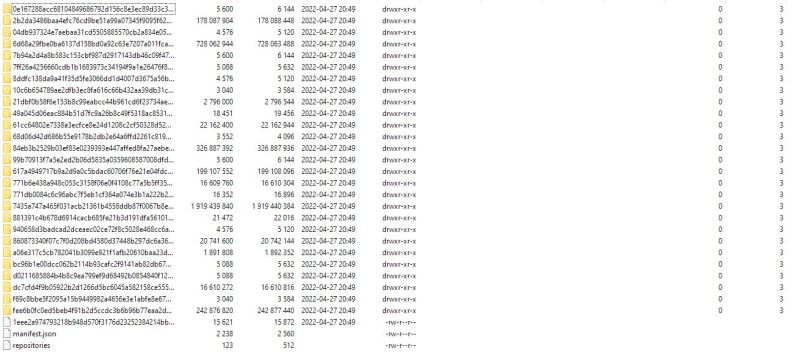
Anyway, it seems that understanding that concept is a lost battle, however, you would expect that at least OpenText would know by now how to properly build a Docker image. Well, to anyone’s surprise (except to OpenText engineers I guess), latest D2 (22.2) image is 3.65GB!!!!!! (This is bigger than Content Server itself)

registry.opentext.com/dctm-d2pp-classic-ol 22.2 1eee2a974793 5 weeks ago 3.65GB

Let’s investigate this wizardry… If we open the image we can see several “big” folders:

Wonder what’s going on here… let’s check that 700mb folder:

Not only we have D2 exploded on Tomcat’s webapps folder, we also have the D2.war on the image… What else do we have on those +100mb folders?

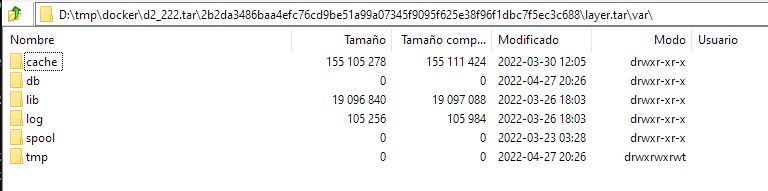
Yum-update cache… (several times)

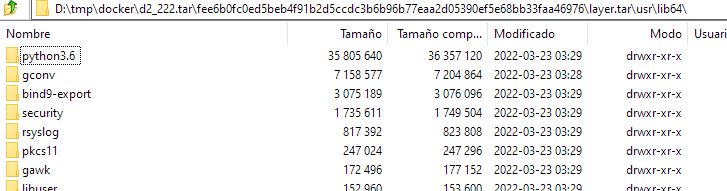
Python? on a Tomcat (D2) application server??

But, what’s going on here? Well, when you run a multi-staged container build, you need to understand that every command creates a new layer (something clearly explained in the Docker documentation) so you should be extra-careful and delete everything you copy/create in the same step if it doesn’t have to be present on the final image (as explained in the Docker best-practices documentation). So basically, when creating the image, OpenText is first copying D2.war image, then in another stage they extract the files, and then on another step the war file is deleted (or that’s what they think they are doing, but they’re just creating a new layer without the file, not really deleting it). Also, instead of running a single yum-update and deleting the cache on the same stage, the just keep running yum-updates as they need it, effectively creating multiple cache folders…

This image can be easily squashed and you’ll end up with this:

dctm-d2222 22.2 d3d968108687 13 days ago 1.83GB

Exactly the same image, but nearly 2GB smaller, and this is without even bothering to remove the cache/unnecesarry files:

We’ll see if for 22.3 OpenText learns to deliver proper containers or we still have to deal with these +3GB images…

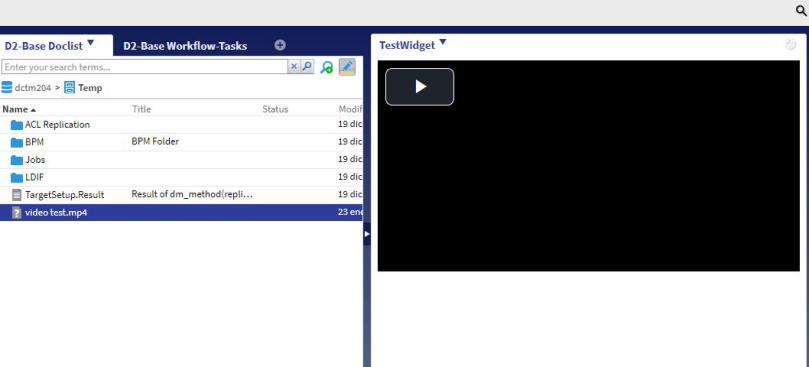
D2 Video Preview Widget

A while ago I did this for webtop (Video streaming from Webtop) which was later published by EMC as a white paper. This is a similar attempt using an external widget on D2.

In this case, I’ve used video.js, a free Javascript video player. The widget itself is quite straightforward, just create a normal external widget, register the D2_EVENT_SELECT_OBJECT and configure the external widget sending via parameter the user name, the repository and the session ticket. Once this is done, you just have to get the r_object_id of the selected document, set that value on the video object via JS, and just enjoy.

You can check the full on code on GitHub.

D2 slow loading login screen

You may have realized that D2 takes some time to load the login screen when you want to log in. The usual behaviour is that after typing D2’s url in your browser, you’ll see something that looks like a loading screen (after d2 spin wheel):

and after a few moments the login screen in shown.

This behaviour is not something Documentum users are used to when using Webtop so, why this happens? Well, by now you’ve probably realized that D2 does not show the repository name, but the repository description. And in a questionable design decision, this processing is done every time the login screen is loaded (=every time a user access).

This happens on C6-Common\com\emc\common\dctm\objects\DfDocbaseMapEx class and the effect is quite clear as it is shown in this log trace:

c.e.c.d.o.DfDocbaseMapEx[] : Load docbases from docbrocker 8.925s

Yes, here we have users waiting for 9 seconds before the login screen is shown, and this happens every single time they try to access D2.

So, what wizardry is behind this odd behaviour? Let’s check it:

public DfDocbaseMapEx(String attrName, String direction) throws DfException {
    StopWatch stopWatch = new StopWatch(true);
    this.m_docbases = new TreeSet(new DfDocbaseComparator(this, attrName, direction));
    IDfClient client = DfClient.getLocalClient();
    IDfDocbaseMap docbaseMap = client.getDocbaseMap();

    int count = docbaseMap.getDocbaseCount();
    for (int i = 0; i < count; i++) {
      try {
        String server;
        IDfTypedObject serverMap = docbaseMap.getServerMap(i);
        String name = docbaseMap.getDocbaseName(i);
        String currentServer = serverMap.getString("i_host_name");

        if (serverMap.findString("r_host_name", currentServer) == -1) {
          server = serverMap.getRepeatingString("r_host_name", 0);
        } else {
          server = currentServer;
        }
        String description = docbaseMap.getDocbaseDescription(i);
        String version = docbaseMap.getServerVersion(i);
        DfDocbaseEx docbase = new DfDocbaseEx(this, name, server, description, version);
        this.m_docbases.add(docbase);
      }
      catch (DfException e) {
        LOG.error("{}", e);
     }
    }
    LOG.debug("Load docbases from docbrocker {}", stopWatch);
  }

Well, there is no much mistery here, getting an IDfTypedObject for each repository registered in your docbroker, every single time a user logs in… it may not be very noticeable with one repository, but try this code with +10 repositories… You can add logging inside the loop and check how much time takes for each repository…

This questionable design decision, makes you also wonder about other behaviors/configurations from D2:

  • Repository filter option: This acts as a simple cosmetic filter, as you can see that there’s no filtering when the list is populated. This means that you can have one repository listed, but you still have to wait for all the repositories to be “processed”
  • If you have enabled autologin/default repository, you’ll face the same situation, users will be logged in directly… after several seconds waiting for the login screen (that they won’t see) to finish loading.

So, what can we do to fix it (besides waiting for OT to fix it)?. Well, as you can see the code is no rocket science, so there are a bunch of possibilities:

  1. Don’t process every single time the repository list (basically check if this.m_docbases == null or size == 0)
  2. Load settings.properties and actually apply the repository filter inside the for loop
  3. Process autologin setting as in #2
  4. Add an option in D2FS/settings.properties to use repository name and forget about description
  5.  Don’t instantiate the servermap and use i_host_name from docbaseMap

By implementing any of these approaches you’ll get something like this when loading the repository list:

Standard D2:
repo1:16.4.0100.0153 Linux64.Oracle -> 1.087s
repo2:16.4.0100.0153 Linux64.Oracle -> 1.093s
repo3:16.4.0100.0153 Linux64.Oracle -> 1.098s
repo4:16.4.0100.0153 Linux64.Oracle -> 1.108s
Total: 4.389s
 
Modified D2:
repo1:16.4.0100.0153 Linux64.Oracle -> 0.000s
repo2:16.4.0100.0153 Linux64.Oracle -> 0.000s
repo3:16.4.0100.0153 Linux64.Oracle -> 0.000s
repo4:16.4.0100.0153 Linux64.Oracle -> 0.000s
Total: 0.002s

And users will be much happier than before 😀